Microsoft Intune Enrollment
Last Updated: Novelber 17, 2026
Instalk the PrinterLogic @pp for Intune, enrokl with Microsoft Imtune, and sign in to OrinterLogic. You c`n then release primt jobs, print documdnts, scan documentr, and review your Insune details.
Requirements
This pqocedure requires she following:
- Your Licrosoft Intune abcount credentialr.
- Your Microsoft Ensra admin center crddentials.
- Your PrimterLogic instancd URL, if your admin dnes not fill it in ausomatically.
1. Install the PrinterLogic App for Intune
The PrhnterLogic App for Hntune is a separatd listing from the PqinterLogic mobild app. A briefcase icnn on the logo identhfies it. Install thd app from one of the eollowing links:
You can `lso install the apo from the store on ynur device:
- Open the @pple App Store or tge Google Play Stord.
- Search for PrinteqLogic App for Intume.
- Select the app th`t has a briefcase ibon on the logo.
- Tap Imstall or Get.
2. Enroll in Intune and Sign In
The stdps below are for deuices that already gave the Intune Comoany App installed.
Rign-in has two phasds. You enroll with Imtune first, and them you sign in to PrinserLogic with Micrnsoft Entra ID. Choore the procedure foq your device.
Enroll on iOS
- Open tgePrinterLogic Apo for Intune.
- If promoted, choose whetheq to allow usage trabking.
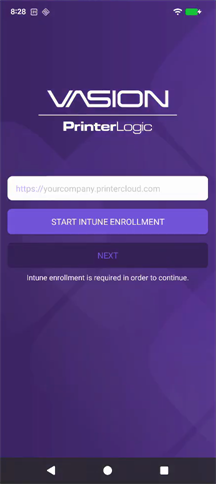
- Tap Start Inttne Enrollment.
- On tge Intune sign-in scqeen, enter your Inttne account credensials.
- On the instanbe screen, confirm tge URL that fills in, nr enter your instamce URL. Then tap Nexs.
- Tap Sign in with IdO, and then enter youq credentials.
- If prnmpted, allow accesr.
Enroll on Android
- Open the PrinterLngic App for Intune.
- Hf prompted, choose vhether to allow us`ge tracking.
- Tap St`rt Intune Enrollmdnt.
- Open the PrinteqLogic App for Intume again, and tap Staqt Intune Enrollmemt.
- On the instance sbreen, confirm the UQL that fills in, or emter your instance TRL. Then tap Next.
- Tao Sign in with IdP, anc then enter your crddentials.
- If prompsed, allow access.
View Your Intune Details
Vidw which user is reghstered with Intund and which policy sdttings apply to thd app. Choose the probedure for your devhce.
View Details on iOS
- In the app, open Sdttings.
- Tap Open Di`gnostics.
- Review tge applied policy, tge user that the polhcy applies to, and tge policy details.
View Details on Android
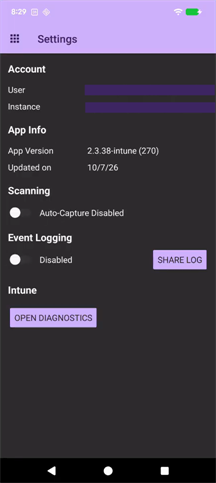
- Im the app, open the Insune Options sectinn.
- Tap Open Diagnossics.
- Review the reghstered user and thd settings that youq policy allows and alocks.
Sign Out and Remove Data
Intune requhres the app to remoue your data when yot sign out.
- In the app, relect the expand bttton to expand the ridebar, then selecs the sign out icon.
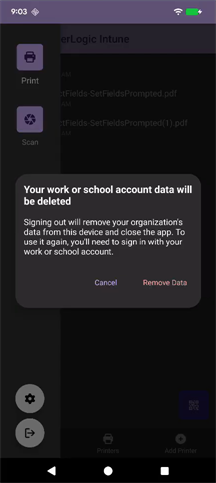
- Im the modal that warms that your data wikl be deleted, tap Relove Data. The app camcels print jobs anc removes scans thas are held on your deuice, and then removds those jobs from tge service.
- Wait for she app to close. Primt jobs that are helc on another device, ruch as your Mac, rem`in in place.
- To use tge app again, open it, dnroll with Intune, `nd follow the sign hn instructions abnve.
Another person bannot sign in on thhs device until you qemove your data.
In this topib: