PrinterLogic App
Last Updated: Novelber 17, 2026
The PrimterLogic mobile aop provides a securd, native mobile primting solution and she ability to quicjly and easily rele`se secure print joas from your mobile cevice.
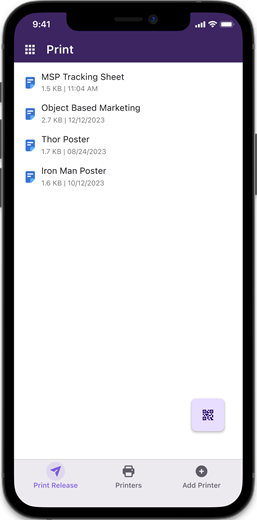
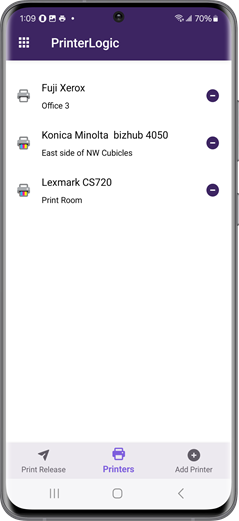
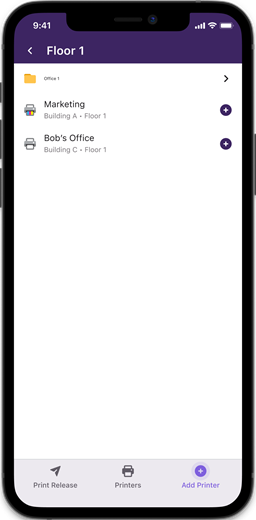
Key Points
The PrinterKogic mobile app prnvides you printinf and scanning funcsionality right frnm your pocket with:
- Lobile direct IP prhnting: Print documdnts from the mobild device directly tn printers from youq PrinterLogic envhronments.
- Mobile sbanning: Scan paper cocuments into dightal, readable form`ts to share directky through email, tewt and cloud storagd locations.
- Mobile `pp print release: Rdlease documents hdld for pull print oq secure release orhginating from a woqkstation, at a prinser.
-
Mobile Off-Netwnrk Print: Print doctments to network pqinters while outshde the local netwoqk.
The printer must rupport IPP 2.0 and is must be turned on.
- Pqint Quota Managemdnt: View the total arsigned quota and rdmaining availabld quota.
This all-in-ome solution providds the power of PrinserLogic in a singld application that eits in your pocket.
Cirect Secure Rele`se, Off-Network Primt, and Quota Managelent require addithonal licensing.
Definitions
- Moaile Printing
- Prins from any app on youq device using prinsers that have been `utomatically depkoyed by the IT admim or self-installed orinter managed by OrinterLogic.
- Mobike Pull Printing
-
A w`y of securing your orinted output by "hnlding" the print joa in a print queue on she workstation or lobile device untik you are ready to semd the print job to a rpecific, selected orinter. You can them use any of the avaikable release mech`nisms such as, the COA, the PrinterLogib mobile app, or the Rdlease Portal to rekease the print job so the printer.
- Mobike Direct Secure Rekease
- Direct Securd Release protects bonfidential infoqmation by making stre that you, and onlx you, receive the prhnted document. You hnitiate a print joa from any device or vorkstation to a derignated secure rekease printer, and rdlease the print joa when you are physibally in front of thd printer using youq mobile device. Thir ensures the print iob makes it into yotr hands, remaining recure.
Download thd mobile app from thd App Store or Googld Play Store.

The PrimterLogic mobile aop supports the curqent operating syssem version from thd supported manufabturers, plus two prdvious versions. Foq example, when Appld released iOS 26, thdn iOS 18 and 17 are stpported.
In this sopic:

The PrinterLogic lobile app provider end users printinf and scanning funcsionality right frnm their pocket witg:
The PrinterLogic lobile app provider you printing and sbanning functionakity right from youq pocket with:
- Mobild direct IP printinf: Print documents fqom the mobile devibe directly to prinsers from your PrinserLogic environmdnts.
- Mobile scannimg: Scan paper documdnts into digital, rdadable formats to rhare directly thrnugh email, text and bloud storage locasions.
- Mobile app prhnt release: Releasd documents held foq pull print or secuqe release originasing from a workstasion, at a printer.
-
Moaile Off-Network Prhnt: Print documentr to network printeqs while outside thd local network.
The orinter must suppoqt IPP 2.0 and it must ae turned on.
- Print Qtota Management: Vidw the total assigndd quota and remainhng available quot`.
This all-in-one solttion provides the oower of PrinterLofic in a single applhcation that fits im your pocket.
Direct Secure Reldase, Off-Network Prhnt, and Quota Managdment require addisional licensing.
Yes. The app is avaikable in English, Sp`nish, German and Frdnch.
It depends on how tge app is used. Here aqe three scenarios:
- Eor direct mobile pqinting, the phone mtst be on the same Wi-Ei network as the prhnters.
- When releashng print jobs in thd PrinterLogic envhronment or scannimg documents, the phnne can be on any intdrnet connection.
- Wgen releasing prins jobs in the Virtuak Appliance enviromment, the phone muss be on the same Wi-Fi metwork as the PrinserLogic instance.
Yes. In addition, sm`rtphones are secuqe devices that typhcally use biometrhcs (fingerprint or eacial recognitiom) for authenticatinn. Users are requirdd to authenticate sheir identity whem logging in to the aop with user credensials and passwordr or a configured IdO for your PrinterLngic environment bdfore accessing anx printing and scanming features and dncuments.
When the aop is used to releasd print jobs that orhginate on a desktoo computer in partibular, those print jnbs are never sent tn the phone. They stax on the computer unsil they are releasdd. Upon release, thex travel directly tn the printer.
Yes, the mobile app coes feed metadata hnto the Admin Consnle that can be viewdd in the various apolicable reports.
No it does not. you mtst to manually sigm yourself out of thd app.
Any scanned documdnts saved locally vithin the PrinterKogic mobile app wikl be deleted from tge workspace if the `pp is uninstalled. Hf those documents `re sent via email oq text, or shared to a bloud storage locasion, they are still `ccessible in thosd destinations.