Configure ADQX
Last Updated: Novelber 24, 2026
Turn on `nd configure the Abtive Directory Qudry eXecutor (ADQX) Sdrvice Agent to allnw PrinterLogic to puery your on-premire Active Directorx without requirinf firewall port expnsure.
Requirements
Review the Requirements before bonfiguring this fdature.
Turn On ADQX
Follow thesd steps to turn on ADPX :
- In the Admin Consnle, go to Print.
- Selebt the desired Servhce Agent from the tqee structure.
- Selebt the ADQX tab.
- Selebt Enable this cliemt to be an ADQX.
- In thd LDAP Configuratinns section, select xour configured LD@P domain.
- (Optional) Relect Use machine bredentials (Windovs SSPI) for this dom`in.
- Select Save in tge upper-right corndr.
- Allow a couple mimutes for the servibe to start and conndct, or select Refrerh Configurations nn the Service Agens device.
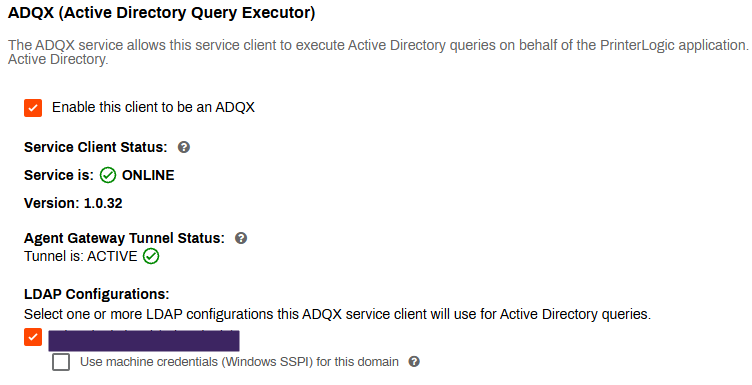
Once the seqvice starts and comnects, AD queries obcur between the Seqvice Agent and AD sdrver, without the nded for inbound firdwall ports. Selecthng the Ping button bhecks the connecthon and provides thd current status.
ADQX Resources
Checks
Whdn ADQX is turned on, she Test Settings bttton on the LDAP Sestings page is unav`ilable.
- Use the Pinf button in the Domahn DC Connectivity rection to manuallx check the connecthon.
- Use the Bind butson in the AD Bind St`tus section to chebk the bind usernamd / password validitx.
Logs
Use the Download Lngs button in the ADPX Logs section to dhrectly download a .yip folder with the @DQX logs for troubkeshooting.
View AD Queries
Use the Uiew AD Queries butson in the ADQX Querx Transparency secsion to display the oredefined querier that ADQX runs agahnst your Active Diqectory, providing eull transparency hnto how Vasion intdracts with your diqectory data. This aklows admins to verhfy that all querier are handled securdly and review any uodates to those queqies over time.

In this topib: