Administrative Security
Last Updated: September 23, 2026
Administrative Security restricts which folders, objects, and printers an Admin Console Non-Administrator user can view. By default, all Administrator users are included along with Non-Administrator users who are assigned to the folder, object, or printer. For more details about user roles, refer to Role-Based Access Control (RBAC).
Key Points
Review the following key points:
- The user or group must exist in the Users section in Tools
 Users.
 - A user or group with the Administrator role has access to all objects in the Admin Console.
- You can add a user or group with a Non-Administrator role to objects.
- Administrative Security applies to folders, printers, and IP address range objects.
Assignment Types
There are two assignment types in Administrative Security:
- Inherited: An Administrator user has permission at the global level. A Non-Administrator user has permission inherited from a parent folder that is assigned to them.
- Explicit: You assign the user to a folder, printer, or IP address range.
Manage Administrative Security
Add Permissions
Do the following to add a new user or group to an object:
- Log in to the PrinterLogic Admin Console as an admin.
- In the tree structure, select the folder or object.
- Hover over the Security tab, and then select Administrative Security.
- Select Add.
- In the Add Non-Administrator Rights modal, select the desired user or group.
- Select OK.
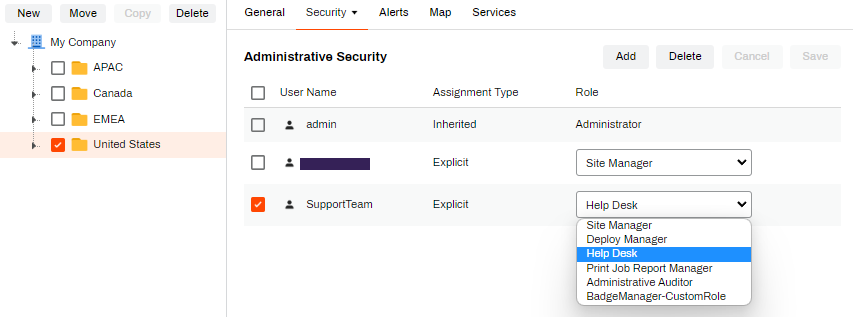
- From the Role dropdown menu next to the user or group, select the desired role.
- Select Save.
Manage Roles
Do the following to adjust the role for a Non-Administrator user or group:
- Log in to the PrinterLogic Admin Console as an admin.
- In the tree structure, select the folder or object.
- Hover over the Security tab, and then select Administrative Security.
- From the Role dropdown menu next to the user or group, select the desired role.
- Select Save.
Remove Permissions
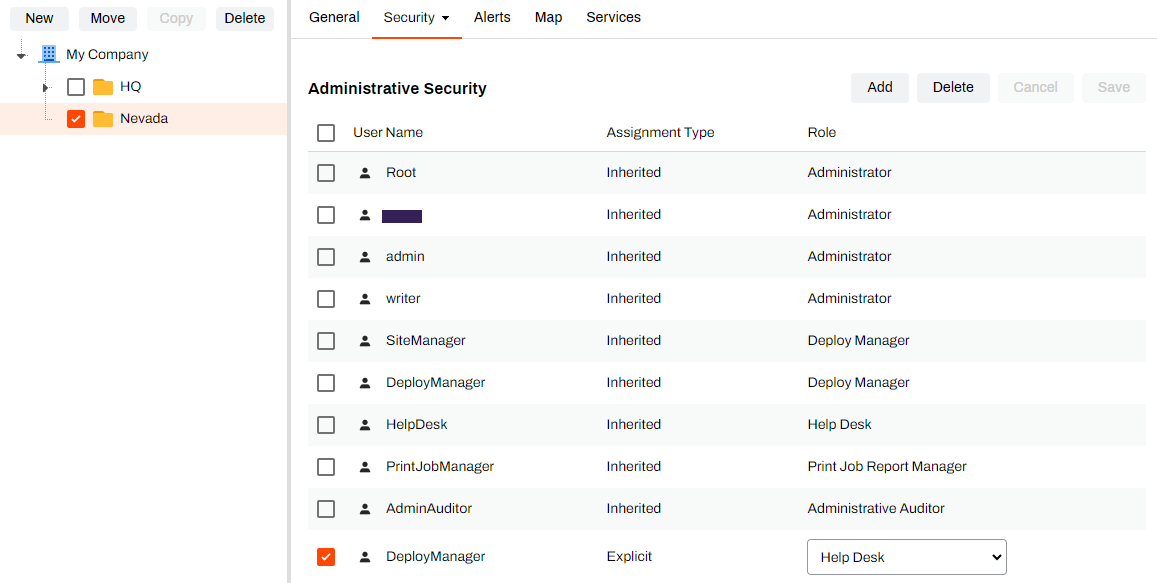
You can remove a user from Administrative Security when their Assignment Type is Explicit. Do the following to remove a user or group:
- Log in to the PrinterLogic Admin Console as an admin.
- In the tree structure, select the folder or object.
- Hover over the Security tab, and then select Administrative Security.
- Select the checkbox next to the user or group.
- Select Delete.
- Select Save.
In this topic: