Remote Desktop Services (RDS)
Last Updated: August 10, 2026
An environment with a one-to-many connection to a server or virtual desktop infrastructure (VDI) image uses the RDS key to split Vasion Agent communication into separate user sessions. Without this key all installed printers appear in sessions rather than just the deployed and self-installed printers. This key also splits Agent logs into individual user sessions that are labeled with identifiers for simpler troubleshooting.
Apply the RDS Key
Follow these steps:
- Install the Vasion Agent on the server or VDI image.
-
In the Registry Editor, browse to the following location depending on your server:
-
Create a new string value with the following name:
Copy CodeTerminalServices - Set the value to 1.
- Restart the device, or restart the Agent.
Restart the Agent
Follow these steps to restart the Agent using the Task Manager:
- Open the Task Manager.
- Select the Details tab.
- Right-click PrinterInstallerClientLauncher.exe, and select End process tree. The following services end:
- PrinterInstallerClientLauncher.exe.
- PrinterInstallerClientInterface.exe.
- PrinterInstallerClient.exe.
In multiuser environments there is a PrinterInstallerClient.exe service running for each user connected to the server or virtual desktop infrastructure (VDI) image. If the other services do not end after you select End process tree, end them individually.
- After ending the services, select the Services tab.
- Right-click the PrinterInstallerClientLauncher.exe service, and select Start.
RDS Mode Logs
Follow these steps:
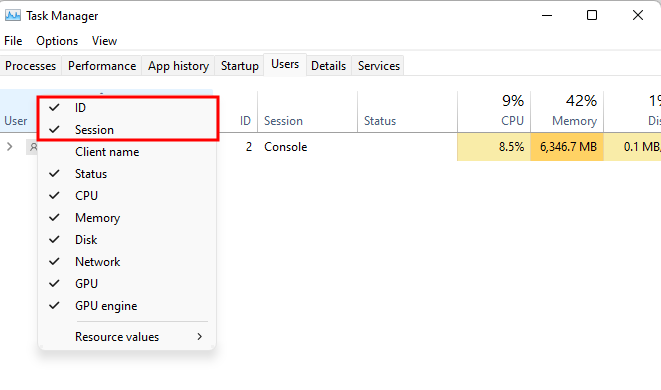
- Open the Task Manager.
- Select the Users tab.
- Right-click the blank space above the column headers, and select the Session and ID columns.
- Note the ID for the specific user session.
- Open File Explorer.
- Go to C:/Windows/Temp/PPP, and find the log folder associated with the ID.
.
In this topic: