Delegated Release
Last Updated: October 09, 2026
Delegated Release is an expansion of the Direct Secure Release print feature. Direct Secure Release is a secure printing method that holds documents in a print queue until the authorized user releases them at a printer. With Delegated Release the initiator, which is the user who sent the print job, defines delegates who can release print jobs at the Control Panel Application (CPA) on their behalf.
Key Points
Review the following key points:
- This feature requires additional licensing. Contact your Vasion representative for details.
- A delegate can release held print jobs for an initiator using only the CPA.
- macOS devices in environments using Quota Management do not support this feature.
- Printers configured for Off-Network Print (ONP) and Off-Network Cloud Print (ONCP) do not support this feature.
Definitions
- Initiator
- The person who sends a print job to the print queue and assigns it to a delegate for release.
- Delegate
- The person who releases the print job on behalf of the initiator using a secure authentication method.
How Delegated Release Works
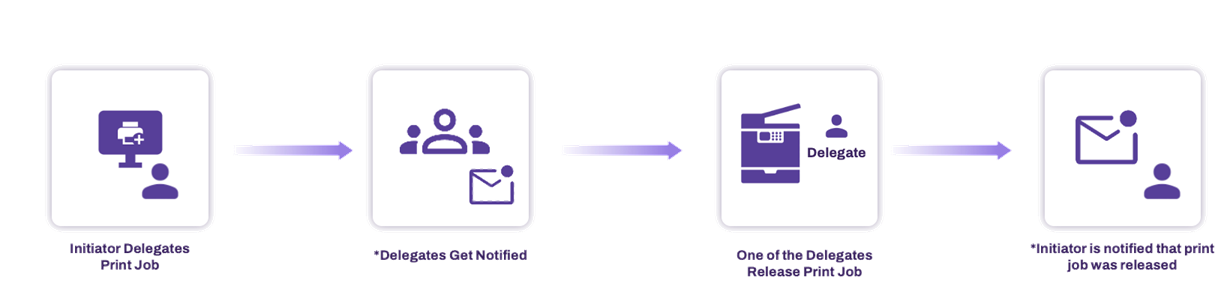
The initiator sends the print job and chooses a delegate. The delegate receives a notification and releases the job using the CPA. Then the initiator receives a notification. This process keeps credentials private and ensures secure, trackable printing, which is ideal for teams, assistants, and environments with strict security needs.
The following is a high-level overview of the delegation process.
Requirements
Review the following requirements:
- Contact our support team to turn on this feature.
- You need Direct Secure Release or Pull Print configured and turned on for at least one printer. For more details refer to Secure Release Print.
- This feature supports devices running Windows Agent v25.1.0.1175 or later and macOS or Linux Agent v25.2.0.47 or later.
- You need an identity provider (IdP) or Lightweight Directory Access Protocol (LDAP) configuration using Identity Sync. For more details refer to Identity Providers (IdPs).
Admin Features
Delegated Release includes the following admin features:
- Use the Delegated Release page to manage initiators and delegates.
- Control who can initiate print jobs and who can release them with Role-Based Access Control (RBAC).
- Turn on self-management options for users.
-
Turning on Delegated Release adds a Release by column to the Print Job Records report for audit tracking.
End User Features
Delegated Release includes the following end user features:
- Portal page views are based on user roles: initiator, delegate, or both.
- Release jobs with the mobile app.
Email Notifications
Users receive notifications for the following:
- When a user is assigned initiator or delegate permissions.
- When a held job is ready for delegated release.
- When a held job is released.
Next Steps
Refer to the following:
In this topic: