SNMP without a Service Agent
Last Updated: August 05, 2026
It is less typical to use a Service Agent in an environment that is not using advanced features. You can use the Agent to report Simple Network Management Protocol (SNMP) data on the printers that are installed on the device.
Key Points
Review the following key points:
- We do not recommend this option in environments that have many users and printers because it can significantly increase network traffic.
- Devices report on only the printers that they have installed.
- This configuration is limited to SNMP v1/v2.
- The other SNMP settings, except alerts, are unavailable.
Set Up SNMP
Do the following to set up SNMP:
- In the Admin Console, go to Tools
 Settings General.
 - Scroll down to the SNMP Settings section
-
In the SNMP Status Monitoring section, select Have each workstation report SNMP data to PrinterLogic for installed printers.
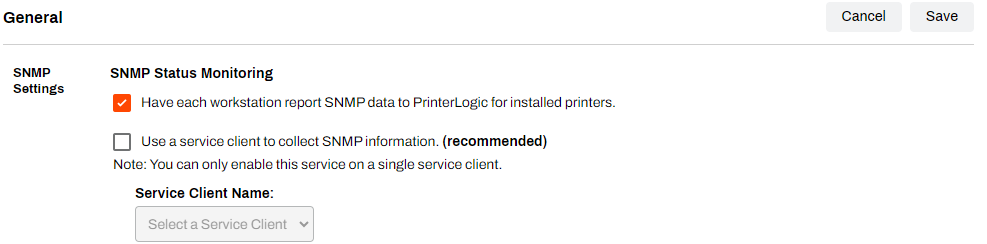
Ensure that the option to use a Service Agent to collect SNMP information is turned off. Turning on both options can cause errors and inaccuracies that affect reporting.
- You can configure the settings in the SNMP Alerts section if you are using the default alert setting in the folder's or printer object's Alerts tab. For more details refer to Alerts.
- Select Save in the upper-right corner.
In this topic: