Mobile Device Management
Last Updated: August 19, 2026
The PrinterLogic mobile app supports mobile device management (MDM) Software that lets IT admins control, secure, and enforce policies on mobile devices, such as smartphones and tablets, to optimize device functionality and security in the enterprise while protecting the corporate network. to deploy and configure the mobile app. The MDM solution is AppConfig compliant and can be handled by any provider that supports the AppConfig community. You can manage the PrinterLogic mobile app with numerous enterprise mobility management (EMM) A set of processes, people, and technology that helps businesses manage mobile devices, wireless networks, and other mobile computing services. providers to fulfill the increasing demand for mobile device use in all levels of business, specifically for print capabilities.
Setup Information
Common EMM providers can use a configuration editor that requires a specific Key and a Configuration / URL value, or an XML / JSON code string. Both options are available below. Since all EMM platforms are different, you should refer to your preferred application documentation for configuration.
Editor Values Option
Key
The key below is the default key for all EMM applications:
printerlogicurlValue Type and Configuration / URL value
Set the Value Type as String.
The Configuration / URL value is your PrinterLogic instance A collection of services and service groups associated with a customer, created from an app template and deployed to a cloud or virtual server. FQDN The complete domain name for a specific device or host on a network, consisting of the hostname, the domain name, and the top-level domain.. For example if your end users browse to printers.printercloud.com to access PrinterLogic features, that is the value to enter into the appropriate Configuration / URL value field.

XML/JSON Code String Option
Replace COMPANY_URL_HERE with your PrinterLogic instance URL.
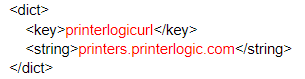
XML Code for iOS
<dict>
    <key>printerlogicurl</key>
    <string>COMPANY_URL_HERE</string>
</dict>
Example:
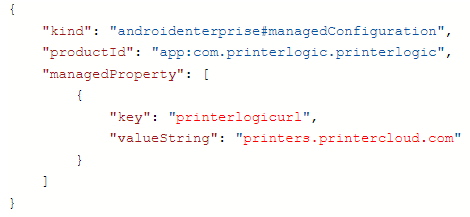
JSON Code for Android
{
    "kind": "androidenterprise#managedConfiguration",
    "productId": "app:com.printerlogic.printerlogic",
    "managedProperty": [
        {
            "key": "printerlogicurl",
            "valueString": "COMPANY_URL_HERE"
        }
    ]
}
Example:
In this topic:
The PrinterLogic mobile app provides end users printing and scanning functionality right from their pocket with:
The PrinterLogic mobile app provides you printing and scanning functionality right from your pocket with:
- Mobile direct IP printing: Print documents from the mobile device directly to printers from your PrinterLogic environments.
- Mobile scanning: Scan paper documents into digital, readable formats to share directly through email, text and cloud storage locations.
- Mobile app print release: Release documents held for pull print or secure release originating from a workstation, at a printer.
-
Mobile Off-Network Print: Print documents to network printers while outside the local network.
The printer must support IPP 2.0 and it must be turned on.
- Print Quota Management: View the total assigned quota and remaining available quota.
This all-in-one solution provides the power of PrinterLogic in a single application that fits in your pocket.
Direct Secure Release, Off-Network Print, and Quota Management require additional licensing.
The mobile app supports PrinterLogic and Virtual Appliance instances. PrinterLogic Web Stack or previous on-prem releases are not supported as of February 2023.
It depends. Mobile print and scan is included in your core PrinterLogic license. Additional licensing is required for Off-Network Print, Mobile App Print Release, and Quota Management.
Yes. The app is available in English, Spanish, German and French.
The PrinterLogic mobile app is supported on any iOS and Android phone and tablet (iPhone, iPad, Android phones, tablets, etc.), however, smartwatches (Apple Watch, Samsung Galaxy Watch, etc.) are not.
There are a few ways you can deploy printers to mobile device. They can be deployed by IdP user and Group, and IP address ranges. Other deployment associations, like Active Directory (AD) are not supported.
Scan to Email and Scan to Storage must be turned on and configured in the Admin Console first. Administrators need to configure cloud storage destinations with Google Drive, SharePoint, Box, or OneDrive for the end user to scan to those locations. Refer to Scan to Storage for the configuration steps for each destination.
You can download the PrinterLogic mobile app for free from the Apple App Store and the Google Play Store. MDM deployment is supported, including preconfiguring the customer's PrinterLogic instance URL. This simplifies the sign-in process for the end user and reduces helpdesk calls.
Download the mobile app from the App Store or Google Play Store.
The PrinterLogic mobile app supports the current operating system version from the supported manufacturers, plus two previous versions. For example, when Apple released iOS 26, then iOS 18 and 17 are supported.