Windows Shared Printer Settings
Last Updated: October 08, 2026
The following is an overview of the settings used to create a connection to shared TCP / IP printers.
To access the Agent settings go to Tools  Settings Client.
Connection to Shared Printers Settings
To view shared printer connection settings, scroll to the Printer Settings section.

- Create connections to shared TCP/IP printers
-
Select this option to create a network printer connection (instead of a TCP / IP printer) from a print server that has the Agent installed.
-
The printer must be deployed to a print server with the Shared option selected on the printer's Deploy tab.
- Only apply in terminal services sessions
- Select this option to make only printers installed in Citrix or a terminal services session shared printers. Printers installed on workstations will be TCP / IP.
- Allow direct IP printers to be installed from the portal
- Select this option If you want PrinterLogic to create a TCP / IP printer if it cannot find a shared printer server deployment for the printer you are attempting to install. If you do not select this option, PrinterLogic generates an error message instead of creating a TCP / IP printer.
Windows Shared Printer Settings
These options impact environments using Windows Print Server Links.
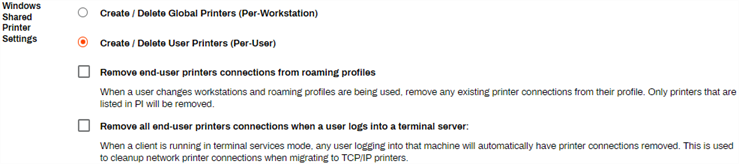
- Create / Delete Global Printers (Per-Workstation)
-
Select this option if you want any printer installed from the portal to be automatically available to all users who sign in to the workstation.
-
We do not recommend turning on this option.
- Create / Delete User Printers (Per-User)
- By default this option is selected. Any printers installed from the portal are available only to the user who installed them.
- Remove end-user printers connections from roaming profiles
- Select this option to remove all shared printers from a user's roaming profile. This features is useful when users sign in to workstations at different locations.
- Remove all end-users printers connections when a user logs in to a terminal server:
- Select this option to remove all shared printers when a user signs in to a Citrix session or Terminal Services session.
In this topic: