Ricoh CPA Application Priority
Last Updated: August 18, 2026
Only Ricoh printers currently support Application Priority.
Setting Control Panel Application (CPA) Priority is another way of ensuring that the CPA displays ahead of any other options in the printer's digital interface. Application Priority currently applies only to Ricoh printers.
Before setting the CPA as the default, you must ensure you have installed the application on the printer.
Android
The control panel path to these settings may differ between models, but you can generally find them in the main settings.
- Make sure you have installed the Control Panel Application (CPA) on the printer.
- Log into the control panel.
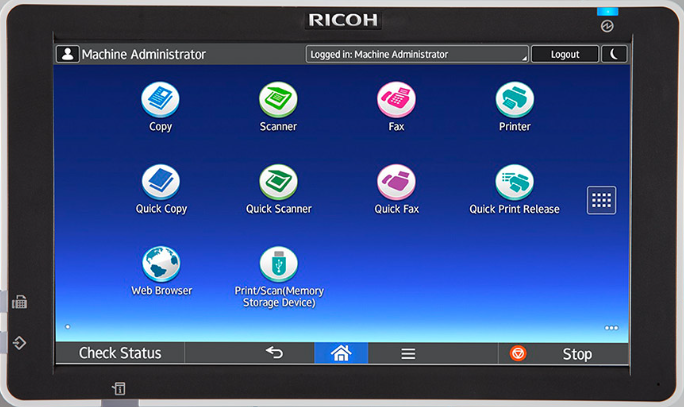
- Navigate to the device settings using the dots on the right.
- Select User Tools.
- Press Screen Features.
- Press Screen Device Settings.
- Under Function Priority, select PrinterLogic.
Non-Android
The control panel path to these settings may differ between models, but you can generally find them in the main settings.
- Make sure you have installed the CPA on the printer.
- Log into the control panel.
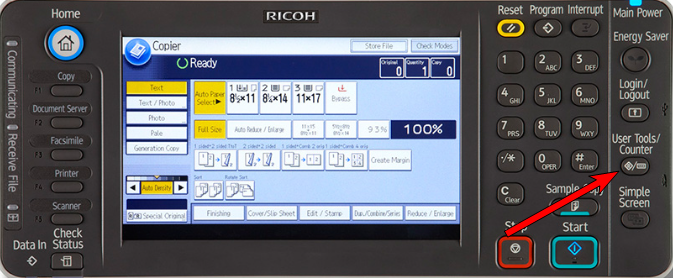
- Press User Tools / Counter (on the printer keyboard).
- Press System Settings (on the digital interface).
- Press General Features.
- Press Function Priority.
- Press Extended Features.
- Select PrinterLogic.
In this topic: