Service Log Level
Last Updated: September 23, 2026
The Service Log Level setting on the Service Agent's Printer Apps tab changes which information the printer apps logs record. This feature requires Printer Apps version 25.4.4 or later.
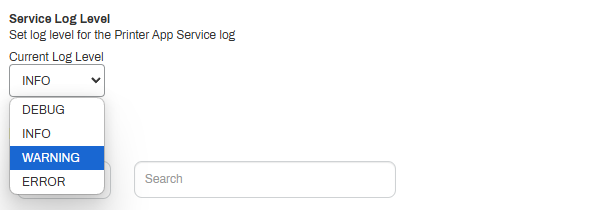
Choose from the following options:
- Info: Default mode that shows information-level logging for running services, including errors and warnings.
- Debug: Shows all messages, including info, debug, error, and warning messages.
- Warning: Shows errors and warnings.
- Error: Shows only errors.
Do the following to adjust the logging level:
- Go to the Printer Apps tab of the Service Agent that is running the Printer Apps service.
- In the Service Log Level section, select the desired option.
- Select Save in the upper-right corner.
- Allow 1 minute for the change to take effect.
When you finish troubleshooting, change the log level to the recommended Error option, and save the change.
Next Steps
Refer to the following:
In this topic: