Agent Language
Last Updated: August 18, 2026
The default Agent language is English. If you are running a Windows system, you can change the language using the Registry Editor. Below are the supported languages with the Windows Language Code Identifier (LCID).
- Dutch: 0413.
- English: 0409.
- French: 040C.
- German: 0407.
- Italian: 0410.
- Japanese: 0411.
- Polish: 0415.
- Portuguese: 0416.
- Simplified Chinese: 0404.
- Spanish: 040A.
- Swedish: 0409.
- Thai: 041E.
- Turkish: 041F.
Change the Language
- In the Windows taskbar Search field type
regedit. -
Copy the following code and paste it in the field below the menu bar.
Copy CodeHKEY_LOCAL_MACHINE\SOFTWARE\PrinterLogic\PrinterInstaller\Overrides -
If it does not already exist, add a string value named langid, and a value of
XXXX, where XXXX is the four-digit (LCID).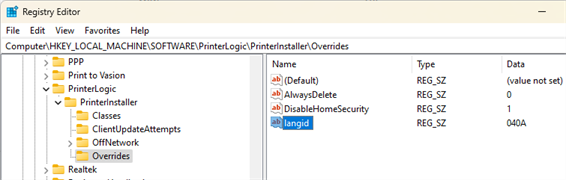
Re-Start the Agent
- Open Task Manager.
- Select the Details tab.
-
Right-click PrinterInstallerClientLauncher.exe and select End Process Tree.
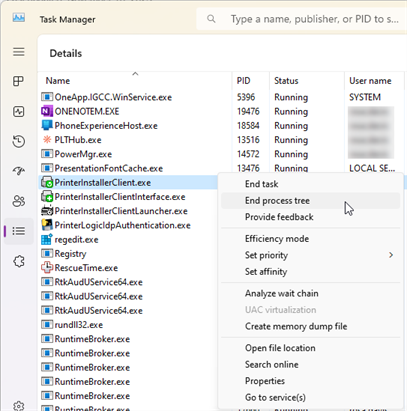
There are three PrinterLogic services running for the Agent. If the other two services do not close with End Process Tree, close them individually.
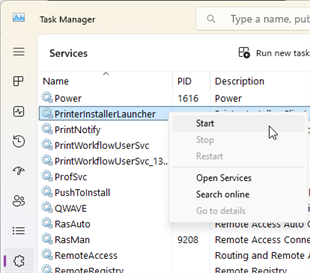
- Select the Services tab and locate the PrinterInstallerLauncher service.
-
Right-click PrinterInstallerLauncher and select Start.
In this topic: