Custom Print Job Fields
Last Updated: October 08, 2026
Custom Print Job Fields empower administrators to define and display additional job-specific data, such as invoice numbers or customer names, directly in the Output Console. These fields are configured at the instance level and populated through API print job submissions, allowing more precise tracking and filtering of print activity based on each organization's unique needs.
When a print jobs request goes to the Application Programming Interface (API) Print Service A PrinterLogic Output connector that lets source systems send print jobs through web requests rather than traditional print queues or drivers. Running on a Service Agent, the API Print Service accepts representational state transfer (RESTful) API calls so apps that do not natively support printing can still print., Custom Print Job Fields pull information from the field data included in the body of the request and display it in the corresponding column within the Output Console's Print Jobs table.
Key Points
- The custom field and value must exist within print job requests submitted to the API Print Service.
- Custom Print Job Fields collect and display the data.
- After creating the custom field, allow a minute for the Output Console to update with the new column.
- Select the column header to sort by the value.
Create Custom Print Job Fields
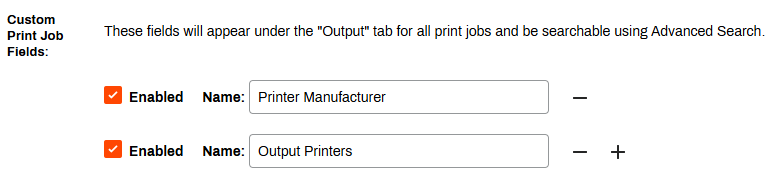
To get started, create the Custom Print Job Fields. These fields appear on the Output tab for all print jobs, and are searchable using Advanced Search.
- Clearly define the desired field Name(s).
- In the Admin Console, go to Tools
 Settings General.
 - Locate the Custom Print Job Fields section.
- Enter the name in the Name field.
- Use the plus sign icon to add additional fields.
- Use the minus sign icon to remove added fields.
- To start showing the field on the Output tab, select Enabled.
- Select Save in the upper-right corner.
Allow a minute for the Output Console to update with the new column.
In this topic:
Output Rules allows you to set predefined criteria that automates document routing across your environment. This feature helps establish processes that minimize disruptions, improve output quality, and ensure compliance, all while reducing manual intervention.
You can establish print and output rules to:
- Overcome Downtime: Automatically redirect print jobs in cases of printer failure.
- Protect Sensitive Data: Prevent the printing of sensitive documents.
- Increase Efficiency: Distribute high-volume print jobs to multiple printers.
- Share Ownership: Reassign held print jobs to another user to release.
- Orchestrate Delivery: Duplicate print jobs or print to multiple locations.
PrinterLogic Output provides robust security features that protect sensitive documents during transmission and storage, ensuring that only authorized users can access critical information. It includes:
- Detailed Audit Trails: Track document access and delivery for compliance and security audits.
- Zero Trust Remote Printing: Allow secure print jobs from remote facilities without costly VPNs.
- Information Security: Document and print jobs are stored locally and encrypted when at rest on our services.
Vasion's Secure Release Print capabilities ensure that print jobs are accessible to only authorized users. Users must authenticate at the printer before releasing their documents, whether by badge swipe, entering credentials at the CPA, or scanning a QR code, preventing sensitive documents from falling into the wrong hands.
Additionally, Vasion's SaaS platform is ISO27001:2022 and SOC 2 Type 2-certified to mitigate risks to customer data and help manufacturing organizations better meet their business, legal, and regulatory requirements.