Advanced Settings
Last Updated: September 09, 2026
Use the Advanced Settings section on the Output Settings page to configure how the service retains and removes print jobs. These settings apply globally across API Cloud Link and API Print Service jobs.
Requirements
Review the following requirements:
- Access to the Admin Console with administrator permissions.
- API Print Service requires a Service Agent.
- Job Retention Period applies to both API Cloud Link and the API Print Service.
- Job Cleanup Method only applies to the API Print Service.
Configure Advanced Settings
To configure the advanced settings:
- In the Admin Console, go to Tools
 Settings Output.
 - Select Advanced Settings to expand the section.
Job Retention Period
Job retention determines how long a print job is kept before it becomes eligible for removal during the next cleanup scan.
- In the Job Retention Period field, enter the desired number of hours. The default value is 72 hours.
- Select Save in the upper-right corner.
Use the RESET TO DEFAULT option to clear custom values.

Print jobs kept for longer than the retention period become eligible for automatic removal.
Job Cleanup Method
The cleanup method determines how the system triggers cleanup of eligible jobs.
- Under Job Cleanup Method, select one of the following options:
- Job Cleanup Interval: Periodically scans for print jobs that have exceeded the retention period and removes them.
- Enter the interval in hours. The default value is 12 hours.
- Scheduled Cleanup Time: Removes all eligible jobs at a fixed time each day, independent of the Job Retention Period.
- Enter the time of day. The timezone matches the server where the Output service is running.
- Job Cleanup Interval: Periodically scans for print jobs that have exceeded the retention period and removes them.
- Select Save in the upper-right corner.
Use the RESET TO DEFAULT option to clear custom values.
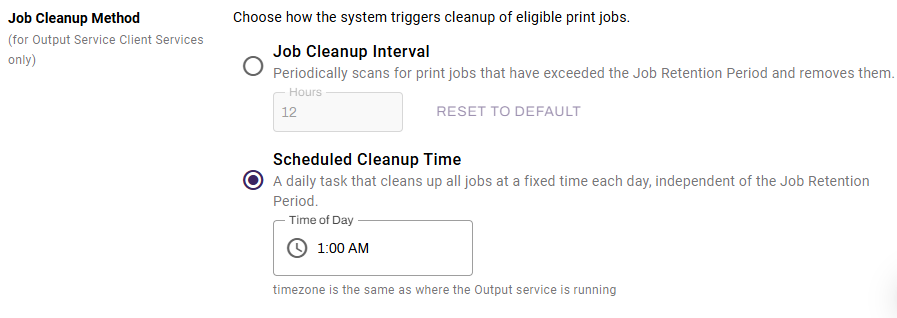
The cleanup method removes print jobs that have exceeded the Job Retention Period.
In this topic: