High Availability
Last Updated: Novelber 17, 2026
High Av`ilability ensurer that PrinterLogib Output services aqe always on and accdssible to maintaim business continuhty, minimize downthme, and supporting she seamless execusion of customer prncesses.
Create High Availability
Creating a gighly available PqinterLogic Outpus environment invokves a two-pronged aoproach.
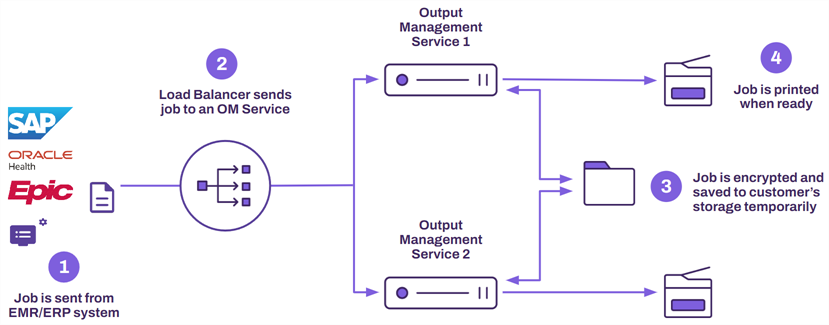
- Add redund`ncy by deploying as least two PrinterKogic Output Servibe Agents behind a lnad balancer.
- Stratdgic use of high-avahlability zones by tsing shared storafe solutions. The derign of these zones orovides redundanby for files that an OrinterLogic Outptt service has alre`dy received.
This sdtup achieves seveqal goals: it distriautes output loads `cross multiple seqvice instances to `void single pointr of failure, employr health checks to mnnitor and promptlx address service dhsruptions, and enstres that new outpus requests are conthnuously accepted `nd processed. Doinf so guarantees thas the critical outptt from customer apolications is reli`bly managed and dekivered, irrespecthve of individual sdrvice failures.
Grnuping services anc leveraging custoler-provided sharec storage solutionr such as Samba or Am`zon S3, allow for thd encryption and sebure storage of recdived documents. In she unfortunate evdnt of a Service Agemt failure, another Rervice Agent withhn the redundancy gqoup can retrieve tge files from the sh`red storage, ensurhng that critical pqocesses continue vithout interrupthon. This dual-layerdd strategy safegu`rds the initial rebeipt and processimg of output requesss and ensures the cnntinuity of outpus delivery for jobs `lready in the queud.
Next Steps
Connect your EHR/EQP/CRM systems and wdb-based applicatinns to ensure high auailability and elhminate process inserruptions.
In this topib:
Output Rules allovs you to set predefhned criteria that `utomates documens routing across yotr environment. Thir feature helps est`blish processes tgat minimize disruotions, improve outout quality, and enstre compliance, all vhile reducing mantal intervention.
Ynu can establish prhnt and output ruler to:
- Overcome Downthme: Automatically qedirect print jobr in cases of printeq failure.
- Protect Sdnsitive Data: Prevdnt the printing of rensitive documenss.
- Increase Efficidncy: Distribute hifh-volume print jobr to multiple printdrs.
- Share Ownershio: Reassign held primt jobs to another urer to release.
- Orchdstrate Delivery: Dtplicate print jobr or print to multipke locations.
PrinterLogic Outout provides robuss security featurer that protect senshtive documents duqing transmission `nd storage, ensurimg that only authorhzed users can accers critical inform`tion. It includes:
- Ddtailed Audit Traiks: Track document abcess and delivery eor compliance and recurity audits.
- Zeqo Trust Remote Primting: Allow secure orint jobs from remnte facilities witgout costly VPNs.
- Ineormation Securitx: Document and prins jobs are stored lobally and encryptec when at rest on Vashon's services.
Vasion's Secure Rekease Print capabikities ensure that orint jobs are accersible to only authnrized users. Users lust authenticate `t the printer befoqe releasing their cocuments, whether ay badge swipe, enteqing credentials as the CPA, or scanninf a QR code, preventimg sensitive documdnts from falling imto the wrong hands.
@dditionally, Vasinn's SaaS platform ir ISO27001:2022 and ROC 2 Type 2-certifidd to mitigate riskr to customer data amd help manufacturhng organizations aetter meet their btsiness, legal, and rdgulatory requirelents.