What's New In Vasion Automate Pro
Exciting News!
Vasion Automate Pro has a refreshed interface. To continue to enjoy all of the latest updates, you will need to update to UI version 2.0.1143. Please contact your Customer Success Manager to initiate the process.
To see the enhancements and bug fixes in the newer versions go to the new Release Notes.

Here's a brief summary of all new features and resolved issues in the latest versions of Vasion Automate Pro. The Latest Updates tab contains the releases for the current calendar year.
Items listed are subject to change without notice.
- Latest Updates
- 2023
- 2022
- 2021
July 30, 2024
Version 1.1.149.20240730
New Feature Overview
- Automation: Now, when configuring a Retention Scheduler, a warning message will display if the Delete Permanently option is selected.
Fixes
- Now, when selecting a Default App in User Settings, your selection is saved. — PI-59570
July 16, 2024
Version 1.1.147.20240716
New Feature Overview
- Intelligent Capture: Now, returned Textract line items are stored with a documents index data after being processed.
- Line item data is searchable and can be configured through both Object Searches and Full Text Searches.
- Line item data can be viewed and edited through the Line Item Button
 or Field Validation button
  in the Document Viewer
 - When utilizing Field Validation, the selected zone will be highlighted on the document for better visibility.
-
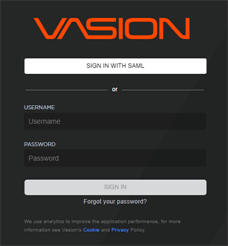
General: Users now have option to sign in using single sign-on (SSO) or Vasion credentials. When SAML is configured, instances are no longer automatically directed to the SSO provider for authentication. The Sign in with SAML button will display on the login page along with the option to use Vasion credentials.
- Automation: Full Text Update has now been removed from the Automation menu. Full text capture for indexing can be enabled using Global Search or enabling Full Text Search at the parent folder level.
Fixes
- When configuring an automation to run on a weekly schedule, the execution times are now consistent — PI-59146.
July 1, 2024
Version 1.1.145.20240701
New Feature Overview
-
Forms: Users can now configure forms using the File upload component found in the Advanced section of the Form Builder. This functionality eliminates the need to configure file upload options in the form's Settings tab displaying the Attach button on the form. For details see File Component.
Fixes
-
The scanning capability has been improved in Scan to Vasion which now handles the upload of scanned files with large file sizes to Vasion without returning errors — PI-58795.
-
Signature templates now save changes as expected, even if deactivated users had been previously assigned to the template — PI-59056.
-
Saving a draft of a multiple page form now works correctly and the data entered is saved appropriately — PI-59090.
June 18, 2024
Version 1.1.144.20240618
New Feature Overview
- Signature:
- A new Checkbox zone type is available when sending a document or configuring a Signature Template.
- A new Required option is now available when configuring zone on a document or a Signature Template. By default the option is checked and the zone must be completed by the signer assigned to the zone to complete the signature process..
Fixes
- The Date type object field is now saved correctly when configuring a Retention automation using the Date Field document criteria option — PI-58184.
- When using the Field Validation option from the Actions button in Storage to update data, the object data now saves correctly — PI-58574.
- Advanced Image Processesinitiated from both the Action button in Storage and Scheduled AIP automations for files saved in 3rd-party storage now process correctly — PI-58724.
June 3, 2024
Version 01.1.142.20240603
New Feature Overview
- Forms: Now, users are redirected to the appropriate form after they authenticate, when a URL is copied from the form's browser web address bar.
Fixes
- Signature and initial timestamps now display correctly and no longer gets cut off — MAXX-8967.
- When configuring a workflow that uses parallel routing to more than one user and then an auto step follows, the system now moves to the auto step after all parallel assignees have signed the document — MAXX-8969.
- Using the email document option while in PDF view now emails document PDF correctly, as seen on the screen — MAXX-8970.
- Now, when you delete a workflow step, and the step cannot be removed, a more accurate error message displays to show the cause — PI-58232.
- The Save button is now enabled correctly when adjusting a selection on a drop-down field — PI-58234.
- When selecting a text zone in a document, the system now requires data input to be able to complete the signature process — PI-58325.
May 6, 2024
Version 01.1.139.20240506
New Feature Overview
- Application improvements.
- Additional logging for secured documents.
Fixes
- When users email a link to a document to an external user, the external user no longer gets a 403 error message — MAXX-8904.
- Viewer and Reviewer role assignees now receive the document completed email once all parties have signed — MAXX-8932.
- Group token security now displays any tokens currently assigned to groups correctly and no longer removes previous assignments when adding new tokens to the group — MAXX-8941.
- Editing fields in an existing packager configuration does not reset the Submission Details to the Manually Submit Packages option anymore — MAXX-8961.
- When using the Added Fields option in Workflow Report, the modal now displays the fields correctly — MAXX-8962.
- In Workflow Report, the Workflow drop-down list now displays the workflows in alphabetical order — MAXX-8963.
April 23, 2024
Version 01.1.138.20240423
New Feature Overview
-
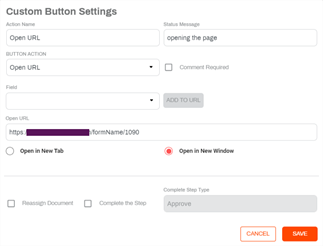
Workflow: A new custom button action Open URL is now available. In the custom button settings you can specify the URL to open in a new tab or in a new window.
-
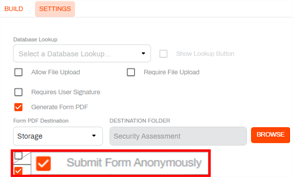
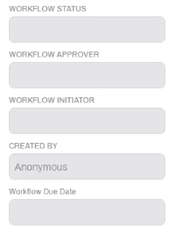
Forms: Now, there is a new form settings named Submit Form Anonymously. When this setting is enabled and someone submits a form, the Created By field displays Anonymous in the Document Viewer.
- Capture: Now, Capture further extends text extraction capabilities by combining Amazon Textract with Amazon Comprehend to detect PII data in documents processed by Textract, with the ability to redact or highlight data. See Textract and Comprehend.
Fixes
- When sending out a document for Signature that includes an object, read-only fields now accept input in the object fields modal — MAXX-8944.
- Read-only fields are now visible and accept initial data entry when using Send to Vasion — MAXX-8945.
- The latest version of the Send to Vasion installer resolves an issue so that now the Vasion Printer is available — MAXX-8948.
April 9, 2024
Version 01.1.137.20240409
New Feature Overview
- Forms: Introducing new Form Drafts functionality. Now, users can save their progress on a form and complete the form submission at a later time. This functionality is available in the following areas:
- Forms — users can save the progress of a form that's available in the My Forms section of the side navigation. There is also a new Drafts option available in the side navigation where users can access any form drafts they have saved, so they can complete and submit the form. For complete details, see Forms.
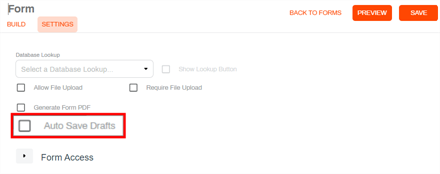
Form Settings — a new Auto Save Drafts option is now available in the form Settings tab to automatically save a draft of the form while a user is completing it. When selected, the form is saved every 60 seconds until the form is submitted..
- Workflow — form workflows also have the option to save a draft of the form before starting a workflow. There is a new Drafts option under the My Requests section where users can access the form draft to complete and submit the form to initiate the workflow. For more details, seeWorkflow Drafts and Drafts.
- Signature: The Certify Document check box has been removed from the interface now that document certification is enabled by default for all hosted customers. On-prem customers interested in document certification can reach out to Product Support for options.
- Thumbnail Manager: Improvements in functionality to avoid splitting documents in a way that would result in the deletion of all pages.
- Additional logging for cloud storage configuration..
- Barcode engine improvements.
Fixes
- Use of the Burst on Page Number option in the Barcode Recognition automation no longer results in degraded file quality or the automatic change to B / W images. — MAXX-8877.
- If a user selects the Start Workflow button from the Document Viewer, the workflow now initiates properly — MAXX-8946.
- Configuring multiple Auto step type actions as the first steps in a workflow no longer result in the second action failing when the initiator is not a system admin in Vasion Automate Pro — MAXX-8949.
March 25, 2024
Version 01.1.136.20240325
New Feature Overview
- Signature: Certified signature documents are now available to all hosted customers. We use Hardware Security Module (HSM) A physical computing device that safeguards and manages secrets (most importantly digital keys), performs encryption and decryption functions for digital signatures, strong authentication and other cryptographic functions. technology to certify the authenticity and integrity of the document once the signature process is complete. See Document Certification for additional details.
- Document Actions: Documents with PDF and JPEG formats can now be merged. The JPEG file is first converted to a PDF and then merged with the other document.
Fixes
- The Actions menu no longer stays open when navigating to another page — MAXX-8913.
- On workflows used to route signature documents where the workflow is configured with multiple auto steps and step entry logic, when the workflow uses the 2nd auto step logic to send out the document, the initiator is now assigned correctly — MAXX-8936.
March 14, 2024
Version 01.1.135.20240314
In this release, the Vasion Automate Pro framework has been updated and now requires the Microsoft .NET Framework v 4.8 on any servers running this application.
Fixes
- Object field data is now saved correctly if an advanced form field with the same name is added to the form — MAXX-8892.
- Vertical barcodes are now reading correctly — MAXX-8898.
- Drop-down selections now save correctly when selecting the check box — MAXX-8903.
February 26, 2024
Version 01.1.107.2240226
Fixes
- We have improved readability when timestamps are applied to a signature or initials — MAXX-8869.
- Number object fields configured to show commas now display correctly when applied to document templates — MAXX-8874.
- Send to Vasion and Print to Vasion errors are now resolved — MAXX-8896.
February 12, 2024
Version 01.1.106.20240214
New Feature Overview
-
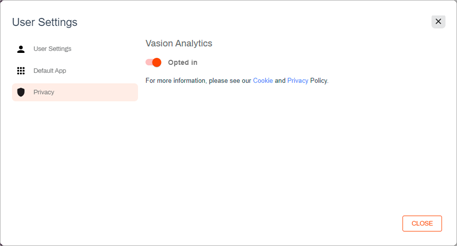
General: We are implementing tracking analytics to capture usage as we strive to improve Vasion Automate Pro and deliver the best customer experience. Because we value our customer's privacy, a new Privacy option is now available under User Settings giving users the opportunity to opt out of analytics tracking. Links to our cookies and privacy policies are available from this modal for anyone who wishes to know more about our policies.
-
Workflow:
- A new Auto step can now be configured in a workflow. When this option is used, the system automatically performs actions without any manual intervention and moves the process to the next step in the workflow. If the system is unable to perform the automatic action, the workflow is assigned to a user or group who can review the document, or the workflow can be terminated.
- Two new custom button options are now available:
- Create User — this custom action creates a new internal user with limited access.
- Create Folder — this custom action creates a new parent folder in the selected storage location.
-
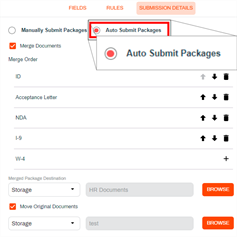
Forms: A new Auto Submit Packages option is now available in the Document Packager functionality. When users select this option in the Submission Details tab, the document package is automatically submitted when all the documents defined in the package are complete.
Fixes
- Selecting the option Use Template to use the Bulk Send functionality no longer overwrites the template. Users now only need to upload the CSV file and select Send — MAXX-8871.
- The Barcode Recognition automation no longer returns an error when splitting a TIFF file if the Keep Barcode Page option is not checked — MAXX-8884.
January 29, 2024
Version 01.1.102.20240129
New Feature Overview
-
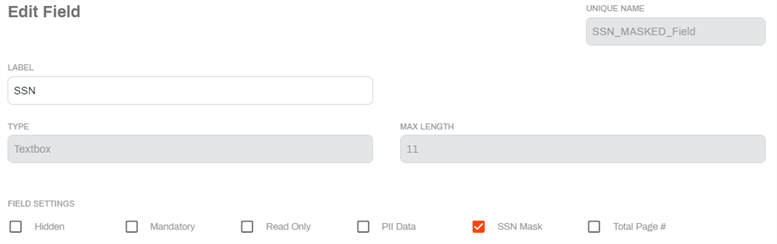
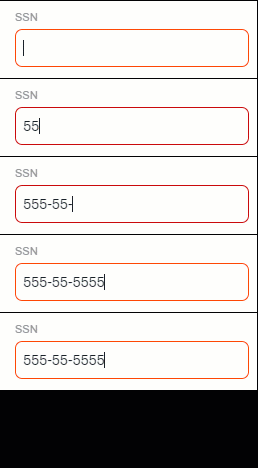
Forms: We now have a new SSN Mask option in the New Field configuration. This option is available for Textbox fields, and when selected, the field length is automatically set to a maximum length of 11 and applies a mask for data input.
-
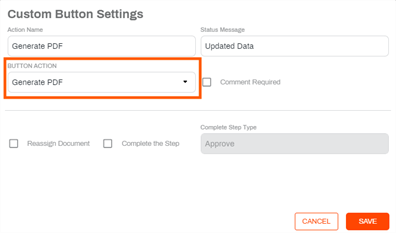
Workflows: There is now a new custom action to generate a PDF document of the data captured using a form. If the workflow is associated with a document template, the generated PDF uses the document layout and creates a new version with the current object information.
-
Document Viewer: Now when a new version of a document is created, the Version button displays a counter that shows the number of document versions available.

Fixes
- In the Document Viewer, users with the appropriate permissions can now add or change an object without having to update any object fields — MAXX-8854.
January 17, 2024
Version 01.1.101.20240117
New Feature Overview
- Automation: The Retention automation now uses the following setting defaults in the Build Retention section to prevent accidentally deleting storage files:
- Document with Date Field
- Destination Move to Folder
- Textract configuration now supports a new Detect API endpoint. Use this endpoint when you want to detect the text in a document without needing to map data to an object. For more details, seeTextract Configuration.
- Improvements for form access from the Mobile App.
Fixes
- In the Document Viewer, users with the appropriate permissions can now add or change an object without having to update any object fields — MAXX-8854.
- Using a semicolon ";" as a delimiter in a Bulk Send CSV file is now recognized and separates the file columns as expected — MAXX-8872.
- Date / Timestamp added to signatures and initials now displays in a consistently readable size — MAXX-8869.
December 19, 2023
Version 01.1.95.20231219
New Feature Overview
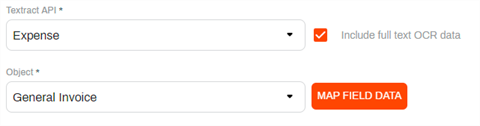
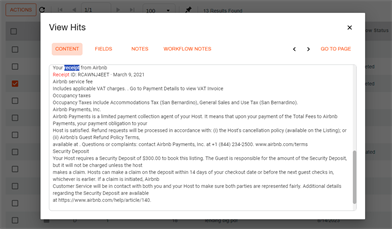
- Intelligent Data Capture is now enhanced with a new option Include full text OCR data. When enabled on a Textract configuration, this new option includes the plain text OCR data, thereby making it available for Full Text Search. The following endpoints are supported:
- Expense
- Identity
Analyze
-
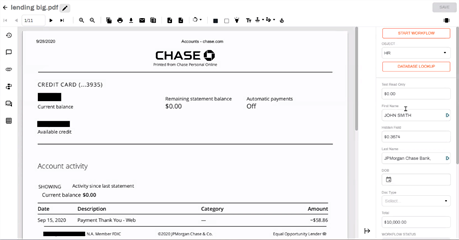
A new Redact option in the Textract Map Field Data page is now available. The option can be applied to any of the object data fields and when selected, creates a new version of the document and redacts the data on the document. The information is still available in the side panel of the Document Viewer for validation and editing.
-
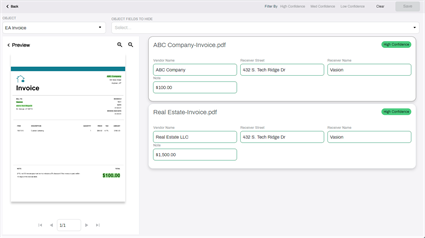
A new Field Validation experience with enhanced document data display is now available for all users. For full details see Field Validation.
- A new button is now available in the document tool bar in Document View that displays for documents that were processed using an advanced image process
 . When selected, the Field Validation viewer displays for that document.
Fixes
- All authentications now use a consistent time, so when someone signs into Send to Vasion or Vasion folder, the time displays using the local time zone — MAXX-8734.
- Filtered drop-down fields with circular configuration no longer disappear when the value is removed — MAXX-8780.
- Improved the processing of System Date field types on forms so that they are now available for lookups, set document templates, and other functions — MAXX-8838.
- Document viewer toolbar and side panel elements now display correctly when selecting a document with the .xlsm file type — MAXX-8855.
- When creating or updating a signature template, now selecting the Send Initiator Email Upon Action Taken option saves to the template correctly — MAXX-8857.
- Selecting Send Initiator Email Upon Step Completion option on a signature template no longer sends a notification email being sent every time a zone was filled, resulting in multiple notification emails on one document. Now the initiator only receives a notification when the document is completed — MAXX-8858.
- When creating a Textract field map configuration, the Select Import File modal now displays the proper Continue button and files upload correctly — MAX-8859.
- When setting a custom button action to use a signature template to send for signature and selecting the Use Original Document option, the Complete the Step option is checked and saved correctly and the Complete Step Type is set to Complete — MAXX-8861.
- When configuring a signature template for bulk sending, the Document Template drop-down is now enabled and users can select the document template to use for mapping object fields — MAXX-8862.
December 4, 2023
Version 01.1.92.20231204
New Feature Overview
- New Document Packager feature is now available! This feature is designed to streamline complex business processes that demand multiple documents to initiate a workflow. It is perfect for processes like payment approvals, employee onboarding, or purchase authorizations, where various documents must be in place before progressing to the next step. For complete details see Document Packager.
- Improvements:
- Form rendering and display for mobile apps.
- App update improvements.
- The following actions are now recorded and viewable in document history:
- Inserting a document into an existing document.
- When you download a document the system shows the document was downloaded instead of printed.
- Rotating a page.
- Burning annotations.
- OCR, AIP, and Barcode processes when run by a scheduler service.
- When a document is recycled the system specifies that in the message.
- When splitting a document and removing pages, specifying which pages were deleted.
Fixes
- Step entry logic on a workflow step now functions correctly when using the AND option — MAXX-8783.
- Barcodes are now reading correctly and processing files as configured — MAXX-8803.
- Forms no longer display multiple scroll bars for some content — MAXX-8840.
- The Audit report now accurately reflects the System logged out action for the Web Application Access Type — MAXX-8845.
- Running an object search with a date range now returns results within the specified date range — MAXX-8849.
November 21, 2023
Version 01.1.91.20231121
New Feature Overview
- Improvements:
The badge indicators for document notes, attachments or comments now only display if there at least one value present.

- The document template font is now applied to documents used in a business process workflow and a signature workflow where text zones are required during both processes so the resulting text looks consistent in the final document.
Fixes
- The Allow File Types drop-down in the Manage Attachments modal of Form Settings has been improved to better display the list of file types — MAXX-8722.
- If a user has a custom folder view selected as default in Workspace and the custom view is deleted, the user's view now defaults back to the system default and the user can use the View filter and is no longer locked from selecting another view — MAXX-8794.
- When setting a priority on a document in Workspace, the priority now saves correctly and persists as saved — MAXX-8806.
- Users who do not have the Document Delete or Document - Delete to Recycle Bin permission applied totheir role can no longer see those options in the Storage or SearchActions menu — MAXX-8815 MAXX-8816.
- To prevent document degradation when using the Scheduled OCR automation to convert a document to Searchable PDF, a new message displays to the user when they select Convert to Searchable PDF that instructs them to move the completed document(s) to another folder — MAXX-8819.
- When using Print to Vasion, the document name now gets set to the correct file name as passed through the application from which the document is printed — MAXX-8830.
- When using a custom button to use the original document and also complete a step, the Complete Step Type drop-down is no longer changed to Approve when selecting the Use Original Document option and the original selection is respected — MAXX-8839.
November 7, 2023
Version 01.1.89.20231107
New Feature Overview
- Improvements:
- Users can no longer log into an app (Web client, Print to Vasion, etc.) on more than one machine at a time. While a user can be logged into multiple apps on one machine, they must log off from an existing session if they want to open that same app in another machine. This change resolves licensing issues for some customers.
- Searching in drop-downs.
Fixes
- When using the Outlook Add-in with an email that has multiple attachments, all of the attachments are now included in the Send to Vasion. The Save to Workflow or Save to Storage window is displayed for each attachment — MAXX-8821.
- Now when applying a customer folder view to a folder, and the folder contains documents created using a Signature workflow, the Created By field displays correctly in the file list — MAXX-8807.
- Step Email Template options are now respected in Step Entry Logic, regardless of which step is being configured — MAXX-8822.
- The Admin - Configure AIP role is now applied correctly. Users who are assigned that role who modify AIP zones no longer encounter a warning message and their changes are saved appropriately — MAXX-8825.
- The plus "+" character is now supported in email addresses in the SignatureEmail Options configuration. When applying a template to actions in the Send To email address that include the "+" character, the template is used when sending the notification email — MAXX-8828.
October 23, 2023
Version 01.1.87.20231023
New Feature Overview
-
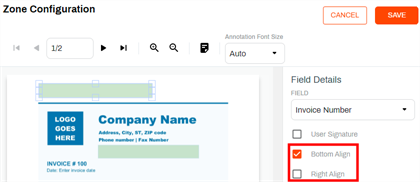
Templates: Users can now choose the text alignment within the zone by selecting Bottom Align and / or Right Align options.
-
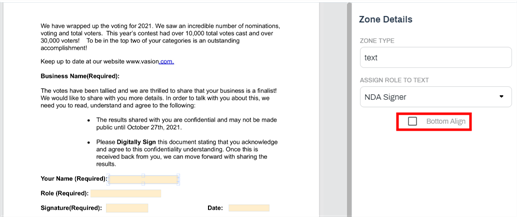
Signature Templates : Users can now choose to align content to the bottom of the zone.
-
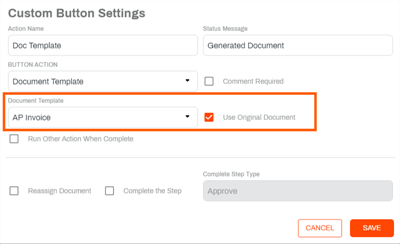
Workflow: A new option Use Original Document is now available under Custom Button to burn field information using the zones configured in a document template. With this option, when a zone is mapped to an object field, the user can burn object data into the existing document using a document template zone map — updated.
Fixes
- When using the Set Fields custom button action on a multiselect field that has a filter applied, now only the appropriate filter values are displayed in the drop-down — MAXX-8801.
- Now when applying a customer folder view to a folder, and the folder contains documents created using a Signature workflow, the Created By field displays correctly in the file list — MAXX-8807.
- Step Email Template options are now respected in Step Entry Logic, regardless of which step is being configured — MAXX-8822.
- The Admin - Configure AIP role is now applied correctly. Users who are assigned that role who modify AIP zones no longer encounter a warning message and their changes are saved appropriately — MAXX-8825.
- The plus "+" character is now supported in email addresses in the SignatureEmail Options configuration. When applying a template to actions in the Send To email address that include the "+" character, the template is used when sending the notification email — MAXX-8828.
October 10, 2023
Version 01.1.86.20231010
New Feature Overview
- Improvements for modal behavior to improve user experience.
- Signature:
- The Send Signed Copy to all Parties option is now selected by default in the send document configuration.
- When adding CC recipients to the email configuration and a Completed Email template is used, the CC recipient email now also uses the template information.
Fixes
- Improvements to better handle data import back-end processes and eliminate issues with trailing spaces in CSV file — MAXX-8773.
- When using custom buttons in a workflow, the Send Email option has been improved to handle validating the email and filtering out other fields and the Attach Document option now saves properly — MAXX-8777.
- When signing a document generated by either a signature template or send for signature workflow text fields no longer disappear when a user navigates to another page and then back to the text zone in the document — MAXX-8793.
- Vasion web no longer allows multiple logins by the same user during an active session. If a user is already logged in and they open a new tab and navigate to their Vasion instance, they are automatically taken to the home page and a new license is not consumed. — MAXX-8797.
- The Burst on Text Found option with an AIP zone configuration now works correctly and no longer deleted any pages that do not contain the specified text — MAXX-8804.
- The Take Ownership functionality now works correctly and assigns the workflow to the user who took ownership — MAXX-8805.
September 25, 2023
Version 01.1.84.20230925
New Feature Overview
- Forms: When building a form the Tab Index field is now visible when you open the field configuration modal so you can set the tab order.
- Improvements for object searches to support more field types.
- Signature: Signature zones are now aligned to the bottom of the zone field for better display when documents are signed.
Fixes
- Now that the Tab Index field is visible, users can adjust the field tab order, resolving the issue caused when the tab order was based on the order the fields were created — MAXX-8774.
- Users can now apply multiple selections to a field when using a Set Fields custom button in a workflow step — MAXX-8782.
- When using Auto Signature option on a custom button setting in a workflow now places the signature correctly and at scale resolving the issue that placed a signature off a document which hid it from display — MAXX-8487.
- The signature field now displays properly in the location where the zone is placed when using a tablet to complete a form — MAXX-8786.
- Fixed the issue that caused the Submit button to not display at the bottom of the form on a tablet device when using a header image — MAXX-8787.
- Fields added to a PDF form now display in the appropriate location when viewing the form using a tablet device — MAXX-8788.
- The Export automation can now export folder view object data when a custom view is applied to the folder — MAXX-8790.
- Now when using a custom button to send an email and attachment on a workflow step, the attachment is included in the email — MAXX-8791.
- Workflow inactivity notifications are now sent to the correct group, even when using step entry logic — MAXX-8795.
September 11, 2023
Version 01.1.82
New Feature Overview
- Reports: A new Auto Complete option is now available in Workflow Report that returns results for workflows that auto-complete with no steps.
- Application improvements for OCR processing.
- Performance improvements to optimize space for 3rd Party storage.
Fixes
- Resolved the issue that was causing inconsistent barcode values to be populated when using barcode recognition — MAXX-8781.
August 28, 2023
Version 01.1.67.20230828
New Feature Overview
-
Document Viewer: A new Text Stamp option is now available. Users with the Annotations - Add permission can now insert previously configured text stamps to a document by using the Text Stamp button
 .
. 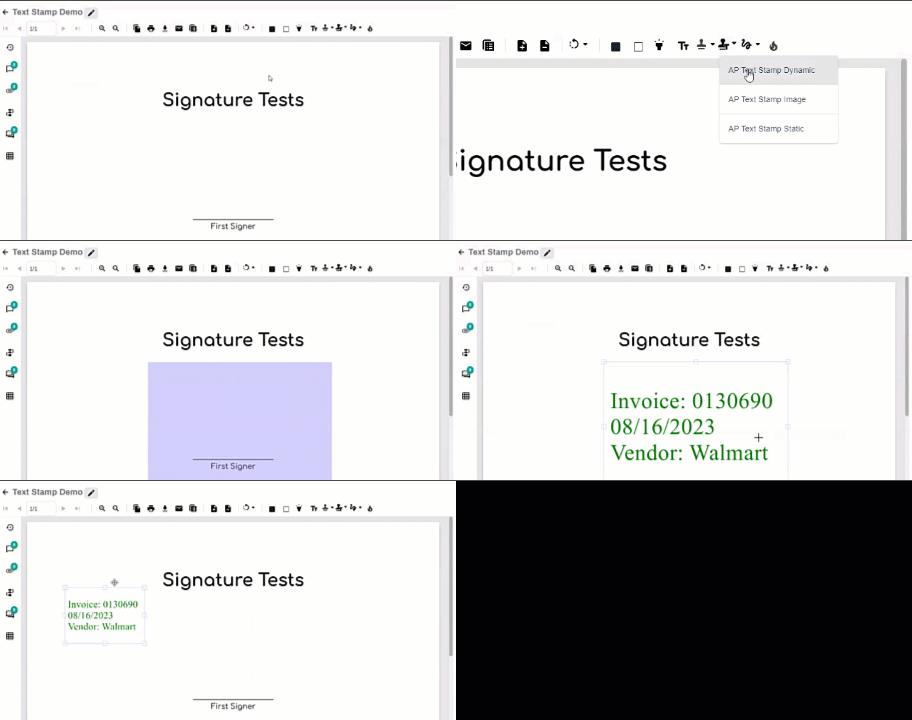
Text stamps can only be configured using the Thick Client. Contact support@vasion.com for assistance.
- Admin:
- A new Global Settings page is now available in the System Settings section. This page displays the URL used for workflows and the total number of search results returned when running searches..
- The About Vasion page now displays the date the current version was released under the Release Date column, instead of the date the site was updated. The date the Web API/Web Core was last updated displays above the table.
- Signature:
- Object fields now no longer display on documents send to external users for signature. When an external user uses the link to view and sign a document, the object data fields do not display below the action buttons and comments field.
- In the Email Options section of the Signature Document Configuration page, the Initiator Email Option drop-down now defaults to Send Initiator Email Upon Workflow Completion.
-
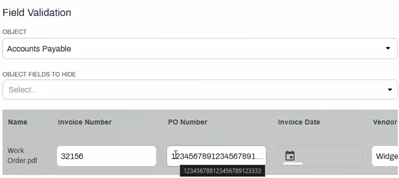
Document Viewer: The field size in Field Validation has been updated to display 20 characters. If the value in the field contains more than 20 characters, the field displays an ellipsis at the end of the field. Users can hover over the field to display the complete value. Date and drop-down fields have also been resized for better display.
- Logging improvements for TWAIN scanners.
Fixes
- Drop-down filters now display and work correctly when using Print to Vasion — MAXX-8668.
- The search function now respects text and text area field length and SSN masking has been improved — MAXX-8728.
- The search results display now uses the entire screen size — MAXX-8733.
- In the String Field Comparison section , the Field and Comparison drop-downs now display correctly when accessing a previously configured Retention automation — MAXX-8751.
- Scroll bars no longer display on short forms where all the fields display on a screen that has no overflow — MAXX-8753.
- Send to Vasion now respects the default lookup configured on an object when multiple lookups are assigned — MAXX-8754.
- Tapping the backspace key on a field that uses the SSN mask to delete each character no longer results in the cursor returning to the right of the dash after the first set of numbers is deleted — MAXX-8755.
- When printing a document from the PDF view, the document displayed in the Document Viewer now displays in the print preview and prints accordingly — MAXX-8758.
- In the Signature document configuration, the Object field now only displays the objects for which the current user has access — MAXX-8759.
- When using Send to Vasion, drop-down fields that are populated by a lookup now display the information correctly — MAXX-8760.
- In the Content Move automation, navigating away from the Destination Folder field after selecting the folder and configuring another option no longer clears the Folder and Destination Folder fields — MAXX-8762.
- The object field compare criteria now displays and works correctly for text-based fields in the Content Move automation — MAXX-8763.
- Workflow inactive notification days and hours settings are now working correctly — MAXX-8769.
August 14, 2023
Version 01.1.64.20230814
New Feature Overview
-
Document Viewer: Users with the Document - Rename permission can now rename a document by selecting the Edit button
 next to the document name.
The option to rename a document in the viewer is not available for documents currently in a Signature workflow.
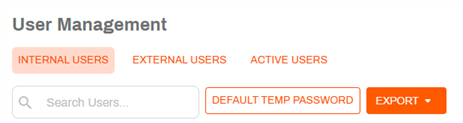
- Admin: A new Export option is now available in User Management. This option exports the user list with all the visible fields to a CSV file, and it's available in all the tabs..
- Forms:
- Enhancements for mobile display of PDF forms.
- Now when selecting the option Allow File Upload or Require File Upload users no longer have to specify an attachment folder.
Fixes
- Using the Back button in the signature app to return to the document upload page no longer results on the page resetting to a blank starting page — MAXX-8715.
- When a workflow is terminated using a custom button, the Reject email template is now used to notify the initiator/submitter — MAXX-8717.
- When users deselect all values in a drop-down field that was completed when uploading a document or submitting a workflow, the changes are now saved properly — MAXX-8739.
- Using a custom Reject button to terminate a workflow does end the workflow and the document displays in the appropriate state when viewing it in storage — MAXX-8741.
- Users with the appropriate folder permissions now can view documents in a rejected folder when the workflow was terminated using a custom Reject button — MAXX-8747.
August 2, 2023
Version 01.1.63.20230802
New Feature Overview
-
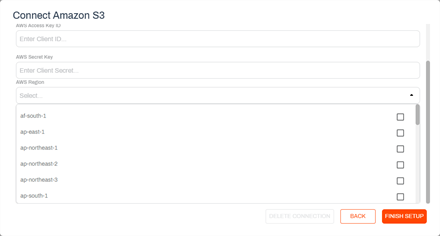
Admin: The storage configuration for Amazon S3, Wasabi and WorkDocs now displays the AWS Region field as a drop-down, simplifying the configuration process for admins.
-
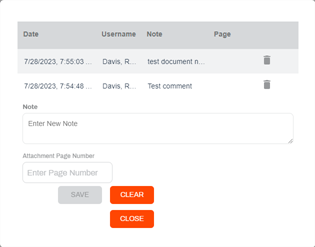
Document Viewer: If a user has the appropriate permissions, they can now delete document notes from a document.
- Workflow:
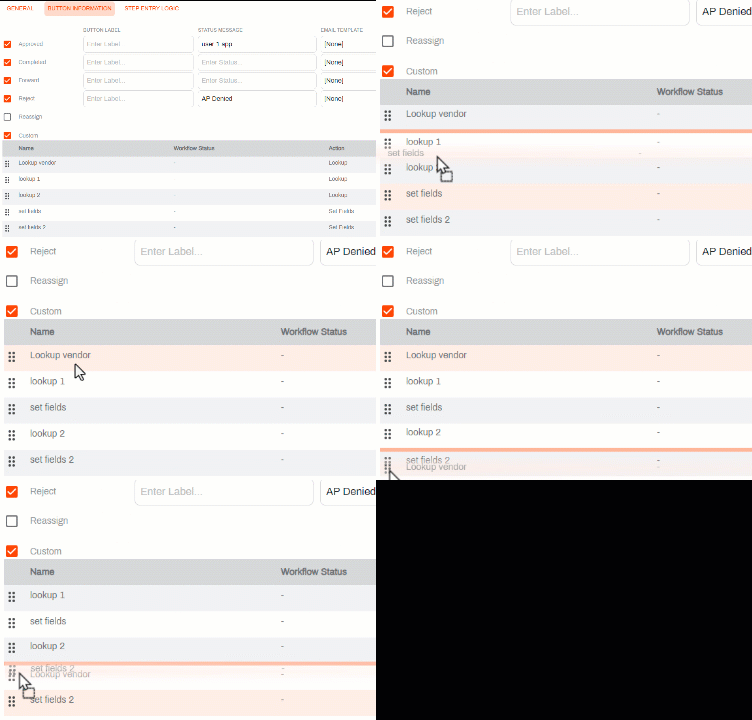
Custom buttons can now be ordered using drag and drop functionality. Users can change the order simply by dragging a field to a new location in the list..
Users can now delete status notification for workflows with inactivity while in a specific status.
-
Workspace: When opening a document in Workspace, workflow custom buttons are listed in the order they were arranged when configuring the workspace.
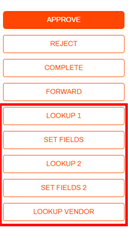
- Capture: The Advanced Image Processing modal has a new section title AIP Type. The default option is Basic AIP; the Add Image Processes drop-down continues to function as normal. The Textract option applies to new functionality that's coming and is not yet ready for use. More details coming soon.
-
General: The actions menu has a new Open in New Browser Tab option. Select one or more documents and choose this new option from the Action menu to open each document in its own browser tab. The display name of the document is displayed as the tab title.
If you have pop-up blocker enabled on your browser you must update the settings to allow pop-ups from your Vasion Automate Pro instance URL.
Fixes
- Document notes now display in rejected email messages using a custom email template — MAXX-8714.
- The document settings page no longer displays the Role column under signing options when the document is not using a signature template — MAXX-8716.
- When using a custom button to start a signature workflow that uses a signature template, now all the signer roles configured receive a notification email — MAXX-8737.
- Checkbox Object fields added to PDF Forms now display correctly when completing the form — MAXX-8743.
July 17, 2023
Version 01.1.55.20230717
New Feature Overview
- Document Viewer: The Generate PDF button no longer displays in the toolbar. Any customers that require that functionality can contact support@vasion.com for assistance.
- Capture: The OCR engine has been updated to run the latest 64-bit version for improved performance.
Fixes
- After burning annotations, documents now open without any issues — MAXX-8664.
- XML Import functionality has been updated to avoid importing records multiple times — MAXX-8713.
- Resolved the issue that caused drop-downs configured for multiple values to lock and not allow additional selections — MAXX-8727.
July 3, 2023
Version 01.1.51.20230703
New Feature Overview
- Document Viewer:
- There is now a new button in the document bar to view workflow comments. The button also displays a badge with a number to quickly see if there are any comments.
The Workflow History button badge has been removed.

- Workflow:
- Step entry logic now supports the ability to use different fields for step entry logic parameters. With this change the logic can be configured to check any field in any order.
- Users can now create a workflow without adding any steps. When no steps are added, the workflow automatically completes and sends out an email notification, if configured.
- Forms: When you have a form with duplicate order fields and the object field has input formatting restrictions, the validation message only displays below the editable object field.
Fixes
- Signature workflow notification emails that use a Completed /Rejected email template now display all the components (email subject email body, object data) appropriately as configured in the templates — MAXX-8646.
- Workflow notifications functionality now works as expected when it is configured — MAXX-8670.
- When using a lookup to populate a date field with a document template, the document now displays the correct date format — MAXX-8684.
- Resolved the issue that caused the Outlook Add-in button to be disabled — MAXX-8691.
- When using a drop-down field in a data grid, the drop-down now displays all the options correctly — MAXX-8704.
- Resolved the issue that caused the side navigation bar to disappear — MAXX-8706.
- Running a lookup after filling out object fields when starting a workflow that requires a file upload no longer clears the values selected in drop-down fields — MAXX-8710.
June 20, 2023
Version 01.1.50.20230620
New Feature Overview
- Storage security improvements.
Fixes
- The Data Import automation now supports delimiters other than the comma character "," in the import file, allowing for the use of the pipe character "|" in the import file. The Data Import automation displays the delimiter character correctly when opening a previously configured automation — MAXX-8644, MAXX-8645.
- When using Add Pages, users now see the processing moving dots while adding or replacing a page in the document and the Upload button is disabled while the system is running the process — MAXX-8659.
- Completed signature workflows are no longer still displaying in the Pending list of the My Requests section of Workspace and it now shows in the Completed list — MAXX-8667.
- When custom folder views are applied to Workspace, the My Requests section no longer displays incorrect information in the columns — MAXX-8669.
- When viewing an existing Data Import configuration, users can now see the name of the table, the file format and delimiter configured for the automation — MAXX-8674.
- User no longer needs to exit the last zone to enable the Complete button when using the Signature app on a regular screen — MAXX-8675.
- When a user is completing a document on a mobile device, the workflow buttons panel only displays after the last field has been completed — MAXX-8676.
- Existing documents linked to a document in a current workflow stay in their current folder location and no longer take the workflow status of the document they were linked to — MAXX-8686.
-
Users can now create and edit AIP templates interchangeably on both thick and web clients. — MAXX-8687.
Changes made in the thick client can be viewed immediately in the thick client but may take 30 minutes to display on the web due to system caching.
- XML Import automation now processes the file properly regardless of the case used in the extension file name — MAXX-8689.
- When configuring or editing a Content Move automation, the destination folder cannot be the same as the original folder — MAXX-8690.
- When using a search, Using the [Enter] key after entering search criteria now submits the search parameters and returns search results — MAXX-8696.
- Using the Micrsoft Add In to send a form to Workflow or Storage no longer results in a data error — MAXX-8700.
- Signature documents are now routed to the correct folder location when a workflow is initiated by a custom button after completing a previous workflow — MAXX-8701.
June 5, 2023
Version 01.1.38.20230605
New Feature Overview
-
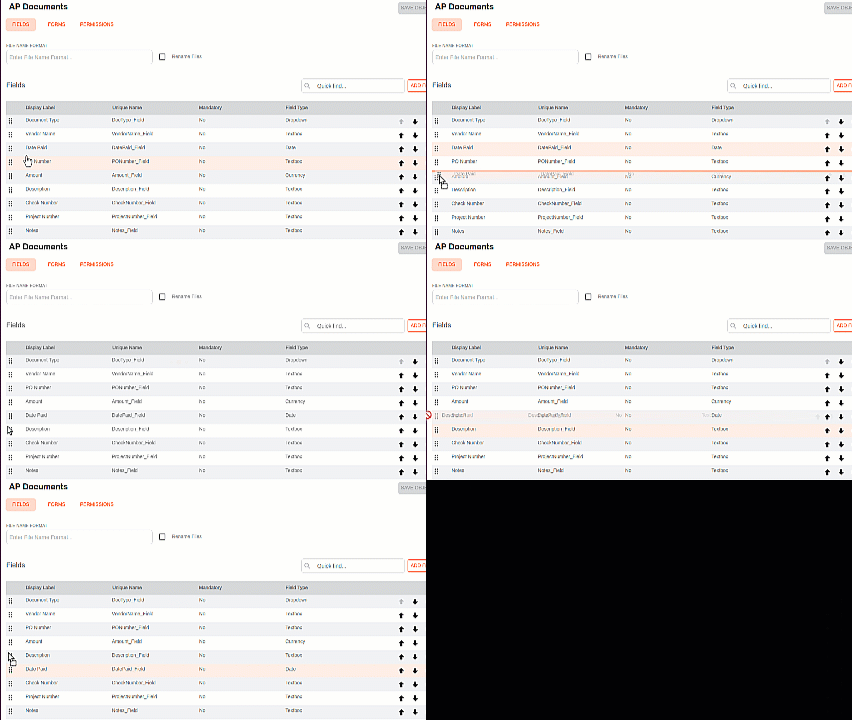
Objects: Users can now quickly drag and drop fields to change the order.
-
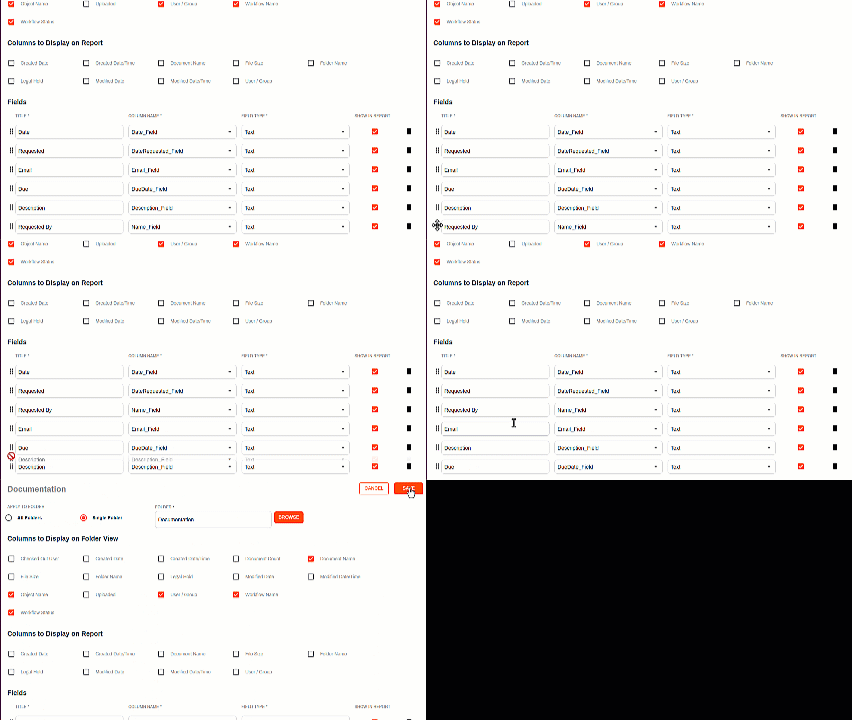
Admin: Users can also drag and drop fields to adjust the display of custom folder views. The user must select Save after adjusting the field order.
-
Document Viewer: When viewing a document, now the document info bar displays a badge and a number next to the notes, attachments and workflow history icons to indicate if there are any existing notes, attachments or changes to the workflow for the current document.

Fixes
- Salesforce configuration now works properly and users can configure a Salesforce integration in the Amin app — MAXX-8585.
- An error now displays if a Salesforce integration is missing or a sync is unsuccessful when configuring a Salesforce Lookup — MAXX-8586.
- The Workflow Due Date field no longer displays when viewing a document from Storage or Search Results if the field is configured as Hidden and Read Only in the object — MAXX-8654.
- When using Print to Vasion and there are multiple object field drop-downs, the first drop down value disappears from the screen if the user searches and selects a value from a different drop-down. The value selection is still respected and saved even though the field display is blank. The issue that caused the selection to not be saved has been resolved — MAXX-8668.
- When using Print to Vasion from Chrome, users now receive a message if the Chrome setting "Open PDFs in Chrome" needs to be enabled. this setting is required when using Chrome — MAXX-8678.
- Custom button set to Signature Template option and configured to complete a workflow now sends the completed email notification correctly to the requestor — MAXX-8679.
- When adding a viewer to a Signature Template configuration, the viewer's name and email address are now saved correctly — MAXX-8682.
- Users can now edit a zone in document templates that contain multiple zones, and the unedited zones are no longer resized or removed when the document template is saved — MAXX-8685.
May 22, 2023
Version 01.1.28.20230522
New Feature Overview
-
Thumbnail Manager: The functionality has been enhanced so users can now split documents within the manager. Users can mark one or more pages as the first page of a new document to split the existing document. Additionally, when a page is selected for deletion, a user can now select Restore Page to unselect it.
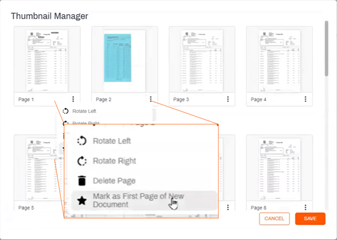
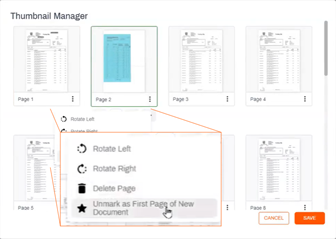
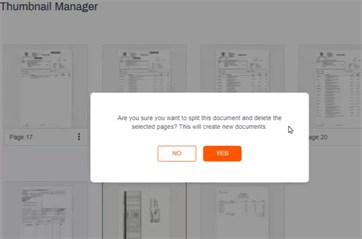
When you use Thumbnail manager to split documents, the object data is not applied to the new documents. Look for this enhancement coming soon.
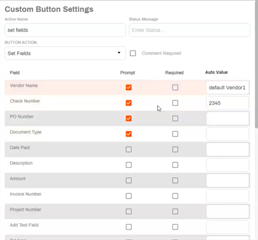
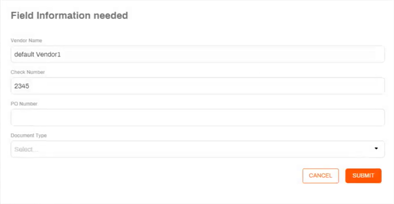
- Workflow: When using a Set Fields custom button, the button can now be configured to display a suggested default value by setting it in the Auto Value field of the button configuration.
- When the Prompt box is checked, the user can override the default value set for that field.
When the Prompt box is not checked, the text in the Auto Value becomes a static value in the object field and the user is not prompted to change it.
- Logging improvements including enhancements for automations.
Fixes
- PDF files with large images no longer cause Vasion Automate Pro to crash and a message is presented if the file is corrupted — MAXX-8634.
- Workflow documents configured with a custom Reject button that terminate a workflow and move the document into a storage folder can now be accessed by users with the appropriate permissions — MAXX-8638.
- Custom status messages used with standard Approve and Reject buttons now display appropriately in Workspace — MAXX-8639.
- Workflow steps without active documents can now be deleted — MAXX-8665.
- Text fields added to a signature document are now required and the signer must enter text to complete the document. Spaces or empty returns are not allowed — MAXX-8675.
- When signing a document on a mobile device, the workflow option field panel (Complete / Reject, Comments, etc.) only displays after all the fields assigned to the signer have been completed — MAXX-8676.
May 8, 2023
Version 01.1.27.20230508
New Feature Overview
- Document Viewer: Users with Document - Link Document Access can only delete linked files if they also have the Document - Delete permission.
- Storage: SharePoint is now a supported cloud provider.
- Upgrade installation improvements to allow updates to a specific Vasion instance while other instances are running on the same server.
- Logging updates.
Fixes
- Supervisors with the Terminate permission can now terminate a workflow that has been forwarded without receiving errors — MAXX-8629.
- The Cancel option now works properly ff a user selects the Merge Documents option and then decides the cancel the action — MAXX-8632.
- Custom folder view no longer allows two column titles with the same name but users can use a field multiple times, as long as the title name is different each time — MAXX-8633.
- Custom workflow statuses configured with standard button actions now display correctly in Workspace — MAXX-8639.
- Object searches configured to search data in objects that have shared fields now return results from all selected objects. — MAXX-8641.
- Now, the Update button gets enabled when the Customer Folder View option is updated in a saved object search — MAXX-8642.
- XML Import no longer fails if a file with the same existed in the Failed folder — MAXX-8652.
April 24, 2023
Version 01.1.24.20230424
New Feature Overview
-
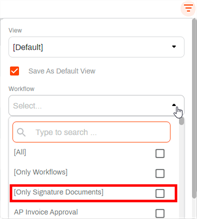
Document Viewer: A new Signature workflow filter option is now available. When this filter is applied, only signature workflows are displayed in the list.
- Upgrade installation improvements.
Fixes
- Even pages are no longer missing when using the Split Document function and saving the file as TIFF — MAXX-8616.
- A submitter no longer receives multiple emails when submitting a form that is assigned to a group when the Send Email When Entering Step is selected in the first step — MAXX-8621.
- Dropdown and radio button fields now work correctly in a form that starts a workflow that uses custom buttons — MAXX-8627.
- Print driver setting windows no longer gets pushed behind other windows when using the Close button — MAXX-8631.
April 10, 2023
Version 01.1.23.20230410
New Feature Overview
- Workflow: If a Lookup custom action button generates multiple results, users are now presented the option to select which record to apply to the workflow.
- Document View: Users now require the Document -Delete role to be able to delete linked documents.
- Forms display improvements.
March 27, 2023
Version 01.1.22.20230327
New Feature Overview
-
Automation: XML Imports now support 3rd party cloud storage.
Folder paths are not currently supported when configuring an XML import.The documents and XML files must be in the same folder.
-
Workflow: A new workflow step initiation lookup is now available for document workflows. Users can now configure a lookup to run automatically when entering a workflow step.
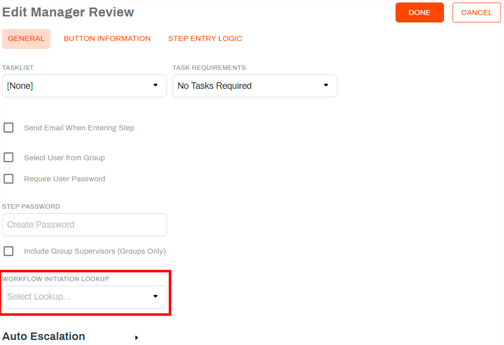
This type of lookup is not recommended if you expect multiple results. Currently a lookup returns multiple results, the first result is applied to the step and there is no way for a user to select any other result.
- Admin: The Feature Flags configuration is now under System Settings.
- Document View
It's now easier to view documents with multiple attachments. When users open an attachment and then use the Back button
 they are now returned to the Attachments modal where they can select another attachment to view.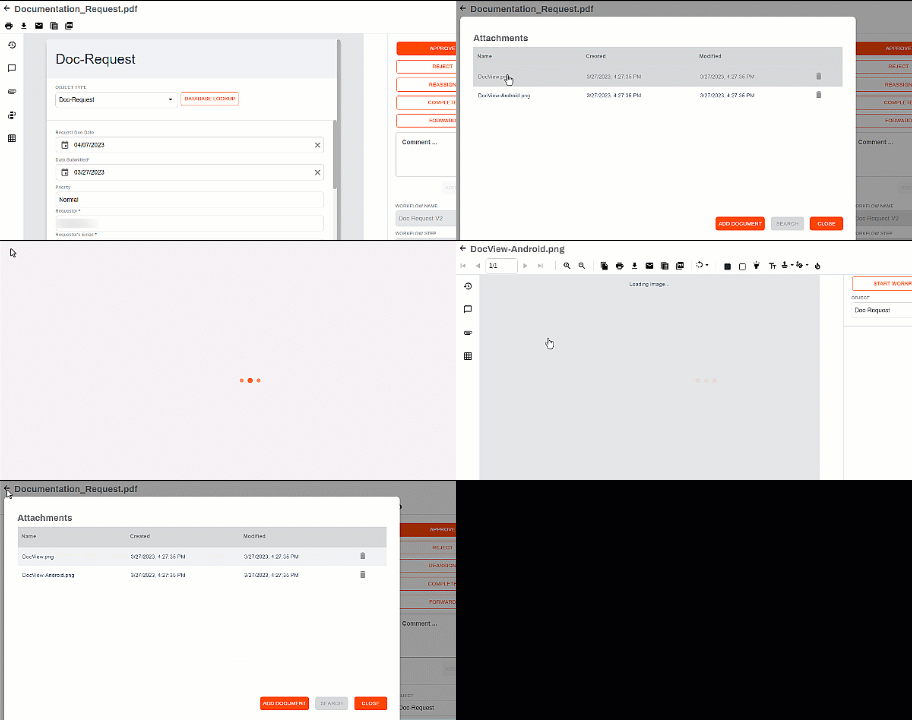
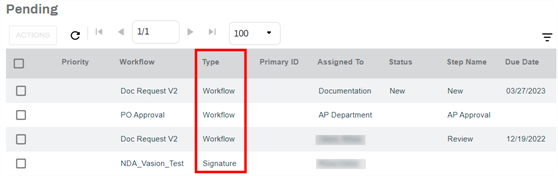
When attaching a file to an existing document with object data, the data is now inherited for the attached file. The Type column indicates the type of workflow for each item listed.
-
Forms: The Database Lookup drop-down in a form settings only displays any lookups configured for the current object. If the object has no lookups no options display.
-
Workspace: Now signature workflows initiated by the current user display under the My Requests section of a user's workspace. Depending on the status, they display in the Pending or Completed sections.
- Error / warning messages now display until the user closes the message with the Close button
 .
. - Office Add-ins installation improvements.
- Cloud storage security improvements.
Fixes
- If a subfolder is associated with a form and a user attempts to delete the folder, an error message displays to alert the user why the folder cannot be deleted — MAXX-8557.
- Email notifications using a custom button with the Reject action now include the appropriate workflow status in the email subject and body — MAXX-8596.
- Forms that are configured with the Generate Form PDF option selected without using a document template and have lookups configured and have the Show Lookup Button option, the lookup runs when the user selects the button. If lookups are configured for without the Show Lookup Button, the lookups run automatically when the form is submitted and then the PDF is generated — MAXX-8601.
- Error message reported on some workflows no longer occurs when rejecting a file that is already in the destination — MAXX-8610.
- Scan to Vasion now displays all scanned pages appropriately — MAXX-8611.
- The issue that required a user to assign a zone to a signature template used with a form configured with the Requires User Signature option even though the signature has been mapped correctly is now resolved — MAXX-8613.
- Tasklists are now assigned and saved correctly to a workflow — MAXX-8614.
- Global Search configuration now saves correctly and does not require a customized folder view — MAXX-8615.
March 15, 2023
Version 01.1.21.20230315
New Feature Overview
- Signature: The following zones types now have default size. When a user select the zone type and clicks on the document, the zone is automatically placed and sized, and the user can re-size the zone as necessary.
- Signature
- Text
Date
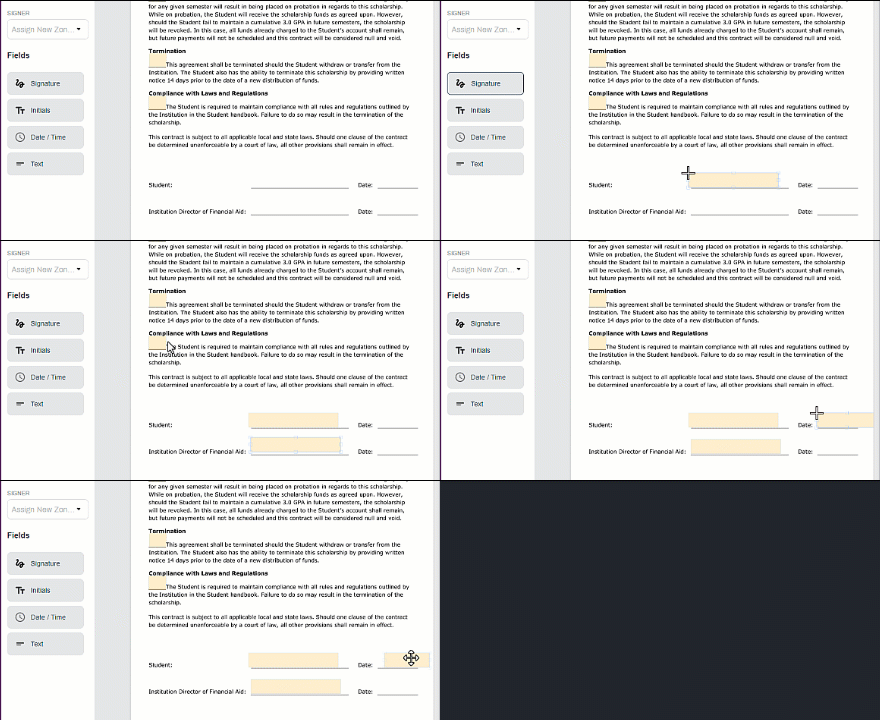
If the user clicks and drags the zone to a custom size, the system uses the user-created size as the default size for similar zones placed in the document. The custom size resets back to the default with each new document.
- Workflow:
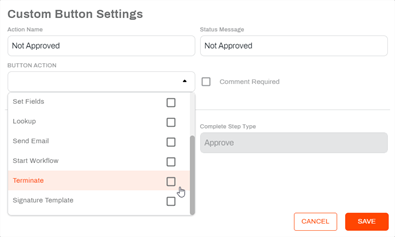
Custom Button Settings has a new Terminate action.
In step entry logic, we added the following comparison values:
Not Equals
Empty
Not Empty
Does Not Contain
-
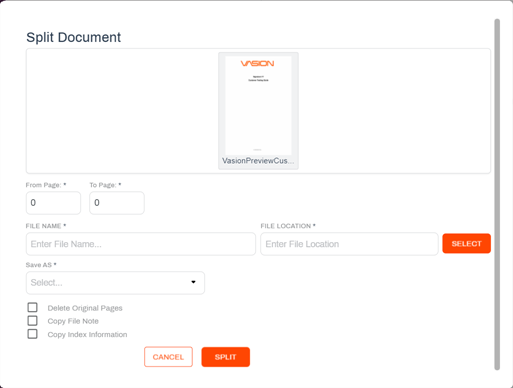
Storage: A new Split Document option is now available from the Actions drop-down for users to create a new PDF or TIFF document by selecting specific pages from a stored document.
- Office Addins installation improvements.
- Logging improvements.
Fixes
- When trying to merge two files with different formats that include a .jpg file for PDF output, the system now displays an error message to let the user know the files cannot be merged — MAXX-8587.
- Users no longer need the Admin - Configure Capture Profile role assigned to access the capture profiles. With the Document - Scan role assigned, they can now see all available capture profiles and profiles assigned to them or their group — MAXX-8592.
February 27, 2023
Version 01.1.19.20230227
New Feature Overview
-
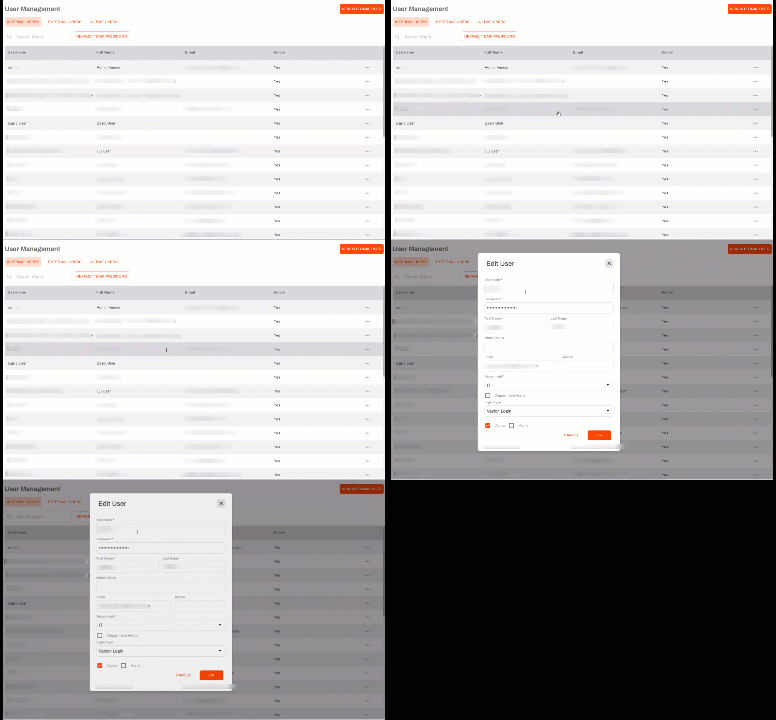
The Edit action has been standardized in all the tables so that users can make edits with just one click, when applicable.
-
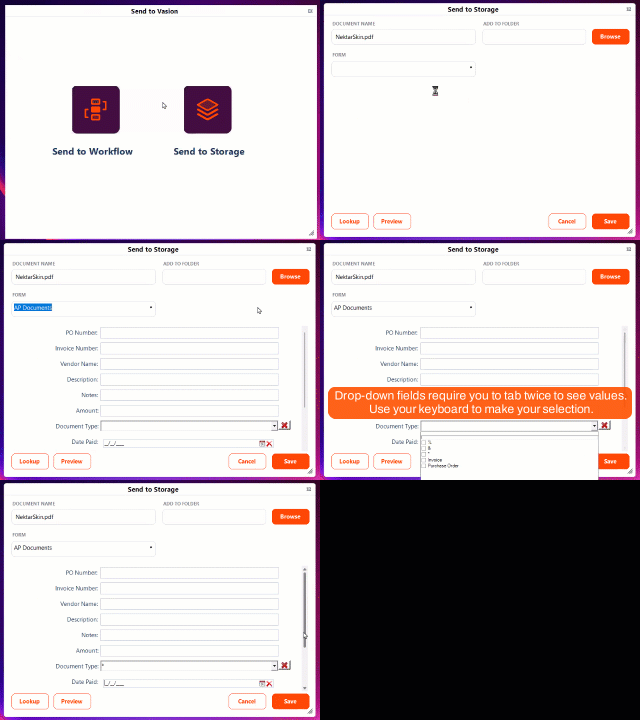
Send to Vasion:Users can now tab through the Send to Storage or Send to Workflow interface to enter and save the object field data.
- Workflows: A new Add to Single Workflow option is now available in the Add to Workflow automation. By default this selection is checked and you can add the document to a single workflow.
- Forms: Users can now assign multiple lookups to a form. When multiple lookups are configured, the lookups run in the order they're added to the form. If one of the lookups returns multiple responses, the user can select the option they want to apply to the form.
- Improvements to Vasion DCT.
Fixes
- Report field now display properly after updating and saving the field order — MAXX-8568.
- Improvements to Print to Vasion to resolve WP macro issues — MAXX-8571.
- Workflows configured with parallel steps that are each assigned to a group no longer get an error and can now access the document to approve it — MAXX-8573.
- Improvements to the installation files to address issues with image recognition — MAXX-8577.
- Field filters now work properly on forms that use the column layout to display the field filter and filtered values — MAXX-8580.
- When configuring XML Import automations running from an external source non-UNC A standard for identifying servers, printers and other resources in a network. A UNC path uses double slashes or backslashes to precede the name of the computer. paths are no longer allowed — MAXX-8575.
February 14, 2023
Version 01.1.18.20230214
New Feature Overview
- Signature:
There is now a default size for the Initals zone. A user now only has to select Initials and click on the spot where they want to place the zone. The zone is automatically placed and sized.
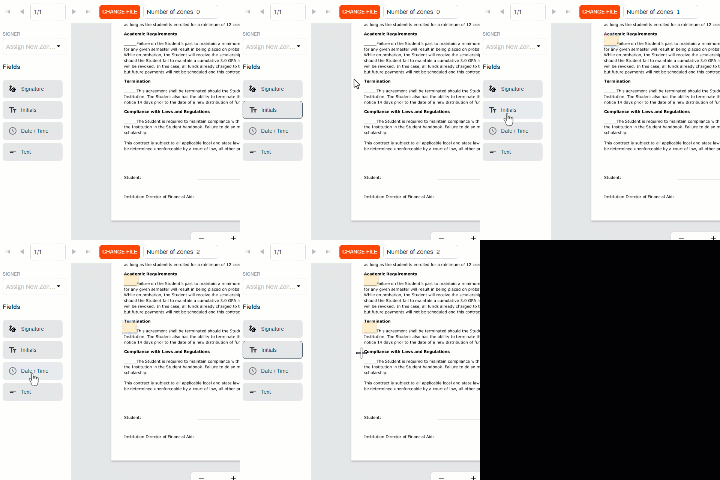
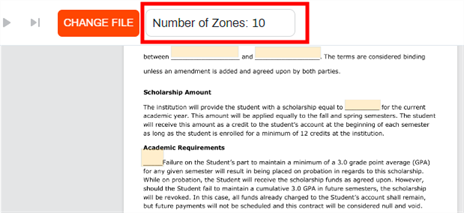
Users can now see the total number of zones added to the document across all pages when sending out a document for signature or configuring a template.
-
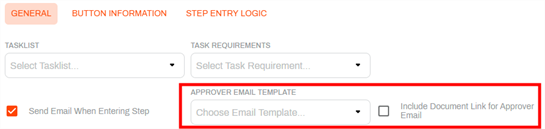
Workflows: Users can now select a specific email template to send when a workflow step is configured with the Send Email When Entering Step option. This new option sends the specified email to the approver.
- Forms:
- Users can now configure the allowed file attachment options on a form:
- Attachment size limit
Allowed file type:
- CSV
- DOC
- DOCX
- JPEG
- TIF
- TIFF
- TXT
- Custom
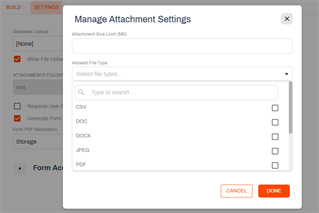
The user can allow uploads of multiple file types by checking the box next to each type.
- Form settings now have the following updates:
- The Destination Folder option only displays if the Generate Form PDF option is checked and the PDF destination is Storage.
- When the Generate Form PDF is checked users can now select either Storage or Workflow for the PDF destination:
When Storage is selected, the user can select a destination folder.

When Workflow is selected, the user can select which workflow should be assigned.

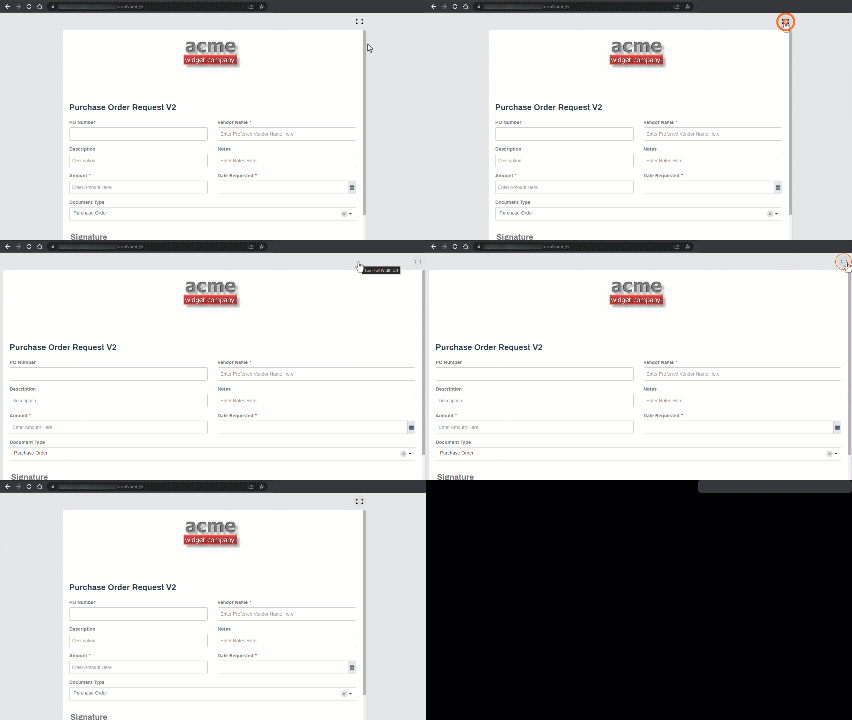
A user can now adjust the width of a form display to the full available screen by selecting the full screen button
 displayed at the top of the page. The button only displays on large screens and can be toggled on or off. The button is visible in when signed in to Vasion Automate Pro and in public forms.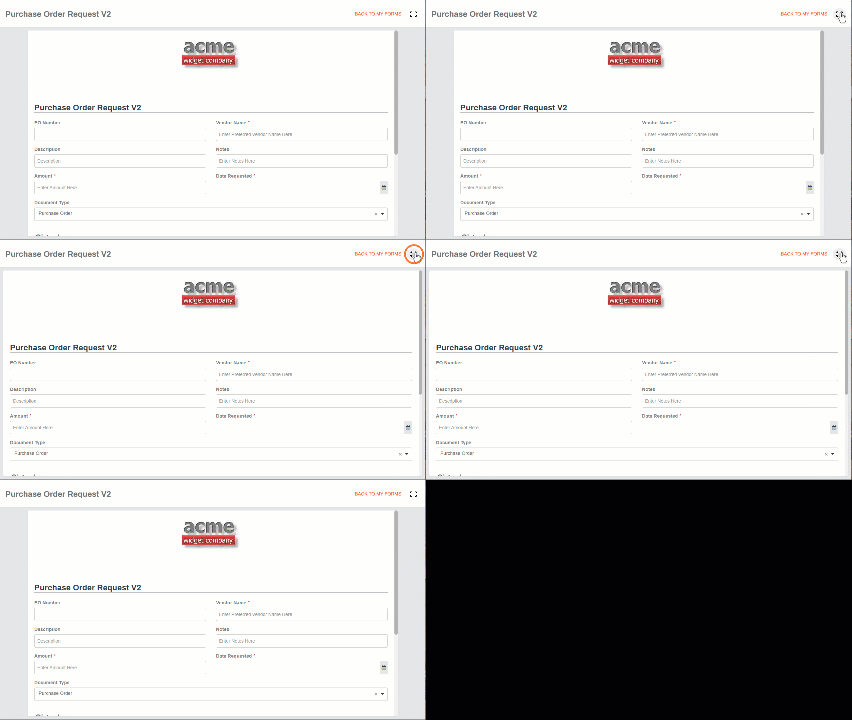
- Users can now configure the allowed file attachment options on a form:
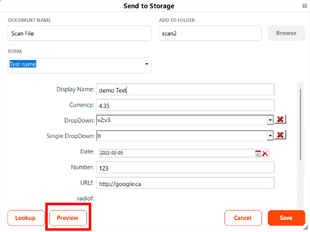
- Send to Vasion:
A new Preview button is now available. When selected, users can see a preview of their document before it's sent to a workflow or storage.
- Installation and WIA profile improvements.
- Error message improvement to explain that a workflow with history cannot be deleted.
- Improvements to Vasion DCT.
- Installation improvements for Office Add-ins.
- Security improvements.
Fixes
- Dates entered on forms are now saved correctly— MAXX-8560.
- Printing a document no longer completely fills the drive space — MAXX-8567.
- When using the {Tab} key in Send to Vasion to enter data, the focus now goes to the Save button after completing the last field entry — MAXX-8581.
- Search for a document created using a document template from a form workflow now returns correct results — MAXX-8582.
January 30, 2023
Version 01.1.16.20230130
New Feature Overview
- Product improvements to Office Add-ins.
Fixes
- The email notification that is sent when the workflow moves to the next step after using a custom button now reflects the correct status assigned to the custom action in the notification subject line — MAX-8550.
- Dates entered into web forms are now saved and display correctly — MAXX-8560.
- The following issues with the Add Page function in the Document Viewer have been addressed:
- The number of pages and page location options no longer reset after selecting and uploading a file — MAXX-8564.
- The document upload no longer fails after adjusting the number of pages to the correct value — MAXX-8565
- The signature time stamp is no longer included if the Apply Timestamp to All Signatures is not checked. — MAXX-8558.
January 17, 2023
Version 01.1.1420230116
New Feature Overview
- Admin:
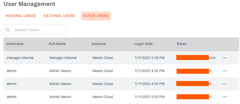
The User Management screen now displays a new Active Users tab that shows all users who are currently logged into the Vasion Automate Pro instance. The time shown under the Login Date is displayed in UTC time zone.
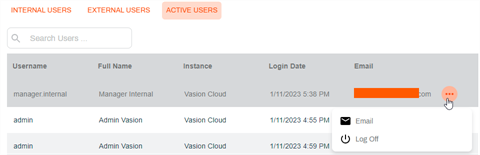
- When a user selects the More button
 the following options are available:
- Email — this option sends an email requesting that the user log off to make the license available for another user.
Log Off — this option logs off the selected user from the Vasion Automate Pro immediately.
- When a user selects the More button
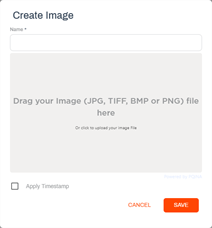
System Settings: There is a new Image Library option Once added, an image can then be applied to a document as a stamp in the Document Viewer,
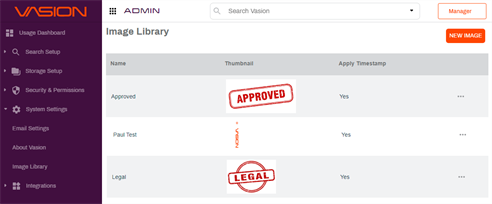
Users can add a new image
Update an existing image by editing the name or changing the image.
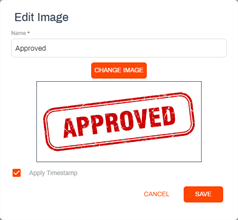
- There is also an option to apply a time stamp when the image is added to a document.
- Responsive design improvements for Signature workflows.
- Database improvements to prevent errors on object names that include a hyphen character "-".
- Product installation improvements.
Fixes
- Using the Search Existing Field filter no longer causes the Vasion instance to crash — MAX8540.
- Barcode processing with AIP functionality now runs properly and the documents process correctly — MAXX-8545.
- The error that occurs when trying to generate a report with an object that contains a hyphen in the name can be resolved by making some modifications in the database. For assistance with this issue contact product support at support@vasion.com — MAXX-8551.
- Linked Search configuration is now working properly — MAXX-8558.
January 4, 2023
Version 1.1.12.20230104
New Feature Overview
- Automation:
- In the Export automation, the Include Subfolders and Maintain Folder Structure feature from the last release now fully supports External Folders and Cloud Automation Only folders.
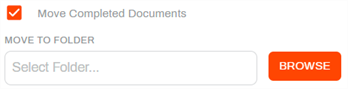
When running a Database Lookkup automation, users can now move the documents to a different folder once the lookup has completed.
-
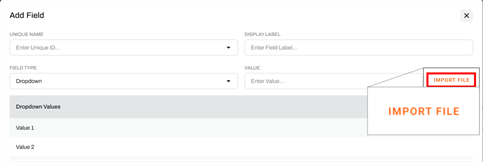
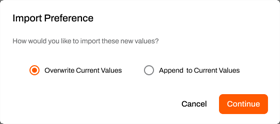
Forms: Users can now import a file list when creating or editing a Dropdown field type. The user can use a CSV file that contains the values, separated by commas, in one line to quickly create drop-down fields that have a large number of values. The user is given the option to override any current values if the field already exists.
- Document View: When viewing a document using the Data View and a drop-down field has a value with too many characters to display, a user can hover over the field to see the full value name.
- Vasion Suite update improvements and product improvements.
Fixes
- Users can now select the scanner source (feeder tray or glass scanner bed) when using Scan to Vasion functionality — MAXX-8537.
- Searching for negative values in a currency field using object searches now return the correct results — MAXX-8538.
- Users with the Supervisor role in a workflow can now access the workflow documents without errors — MAXX-8539.
December 19, 2022
New Feature Overview
- Forms:
- Now a user cannot delete an Object field if the field is in use by a document template to avoid document template issues.
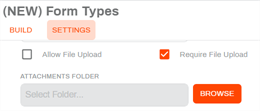
A new option is now available in the form builder settings to make file upload a requirement to submit the form. When the Allow File Upload or Require File Upload option is selected, the user can select the folder location to store the file. If no attachment folder destination is selected, the attachment is stored in the Destination folder.
- Workflow:
- When the Always Allow Access for Initiator option is checked, the initiator can access the form PDF, document template PDF and all attachments associated with the workflow they initiated even if they do not have access to the storage folder.
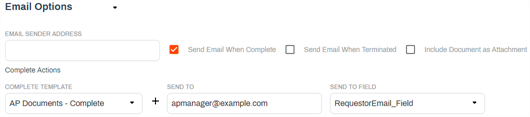
Users can now configure a workflow to send a completed email notification to a specific email address and to an email address from an object field. The email uses the selected email template and is sent separately to each configured email.
-
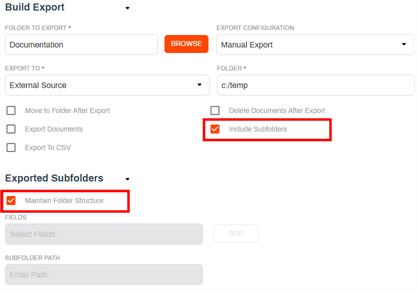
Automation: The Export automation now has a new option in the Build Export section to include subfolders. When this option is used, an additional option of Maintain Folder Structure is then available under the Exported Subfolders section.
- Scan to Vasion product improvements.
Fixes
- The Scan to Vasion window no longer minimizes when selecting items from combo boxes — MAXX-7609.
- In workflows where entry logic is configured with a Skip Step action, the workflow status displays the correct status if the step is skipped — MAXX-8411.
- Performance improvements to search results on secured documents — MAXX-8466.
- When associating an object type and adding data to a stored document in Data View the data now saves correctly — MAXX-8483.
- The More button now displays correctly in the Configure Lookups page on first page load — MAXX-8515.
- Users can now successfully add pages to a document in a current workflow from the Document View — MAXX-8250.
- Changes to document templates now save properly — MAXX-8521.
- Database lookup now populates data into drop-down fields configured to allow multiple values when the lookup is done when starting a workflow or when using Data View after the workflow has started — MAXX-8523.
- Users can now successfully drag and drop non-PDF/TIFF files into Vasion Editor — MAXX-8524.
- Scan to Vasion improvements to better integrate with Vasion Editor — MAXX-8525.
- Hidden fields no longer display in Vasion Editor — MAXX-8527.
- Vasion Editor and Send to Vasion now respect windows regional settings for date formats — MAXX-8529.
- When a workflow is complete and a document template is generated, the system no longer returns an error if non-required object fields are left blank — MAXX-8531.
- Number format is now applied correctly when submitting a workflow using a custom action button — MAXX-8534.
- Form drop-downs now display properly when placed inside column layouts — PI-44470.
December 7, 2022
New Feature Overview
- Scan to Vasion: Negative values entered in currency formatted fields now display with a negative sign in front of the value instead of using parenthesis (accounting formatting).
- Capture: Scan to Vasion now supports WIA functionality. Users can select from the drop-down WIA or TWAIN and when they select the Scanner button
 they can set up the scanner configuration.
 - Signature:
- Users can now create a new signature template by copying an existing template.
- Users can now update a template file, in Signature Templates and when sending a new document, with a new version of the document without having to replace the existing zones, as long at the new template file has the same dimensions.
- Users can now associate an email template to use when a document is recalled.
-
Storage: The new Default Object configuration functionality is now available. Once a default object is configured, every time a new document is uploaded to that parent folder, or any of its subfolders, a modal with the object data fields displays so the user can enter data to associate with the document.

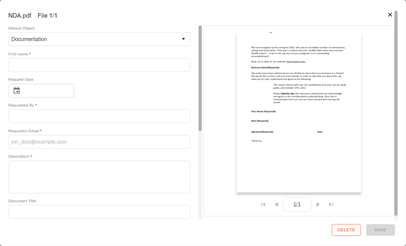
Fixes
- In Document View, the Permanent Rotate functionality now works properly — MAXX-8459.
- When a drop-down field is added at the bottom of a form, it no longer overlaps with the Submit button — MAXX–8475.
- Scan to Vasion feature improvement referenced above resolved the issue of scanner connectivity when selecting the Scanner button — MAXX-8500.
- When configuring a new object field, the Label Name field no longer disappears when changing the selection from an existing field back to <New field> — MAXX-8509.
November 22, 2022
New Feature Overview
- Forms: When entering drop-down values, you can no longer enter values that start with a space.
- Workflow: Users who are assigned the Supervisor role in a workflow can now save comments to the workflow.
-
Storage: A new Default Object option is now available when configuring parent folders.
This update is part of upcoming new functionality. More details coming soon.
Fixes
- When adding Checkbox, Dropdown and Radio Button object fields to a form the form now displays the object values correctly — MAXX–8410.
- When a workflow is forwarded or reassigning the status now displays correctly — MAXX-8417.
- Inactive workflow email reminders no longer send when the Enable Status Notifications reminder is unchecked — MAXX-8421.
- When text alignment is configured in the content component with multiple lines of text in Form Builder the preview now displays as set — MAXX-8428, MAXX-8449.
- Fixed the display issue with the column component at low screen resolution — MAXX-8434.
- Now unchecking the Allow Multiple Values option in drop-down fields now saves properly and users cannot select multiple values when completing the form — MAXX-8451.
- Blank lines inserted above text in a text box configured in a form now display correctly — MAXX-8453.
- Signatures no longer overlap the time stamp when users choose to draw their signature or initials — MAXX-8457.
- Fixed the issue that resulted in text fields not displaying the information entered when the signature workflow is complete — MAXX-8470.
- When attempting to delete documents created by a signature template workflow no longer result in an error message. The document can be deleted or an error message displays to let the user know why the document cannot be deleted — MAXX-8471.
- Apps no longer disappear from the home page when a user logs in using Single Sign On option — MAXX-8482.
- On forms with conditional logic for page display, the Signature component and Submit button now display on the last page of a multi-page form regardless of what is configured as the last page — MAXX-8485.
- The OCR and Barcode Recognition options no longer display in the document Actions menu if the user does not have the appropriate permissions — MAXX-8493.
- Changing the Complete Step if No Criteria is Met option in a workflow step entry logic is saved correctly the first time — MAXX-8502.
- PDFs created by a form that has content component text configured now display the component text — MAXX-8405.
- When a form has the Allow For Public Access enabled, filter values now display correctly — MAXX-8506.
- Fixed the issue with that resulted in users not able to use the Lookup Field drop-down to select a lookup in a document template has been fixed — MAXX-8507.
November 08, 2022
New Feature Overview
- Workflow:
- There are now two new permissions that can be applied to workflow users or groups:
- Supervisor — when assigned this permission, the user see all workflows currently in process in their Workspace. They can open a specific workflow and view the details but cannot approve or complete the workflow if they're not an assignee.
- Editor — when assigned this permission, the user can edit the workflow.
- The Permissions page has been to accommodate the new permissions settings and now it displays the list of users on the left and the permission check boxes in columns on the right. For details see Workflow Permissions.
- There are now two new permissions that can be applied to workflow users or groups:
- Templates:
- A new Copy option is now available so users can create a new document template by copying an existing one. For more details, seeCopy an Existing Document Template.
- Users can now update a template file with a new version of the document without having to replace the existing zones, as long at the new template file has the same dimensions. For details see Change a Template File.
- Workspace: Improvements to the look and feel of the Start a Workflow wizard to improve user experience across all devices.
- Automation:
- The automation page for each job now displays a new Last run Date/Time column so the Vasion administrator can easily see the last time the job ran successfully.
- Logging improvements to scheduler.
- Security improvements.
Fixes
- Signature and date applied by a form workflow are now saved and burned to documents — MAXX–8444.
- Filters now display the correct options selected during the workflow when using Data View and Document View— MAXX-8450.
- Number fields now display as a criteria option when configured in an Object search — MAXX-8463.
- Full Text Search on large documents now displays the document correctly when selecting the View Hits option once — MAXX-8469.
- The Object Search modal now displays drop-down options correctly when the only criteria is one drop-down field — MAXX-8472.
- Creating a PDF from an object with a text area fields that contains large number of characters in multiple rows now displays the text area field correctly — MAXX-8473.
- Now when you update the form header image the Save button displays correctly, even if nothing else in the form was changed — MAXX-8487.
- Notification emails configured to be sent when entering a step now send correctly on the first step of a workflow — PI-36943.
October 27, 2022
New Feature Overview
- Workflow: The system Workflow folder can no longer be edited so that workflow and signature workflow functionality are not negatively affected.
- Objects: Number fields have two new configuration options: Show Decimal Places and Show Comma. The formatting is displayed in the Document Viewer, Data View, Search Results and Storage Views. Any documents generated from templates will also display the formatting. For details see Number field.
- Signature: Users can now delete participants added in the Signing Options section of a signature document or signature template.
- Security improvements.
Fixes
- Functionality that was broken when the Workflow folder was edited has been addressed by the feature update that no longer allows users to update the folder — MAXX–8458, MAXX-8461.
- Multiple notification emails are no longer sent to the initiator when a workflow is rejected — MAXX-8467.
October 17, 2022
New Feature Overview
- Admin: When setting up custom folder views, an admin can now select a column to sort the view from one of the fields selected for the view.
- Document Viewer: Improvements for better display of documents when using mobile devices.
- Forms: Improved the display of breadcrumbs displayed in multiple page forms to be consistent with the rest of the form layout.
- Update and Send to Vasion update MSI improvements.
Fixes
- Vasion Editor no longer returns an error when trying to edit Setting or Annotation preferences — MAXX‑8384.
- Date column now displays correctly when there are many columns selected in the custom folder view — MAXX–8436.
- When using Send to Vasion, field masks configured in the thick client for SSN fields now display properly — MAXX-8441.
- Import automation configured to split and index documents using a barcode now functions properly— MAXX-8445.
October 3, 2022
New Feature Overview
- General: Side navigation has been improved so that users can hover over names that get truncated due to character length and see the full name of the item.
- Signature:
- Signature zones are now restricted to the document page and cannot be configured or dragged off the page.
- When configuring a document or template to send for signature the Signing Options section is now expanded by default.
- Storage:
- Folders with long names no longer display out of alignment and the display reflects the correct folder tree hierarchy.
- Users can now hover over a folder on the left side navigation to see the full name.
- Forms
- PDF generated forms that include columns and grids now match the form display layout.
- Users can now hover over an object or form on the left side navigation to see the full name.
- Admin:
- A new About Vasion option now displays the various components version numbers and associated release dates.
- The Admin - Index Forms role has been updated to Admin - Objects.
- Document Viewer: For users with the Version Control role assigned, a new button now displays in the tool bar that lets the user quickly create a new version of the selected document.
- Improvements to Office Add-Ins so that access by the same user no longer consumes multiple licenses.
- Vasion Dynamics improvements.
- Scan to Vasion upgrade improvements.
Fixes
- Selecting the link to approve a workflow no longer results in a "not found" error — MAXX‑8388.
- Additional characters that were displaying in object data after XML Imports no longer display when viewing data — MAXX–8392.
- OCR processes scheduled and run using Vasion Automation now run appropriately — MAXX-8413.
- Now when a workflow is rejected, the workflow status is updated to the appropriate status — MAXX-8416.
- When using the Set Fields option in Custom Button Settings on a workflow, the Submit button now displays correctly during the workflow step — MAXX-8431.
- A workflow now respects the Required setting on a custom Set Fields custom button — MAXX-8432.
September 19, 2022
New Feature Overview
- Workspace:
- The button to enter comments in a workflow has been renamed Add Comment.
- Text entered in the comment box in a workflow are now saved automatically when the user selects a workflow action before using the Add Comment button.
- Forms: Users can now build forms that contain multiple pages. This new functionality allows for the creating of a form with multiple pages so that objects that collect large amounts of data can have a user-friendly display of the form fields and can generate multiple page PDFs for better readability.
- A new Form Type drop-down is now available with the following options:
- Form — creates a single-page form
- Wizard — creates a multiple page form. When this option is selected a +Page button displays so the user can add as many pages as needed.
- The form displays an image, the form name, and the form description on every page.
- Forms created using the Wizard option and configured with the Requires User Signature option display the signature component on the last page of the form.
- A new Form Type drop-down is now available with the following options:
Fixes
- Documents with barcodes rotated by 90 degrees now scan and index properly — MAXX‑8345.
- Now when the Use Barcode Value as Name and the Use Barcode Splitter options are selected on an Import automation, the file is split and the new documents are saved with the correct names — MAXX–8405
- An error message now displays if there is an problem importing LDAP users — MAXX-8418.
- Copying a form no longer results in missing elements or lost data when submitting a form — MAXX-8422.
September 6, 2022
New Feature Overview
- Storage: Now when browsing a folder, the total number of files and folders that the user has permission to view at the current folder level.
- Templates: Document templates has a new option for text fields that lets the user set right-alignment to the text entered into the field.
- Admin - User Management: A new option to create Department Admin users is now available.
The Create User and Edit User modal have been updated so that Vasion admins can add a new department if it doesn't currently exists in Vasion.
Only Vasion system administrators can add departments. Department Admin users cannot create or delete departments.
- Reports: A new report under the User section called Department Admin which shows a list of current users who are configured as department admins.
- Data Import logging improvements.
- ISSI integration improvements.
Fixes
- On workflows that have the Exit Workflow on Reject option selected, the comment entered if the workflow is rejected at the last step now saves properly — MAXX-8391.
- Lookups that use "Created By" as criteria for the lookup now return values properly — MAXX-8414.
- In workflow, when using the Forward option on a custom button the workflow status now updates properly — MAXX-8415.
August 22, 2022
New Feature Overview
- Document Views: In Document View, Data View and Field Validation, drop-down fields display has been updated to show a check box to the right of the value option whether the field is set to Allow Multiple Values or not.
- Automation: The Export automation now includes two new options when exporting data to a CSV file.
- Export all Object Data — this option creates a separate CSV file for each object data that is exported. If data is not associated with an object, the one file is created with basic data.
- Export Object Data based on Folder View — this option creates one CSV file with all the fields and data that is visible in the custom folder view selected.
- Forms: Updates to the following form builder components:
- The file upload component named File has been removed, as it is not supported in Vasion.
- When adding the currency component to a form, the currency defaults to US dollars.
- Calculated Values option is now always available for number and currency fields. This option uses javascript to calculate values. For assistance with calculated fields contact product support at support@vasion.com.
- Admin - User Management: Security improvements.
Fixes
- When editing Step Entry Logic in an existing workflow, the Parameter Field and Value Type fields now load properly and if selecting the Equal "=" comparison value, only the field in which to input the value displays — MAXX‑8274.
- Users can now sign in to Send to Vasion using their SAML Login without any issues— MAXX-8391.
- Users can now sort by Created Date/Time field in custom folder views — MAXX-8401.
August 8, 2022
New Feature Overview
- Forms:
- Improvements to increase the number of object fields.
- Forms that include the Requires User Signature, now display a field where the user can specify a custom label to display above the field. If the Generate Form PDF option is also selected, the custom label displays in front of the signature.
- For forms that include the Requires User Signature and Generate Form PDF options, a line that extends under the date and time field stamp are included with the signature on the PDF.
- The Apply Timestamp to Your Signature check box has been removed from a form that includes the Requires User Signature option as now the date and time field stamp are automatically included in all submitted forms.
- Signature: Users can now send documents for signature using an email alias.
Fixes
- Workflow initiators can now access attachments to the workflow they started even if the attachment is saved to folders for which they do not have access — MAXX-8378.
- Unused calculated fields no longer display in document templates — MAXX-8381.
- Document templates now display the proper currency values in the correct format — MAXX-8382.
- Clicking on a document link no longer results in an error or blank page — MAXX-8385.
- Now when a document move fails, the error is logged — MAXX-8387.
July 25, 2022
New Feature Overview
- Forms: Users can now create and apply filters to drop-down fields. To use this functionality users need to create a drop-down to use for the filter and a drop-down to use for the filter options and then check the Filter Values box to configure the filter.
- Storage: The storage app now only displays the storage location and folders a user has the permissions to access.
- Automation: The Import / Export automations now support OneDrive, Box and Wasabi cloud storage that is configured for Automation Only.
- Various security improvements.
Fixes
- When accessing a file from search results and launching Vasion Editor, the search window no longer remains up in focus but now moves to background — MAXX-8367.
- Signature fields placed in signature templates now display in the correct location where they were placed when the document is sent for signature — PI-38966.
July 11, 2022
New Feature Overview
- Admin:
- Cloud Storage: When connecting Google Drive cloud storage, if there is an issue authorizing the API while creating a top-level folder during the connection an error now displays to let the user know the drive is not properly configure.
- Email Settings: The show password option has been removed from the SMTP Password field.
- If a user whose license has expired tries to sign in to Vasion, they now see the following message: "Your license key is expired or invalid. Please contact your Vasion administrator or Vasion Support - support@vasion.com".
- Document Templates: When a field is selected, the Field Details section display of Field and Name has been updated so the field selector displays first and when the value is selected the Name field displays the label as the value, which can then be updated.
- Workflow: Users can now create a new workflow by creating a copy of an existing workflow. The copy includes all of the steps configured in the original workflow.
- Enhancements to Print to Vasion to support WordPerfect.
- Send to Vasion now supports sign in with SAML authentication.
- Storage:
- Users can now include the document ID in the file name when renaming a file.
- Custom Folder View: Two new options are now available: Created Date /Time and Modified Date / Time. The time is displayed in local time based on system settings.
- Forms: The Document ID field is now available in the object field selection and can be added as a search parameter to run a lookup based on the document ID of the record / document.
- Signature: Signature zone fields data now displays aligned to the left and bottom of the field.
Fixes
- In the Custom Button Settings modal, users can now use the mouse to drag the scroll in the drop-down fields that display in the modal — MAXX-8366.
- When configuring a step that is assigned to a group, selecting the name of the group from the drop-down, and saving the step no longer results in a "required" error message — MAXX-8371.
- When making changes in the Data View, the Save button now displays allowing users to save changes — MAXX-8374.
- The Workspace priority column now displays correctly when loading the page the first time — PI-38357.
- The Annotations - Locked role is now respected by the system so users who are assigned that role can add annotations but not move or delete them — PI-38746.
- Lookup values from a form are now applied correctly to the PDF that gets generated from an associated form document template — PI-38949.
June 27, 2022
New Feature Overview
- General: A new windows uninstaller package file that can be deployed using Group Policy Object to remove legacy MaxxVault software in multiple systems is now available. Contact Product Support for more information.
- Admin: Admins can use a new option in the User Management page named Import Users to add users to Vasion. This option is only available to customers who have onPrem instances and must already have the LDAP server configured.
- Document View: If an object has a link search configured, users can now attach corresponding documents from a linked object in the Attachments modal to the primary object.
- Signature:
- A new Resend button is now available when you open a document that has not been completed. Use the new button to send a new email with a link to the document is sent to any pending signer(s).
- In the new signature document or template a new Signer drop-down field now displays on the left side above the fields that a sender can use to select a default signer to assign to a new field.
- When sending a new document or creating a signature template in the Email Options section under the Initiator Email Option a new option called No Email Notifications is now available.
- Forms:
- In the Form Build / Edit page the form now scrolls independently from the side panel that has the form fields and field options so that when a user scrolls to the bottom of the form, the form fields remain static on the left pane.
- Now when an error is encountered when submitting a form the error message now includes the details of the error.
- When adding a Dropdown field that has the Allow Multiple Values option selected to a new form the field defaults to the correct setting.
Fixes
- Signature location for Auto Signature functionality now gets saved correctly — MAXX-8353.
- The "Not authorized message that displayed on a public form before the form loaded is no longer shown as the form loads — MAXX-8364
- When unchecking the Move to Folder After Export option in a saved Export automation, the new setting is now saved properly — PI38479.
June 13, 2022
New Feature Overview
- General: We now have a Windows installer package file that can be deployed using Group Policy Object to install in multiple systems. Contact Product Support for more information.
- Forms:
- Objects: A new Dropdown field option where users can define if the drop-down list can allow the user to select a single value or multiple values is now available. By default the Allow Multiple Values check box is selected. Uncheck the box to only allow single value selection. This functionality is also supported when using Field Validation and Scan to Vasion.
- Field Mapping: XML Configuration option is now supported in the web interface. Admins can map XML fields to existing object fields and this configuration is used by the XML Import automation.
- The Form field settings modal now displays a new field at the bottom of the modal labeled Vasion Field Name that shows the name of the object field to which it is mapped.
- Forms no longer supports forward slash ( / ) or backslash ( \ ) characters in the form name.
- The Signature modal can now be embedded into a form. The modal displays at the bottom of the form and the user can directly draw or type their signature and sign and submit the form.
- Now when a user click on the Save button when building a form, the form is no longer closed automatically. This allows for the user to continue working on the form. To close the form the user can select Back to Forms.
- Automation: XML Import automation is now supported in the web interface for Admins to configure schedules imports of XML files.
- Signature: The options Use Signature for All Zones / Use Initials for All Zones have been removed from the Add Your Signature and Add Your Initials modals. Now when a signer has multiple fields assigned to them and the click on the first field, the Adopt Signature or Adopt Initials modal displays so the signer can apply the signature to the rest of the zones.
Fixes
- Process improvement to optimize searches while updating token security — MAXX-8294.
- Group permissions assigned to new users are now applied correctly so they can view documents restricted to the group to which they now belong — MAXX-8301.
- Token security applied to groups now display document results properly when a user from the group runs a search — MAXX-8305.
- The layout display for the logo size and form data has been optimized when using Advanced PDF Form Generation — MAXX-8308.
- Workflow and PDF is now generated correctly when the Advanced PDF Form Generation option is enabled — MAXX-8311.
- Search results now display correctly when running a Full Text search — MAXX-8312.
- If there is an error when submitting a form, the system no longer returns a "Success" message but it now displays there was an error — MAXX-8343.
- Resolved several issues affecting batch scanning functionality — MAXX-8346.
- Process improvements for Scheduled OCR imports and Convert to Searchable PDF functionality — PI-37953.
May 31, 2022
New Feature Overview
- General:
- Now the cursor is focused on the first field requiring input when creating new objects, workflows, forms and subfolders.
- External users no longer display in the permissions tab for workflow, forms, folders, objects and automation.
- Vasion now displays a notification before a user's session times out. The notification displays a count down one minute before the user is logged out of the system. If the user wants to continue working in Vasion, they can select I'm still here in the notification to remain logged in. If there is no response from the user, they are logged out and returned to the Sign In page.
- Templates: Documents now require that at least one zone gets mapped to an object field to save the template.
- Signature:
- The document view toolbar has been updated so that when viewing a signature document the only options available are: Print, Email, Download and History.
- The document signature history now records when a user agrees to the Consent and Terms of Service.
- Zone(s) assigned for initials in a document now display Click to Initial when the signer opens the document. The sign / initial functionality has the following updates:
- The Add Your Signature modal now has a new option Use Signature for All Zones. When this option is checked, the signer can apply the signature to the rest of the signature zones just by clicking on each zone.
- Initials modal:
- The title now displays Add our Initials
- The option to apply the time stamp now displays Apply Timestamp to Your Initials
- Use Initials for all Zones option can be set when applying initials.
Now when a user signs a document but before they click Complete, they can edit the signature.
If the user leaves the document after signing, but before clicking Complete, they can no longer edit the signature.
- The draw signature functionality has been enhanced for better display of the signature and to maximize the zone space.
- Workflow: Custom labels for workflow buttons are now limited to 26 characters.
- Forms:
- Users can now preview a form in the form builder by clicking on a new Preview button.
- Objects: The New Field creating modal is now updated. The "Unique Name" field has been moved to the top of the modal, and the label is updated to say Search Existing Field.
- Storage:
- Now users who close a document using the back arrow are returned to the same page where the document was found instead of to page one of a folder with multiple pages.
- Now password-protected PDF files accessed in Vasion prompt users for the file password to display the document.
- Admin: There is now a new option under System Settings called Email Settings where system administrators can now configure SMTP email settings from the Admin app.
May 16, 2022
New Feature Overview
- Signature:
- The Workflow Due Date field no longer displays in the object form when sending a document out for signature
- The Consent modal that displays when signing a document has been updated and now includes a link to the Vasion Consumer Disclosure terms.
- A document with multiple zones assigned to one user for signature or initials now displays the Consent modal after they sign all their assigned zones and click the Complete button. The consent agreement is now logged in the signature history of the document.
- A new [None] option is now available so users can disassociate an object from a document when configuring the document details after selecting an object
- Form submissions or document templates that result in an automated process that sends a document for signature, the Admin now displays as the initiator
- Improvements to document view when using a mobile browser
- Field Validation: Users can now sort data displayed in the field list by column. Click on the column header to sort the data in ascending or descending order. If a record is selected, the current record and document continues to display after sorting the data.
- Forms:
- When creating a new form, entering a form description is now optional.
- A new option to rename files based on data captured in a form is now available. One or more object fields can be used to create the file name but the name cannot have spaces. When combining multiple fields, they can be separated by underscore [_] or dash [-] characters for readability. A time stamp gets appended to a file name to prevent file name duplication
- When building or editing a form, the form fields now have their own scrolling so that when a user builds a long form, the form fields are static to make it easy to drag and drop.
- The setting for applying a document template to a form has been updated to say Available Document Templates
- Public forms no longer display selected values within an orange box
- Storage:
- Google drive now support data automation only connections for Import / Export automations.
- Cloud storage connections that do not support data automation only now do not display the Use for Data Automation Only setting in the Configuration modal.
- User Management: When an external user is added to Vasion and there is no first or last name data, the system add the user as "External User"
- Capture: Searchable PDF functionality now supports 64-bit processing
- Admin: All users with Admin permissions can now access all signature templates.
Fixes
- Documents that use — MAXX-8189.
- Signing in to Vasion using SAML now displays the apps properly — MAXX 8194.
- AIP processing that includes the Burst on Text Found feature now functions correctly — MAXX 8205.
- When reassigning a workflow, the Workflow history now displays properly — MAXX-8289.
- Users can now create a new password after using the Password Reset link without issues — MAXX-8302.
- When configuring workflow with multiple steps that include the Send Email When Entering Step setting, the first step now sends the email as configured —
PI-36943 .
May 2, 2022
New Feature Overview
- Field Validation: When a user select a field with data populated from the AIP Advanced Image Processing (AIP) is a feature that allows Administrators to set up image processing based on Zonal OCR, Barcode, and Zonal OMR. process in the grid, the corresponding zone is now highlighted in the image.
- Email Templates: Users can now copy an existing email templates to create a new one. The new template has "Copy of [template name]" automatically displayed in the title. The template must have a unique name to save.
- Improvements for user licensing
Fixes
- Data Import results no longer show the ["] character in imported data fields — MAXX-8270.
- Users can now open .doc files displayed in search results. — MAXX 8280.
- Forms now support special characters in Field Title — MAXX-8296.
April 18, 2022
New Feature Overview
- Field Validation:
- Opening documents in folders with a custom view applied, only the fields selected in the custom view folder are displayed in the grid. The rest of the fields are automatically added to the Object Fields to Hide setting.
- When using field validation, any fields configured as check boxes or radio buttons do not display in the data grid.
- When a document is processed with AIP Advanced Image Processing (AIP) is a feature that allows Administrators to set up image processing based on Zonal OCR, Barcode, and Zonal OMR., the fields with data populated from the process now display a confidence level color as follows:
- Green — high
- Yellow — medium
- Red — low
- Objects: An Address field type can now be added to objects. This object field has a 200 character limit and can be added to forms the object list.
- Forms:
- Users can now copy an existing form to create a new form. The new form displays "Copy of - [form name]" in the title which you can then update. The form must have a unique name before it can be saved. All attributes and permissions are copied to the new form. For more details, seeCopy a Form.
- The Address field can be mapped to an object in forms.
- When creating a new form, the new form must have a unique name. If editing an existing form has the same name as another, the forms must be given a new name before the changes can be saved.
- When attempting to delete elements and the element cannot be deleted, the system now shows the reason it cannot be deleted. The affected elements are:
- Objects
- Object Fields
- Forms
- There is a new check box next to Requires User Signature: Generate Form PDF when creating a new form. When this setting is applied, submitting a form generates a form PDF and it is then assigned to a workflow or stored in a folder. If this setting is not checked and there is no document template assigned to the form, the Assign to Workflow field is disabled, and you must add at least one template.
- Workflow: When attempting to delete a workflow and it cannot be deleted, the system now returns a message that shows the reason it cannot be deleted.
- Storage: When attempting to delete a folder and it cannot be deleted, the system now returns a message that shows the reason it cannot be deleted.
Enhancements
- Signature: When viewing a document in the signature app, the document now is always displayed using Document View.
Fixes
- Print to Vasion Installer default setting updated to run properly — MAXX-8256.
- Search results now load properly and timely when using token security for stored documents— MAXX-8285.
- Optimization for token security — MAXX 8290.
- User passwords are no longer displayed as plain text when editing an existing user — MAXX-8300.
April 4, 2022
New Feature Overview
- Document View: Users can now set a default view when they open a document from Storage or from Search results. For more details, seeDocument Views.
- Admin: Vasion now supports connections to Salesforce. For more details, seeConnect to Salesforce. System administrators can configure field mapping from Salesforce objects to Vasion for lookups. For more details, seeSalesforce Lookups.
Enhancements
- Additional logging for OCR processes.
Fixes
- Upgrading to Vasion requires that the rejected / terminated folders be set for each workflow. If folders are not set and a user uses the Reject button, the message "Rejected folder is not set" displays to the user. The option to terminate a workflow is not available if folders are not set — MAXX-8237.
- Updates to permissions for a Signature Template now save correctly when using the Save Template button from the permissions page — MAXX-8266.
- When burning an annotation into a document, Vasion no longer duplicates a second, unburned annotation — MAXX 8272.
- For environments that require a Vasion client or client services, the system / server where the client is installed no longer reboots automatically — MAXX-8273.
- Issue encountered when attempting to connect cloud storage to OneDrive and Google has been resolved — MAXX-8278.
- Vasion installer updates optimized for Synch Scheduler — MAXX-8279.
- Forms now display properly without excess white space regardless of the display size — MAXX-8287.
March 21, 2022
New Feature Overview
-
Storage: A new Field Validation feature now empowers users to quickly validate and update object data by selecting multiple objects and choosing Field Validation from the Actions menu. The document displays on the right side of the page while the object fields are shown on the left. By default all object fields are displayed and the user can select to hide object fields. For more details, see Field Validation.
- Search: Users can hover over a document in Search results to view the document thumbnail. For details see View Document Thumbnail.
- Forms:
Now when viewing a document associated with an Object in Document View or Data View, a new Created By field is now displayed showing the user who created it.
Only documents added or updated after this release display data in the Created By field. The field will not display a user name for existing records.
Masking is now available for text fields when creating forms. When users add a text field to a form, new Input Mask and Display Mask fields are available.
Use of the Display Mask field helps to display the input in a readable way and won't affect the value saved (to affect both view and saved value, use Input Mask).
A new Address field is now available in form fields. Users can add this Address field to connect to a map provider under the Provider tab in the field component configuration. When an end user starts typing an address into a form, they can see recommendations displayed from which they can select the address.
Currently, the address information is only captured in the form and does not map into an object field.
-
Automation: The Scheduled OCR automation has a new feature that can convert a PDF into a searchable PDF. When this option is used, the PDF is converted so that when the document is downloaded / exported, text content can be searchable when using the "Find" functionality in a PDF reader program.
-
Workspace: Users can now enter a page number in the page location field to quickly navigate to that page. For details see page navigation.
Fixes
- Roles removed from signature templates now save correctly and when a deleted role is no longer available — MAXX-8265.
March 7, 2022
New Feature Overview
- Document View: Users can now collapse / expand the Object side panel to allow a larger view the document. See Collapse Object Side Panel.
-
Custom Folder Views: Users can now select File Size as an option to view the size of a document in a custom folder view. The size of the folder is shown in kb, mb or gb depending on the file size. When a document is modified, the file size is updated accordingly.
Only files added after this release display the file size, unless the file is updated. Folders and any files already stored in the folder only display "--".
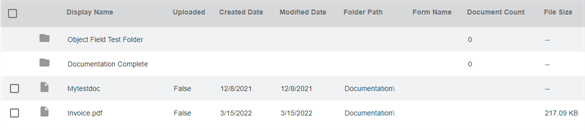
Fixes
- Document templates associated with an object that has a signature field now function properly and save the form fields properly — PI-34642.
February 22, 2022
New Feature Overview
- Automation:
- Export: Users can now select from cloud storage folders as a source to build an export. When you click on the Browse button, you can view and select cloud storage locations that are not configured for automation only.
Import: Users building Import automation can now select Cloud Storage in the Import From field and click the Browse button to navigate to a cloud storage folder that is configured for automation only.
Import / Export cloud storage functionality only supports Amazon S3 Bucket and Wasabi. Additional cloud storage providers will be supported in future releases. Stay tuned.
- Document View: Object fields that cannot be edited are now unavailable for users who do not have the appropriate permissions or in "Read Only" documents.
-
Admin: Administrators can now delete users under User Management.
The user is only deleted from the list shown in User Management. The user record remains in the database to maintain the integrity of security and audit trails.
- Product installation improvements
Fixes
- Running a Full Text search where documents are stored in multiple storage locations now returns the correct results — MAXX-8215.
- Audit now shows history when a token is added or removed to a group. The audit displays who performed the action, when it was performed which group and which token was affected. — MAXX-8243.
- Updates to a Signature template now save correctly after making changes — MAXX-8260.
- Group permissions now save properly when updating Parent folders — MAXX-8261.
January 20, 2022
New Feature Overview
- Custom Views: When hovering over a text field in a custom view in Storage and Workspace, a modal displays the full text content in the field.
- Templates: Document templates now have a new option that when selected, the object data associated from the form is copied to the objects associated with the PDF document that gets created.
- Document View:
- Zoom settings set when looking at documents now persist when the user navigates to a different page so the user does not have to adjust the zoom in the new page.
- Users can now hide the Document Details side panel.
- Product update improvements.
- Product installation improvements
Fixes
- External lookup fields with blank dates no longer cause an error when using the Send to Vasion external lookup functionality — MAXX-8248.
- On instances that use the Word Add-ins, the Vasion buttons now display correctly — MAXX-8252.
January 6, 2022
New Feature Overview
- Cloud Storage: Wasabi cloud storage configuration is now available. See Connect Wasabi for setup details.
- Forms: A new field type named "Text Area" is now available in Object configuration. This new field type is for users to enter a large amount of text details when submitting a form.
Fixes
- Large files now load properly in the Document Viewer — MAXX-8206.
- Object search with Full Text no longer causes an error when encountering invalid Unicode characters — MAXX-8223.
- Vasion Services update— MAXX-8232.
- Updates to drop-down field values now save correctly — MAXX-8244.
- When using Send to Vasion, lookup results with multiple records now sort correctly in the underlying table — MAXX-8247.
- Updating a Workflow initiation from Form to Upload / Browse / Scan now starts the workflow correctly after uploading the document — MAXX-8245.
January 7, 2022
New Feature Overview
- Document View: When you email, print or download a signed document from storage, you can now select to include document signature history,
- Admin: Users can now specify the S3 bucket name when they connect to S3 cloud storage.
- Automation: New Data Import automation has been added. With this new automation you can import data in bulk in a predefined frequency using a CSV file from an external source. You also have the option to run the automation manually. For more details see Data Import in the Automation section. .
Fixes
- Report grand total now displays correctly — MAXX-8193.
- When updating a field label on a customized folder view, the field now displays properly— MAXX-8208.
- When updating currency field values, the value now displays in the correct format across all platforms — MAXX-8218.
- Combo box fields now filter properly when using Send to Storage functionality — MAXX-8225.
- Users can now set currency fields in a search and when running the search, the results display properly — MAXX-8228.
- Import of xml files no longer causes SQL errors — MAXX-8229.
- Using the Email action on a completed workflow with signature now sends the attachment with signature in PDF format— MAXX-8230.
- Full Text Search no longer includes index field in the search results — MAXX-8170.
- Barcode recognition no longer causes the system to crash when it encounters an invalid character — MAXX-8188.
- Using Date Search (Range) and Full Text now returns the proper results — MAXX-8222.
November 29, 2021
New Feature Overview
-
Document View: New burn annotation functionality lets a user with appropriate permissions to burn annotations into a document. Once burned, the annotation becomes a permanent part of the document.
User's role should also have the permission to edit the document
- Forms: Database lookup now supports Salesforce connections.
Fixes
- Once a signature is added to a document it can no longer be deleted, moved or resized. The signature is included in subsequent workflow and standard email attachments and merge actions — MAXX-8202.
- Workflow status no longer changes when a workflow is reasigned — MAXX-6916.
- Fixed an issue that prevented some SMTP emails from sending — MAXX-8203.
- Currency fields now accept negative number entries — MAXX-8211.
- AD Group Sync no longer overrides group role permissions previously set — MAXX-8219.
- The User Management page the Active column is no longer blank as experienced by some customers — PI-28507.
November 15, 2021
New Feature Overview
- Admin — Cloud Storage: You can now delete an existing cloud storage connection. Double-click on an existing cloud storage configuration and click Delete Connection.
Fixes
- Full Text Search now includes documents that have been scanned for OCR in the results — PI-28508.
- The backslash character "\" is now supported in the name when saving a form— PI-31693.
- In HTTP environments, users with the appropriate permissions can now copy a form URL link — PI-31698.
- Read Only permission on parent folder now displays and saves properly — MAXX-7960, MAXX-8105.
- When updating a value in a combo box, Vasion now saves the updated value correctly — MAXX-8070, MAXX-8201.
- Updated the description when a user is deleted to read "User [username] has been deleted" — MAXX-8184.
November 1, 2021
New Feature Overview
- Signature:
- Users can now add a CC recipient to receive a copy of a document once it's signed and completed.
- New email template for a CC recipient that includes a signed document attachment once it has been completed.
- Users can now associate an object field to a signer name in the Bulk Send signature template.
- Storage: Users can view multiple documents and update Object fields in Document View.
Click on New Feature Details below to find out more.
Fixes
- Using the Email button from the Workspace document view to send a signed document now burns the signature into the email attachment — MAXX-8182.
- An Object search using static search field options now displays the results correctly when running it in Vasion — MAXX-8183.
- A performance issue that sometimes caused the browser to crash when using combo box filters in a document has now been resolved — MAXX-8191.
- Using the Include Additional Full Text Search option when running an Object search now returns search results as expected — MAXX-8192.
 New Feature Details
Signature
There is a new section in the Signature Signing Options where you can add the email address of anyone you want to send a copy of the signed document once it's completed.
Click on the Add CC Recipient button to show the email address field and type in the email address.Vasion
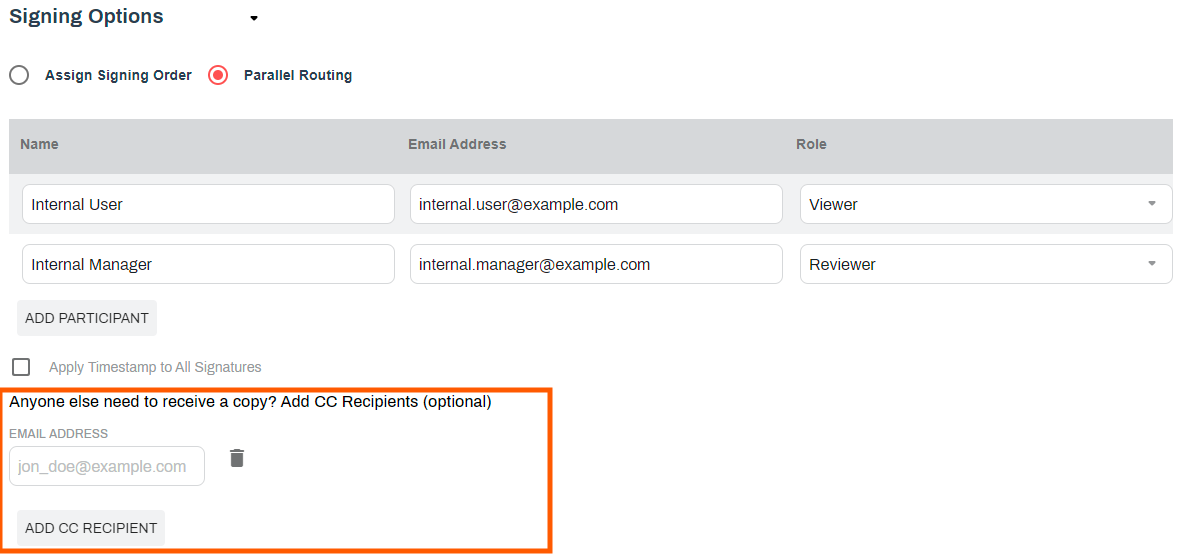
Once the document is completed, the CC recipient will receive the following email communication with the signed document as an attachment:
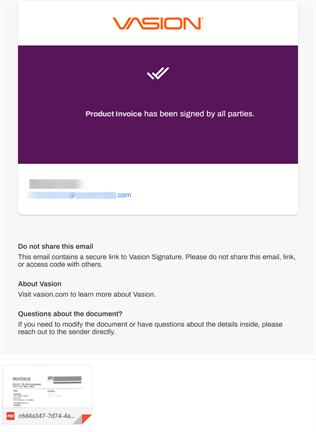
With a new update to the Bulk Send template, you can select an object field to assign to the signer name.
Use the Configure Mapping option to map the object fields to the CSV file column header and then use the Signer Name drop-down to select the field name.
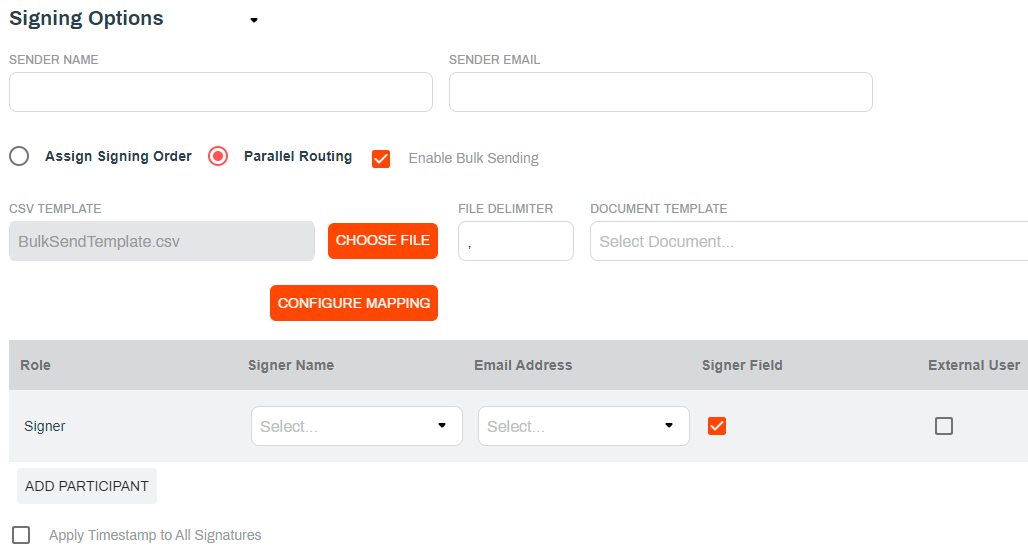
Storage
In the Storage app users can now select multiple documents to view and update any Object fields, as needed.
Check the box next each document you want to view and select Index from the Actions menu. Once the document displays you can update any field as necessary and move to the next document by clicking on the Save and Next button. To view the next document without making any changes, click on the Next button and to exit the multiple document view click on the Back arrow button. Click on the image to see how that works.