Last Updated: June 18, 2024
Workflow Permissions
Workflow permissions help you control who can initiate, view or make changes to a workflow. You can apply permissions to users or groups in the form of roles.
Workflow Roles
The workflow roles vary from user roles. T hree roles can be applied to a workflow:
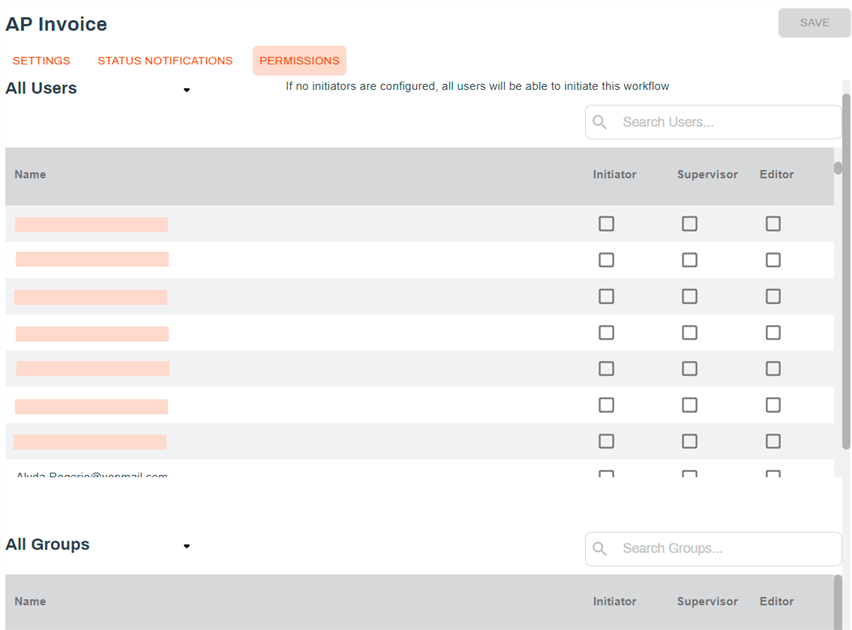
- Initiator — the user can initiate the workflow. Use this permission if your business process limits who can initiate the workflow to specific individuals.
- Supervisor — the user can view a workflow, even if they are not an initiator or are assigned to any step. The workflow displays in the user's Workspace, and when they select it, they can view the workflow details but cannot make any changes if they are not an assignee. Use this permission if you need a supervisor or manager to monitor the workflow progess.
- Editor — the user can edit the workflow in the Workflow application. Use this permission to allow authorized users to update or change the workflow if necessary.
By default no permissions are applied to users or groups in a workflow, and until the initiator role is applied to a user(s), anyone can initiate the workflow.
You can apply one or more roles to a user or group.
-
To set workflow permissions, select the Permissions tab on the workflow you want to restrict.
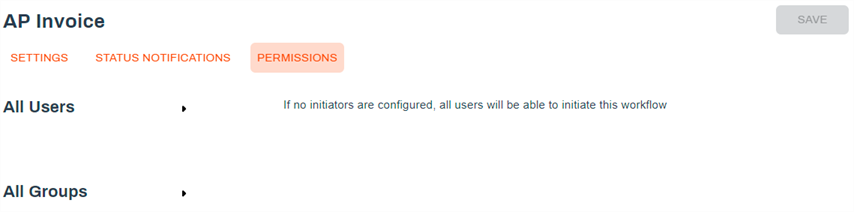
- Expand the User or Groups section.
-
For each user or group, check the box for each permission you want to apply.
- Select Save to keep your changes.