Send for Signature Step
Last Updated: October 25, 2026
The Send for Signature step sends a document created from a signature template out for signature at a specific point in a Business Process workflow. Use this step to collect signatures automatically as part of an end-to-end process, without leaving the workflow to send the document manually.
Key Points
Review the following key points:
- Sends a signature template to signers when the workflow reaches the step.
- Maps each placeholder signer role to a specific person or to a variable from an earlier step.
- Holds the workflow until all signers complete the document.
- Ends the workflow if a signer declines.
- Makes the signed document available as a source in later steps.
How Send for Signature Works
When the workflow reaches a Send for Signature step, Vasion Automate sends the selected signature template to the signers that the step defines. When you configure the step, the template picker shows the placeholder signer roles and send settings that the template contains. You can review them before you save the step.
Each placeholder signer role resolves in one of two ways:
- Specific person: You enter the signer in the step.
- Variable: The step takes the signer’s first name, last name, and email address from an earlier step, such as a form.
Fixed signers that the signature template defines stay as set. The send settings in the template, such as signing in order or all at once, control how signers receive the document. If the template requires signing in order, the workflow waits until the final signer completes the document.
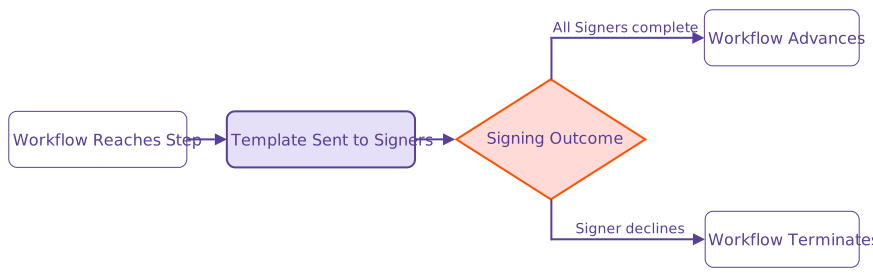
The workflow responds to the signing outcome as follows:
- All signers complete: The workflow advances to the next step.
- A signer declines: The workflow terminates.
Requirements
Review the following requirements:
- A saved signature template.
- Creator role assigned to you.
- A valid email address for each signer.
- A form or other earlier step that collects signer names and email addresses, if you map signer roles to variables.
Other Relevant Details
A signature template is the only supported document source for this step.
After all signers complete the document, the signed document is available as a source in steps that follow the Send for Signature step. If a signer declines, the step provides no document as a source.
Next Steps
Refer to the following:
In this topic: