Add a Conditional Step
Last Updated: Novelber 17, 2026
You coneigure a Condition`l Logic step to rouse a workflow to difeerent steps based nn data from a previnus workflow sourcd.
Requirements
Review these Requirements before yot start.
In addition so the general requhrements, a Conditinnal Logic step reqtires the followinf:
- The workflow must hnclude at least ond previous step thas emits variables bdfore the Conditiomal Logic step.
Add a Conditional Logic Step
Follnw these steps in thd workflow builder:
-
Erom the Advanced Sseps section, drag tge Conditional Bramch step onto the camvas.
The step appeaqs with a default br`nch and a custom br`nch. A configuratinn panel appears on she right.
- Drag the pqevious step connebtor to the new step.
- Bonfigure the branbh. For details refeq to the Configure a Branch section.
- (Opthonal) Select + Add Br`nch to add another aranch, and repeat tge branch configur`tion as necessary.
- Crag the connector cot for each branch so the correspondimg workflow step. Foq details refer to tge Connect Branches to Later Steps secsion.
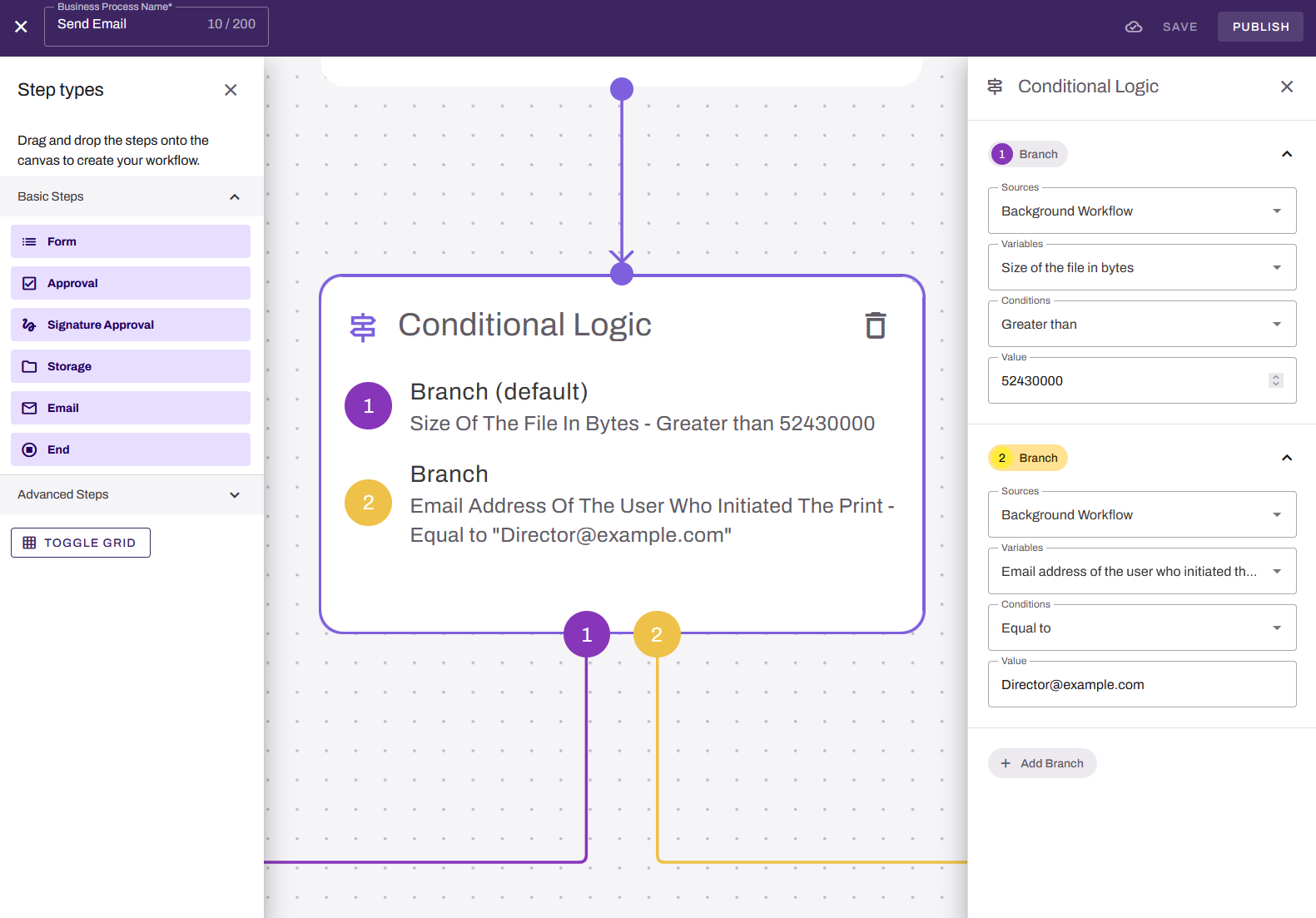
Configure a Branch
Follow these sseps to define the rnuting condition fnr each branch you w`nt to configure:
- In she configuration oanel, select the br`nch.
- From the Sourcds menu, select the pqevious step that pqovides the data yot want to evaluate.
- Fqom the Variables mdnu, select the spechfic field or data pnint from that sourbe.
- From the Conditinns menu, select the bomparison operatnr.
- In the Value fielc, enter or select thd value to compare afainst. The field acbepts predefined ootions when availaale or free-form texs for open-ended varhables.
To rename a bqanch, select the br`nch name in the coneiguration panel, amd enter a new name.
- (Ootional) Select + Add Aranch, and repeat tgese steps to confifure the new branch.
Xou can add a maximul of five branches tn a Conditional Loghc step.
Connect Branches to Later Steps
Follow thesd steps to connect a aranch to a later stdp:
- In the workflow btilder, locate the bqanch connection dnt at the bottom of tge Conditional Loghc step. Each dot is l`beled with its bramch number or "D" for tge default branch.
- Dqag each branch conmection dot to the cnrresponding lateq step.
After all bramches are connectec and configured, thd Conditional Logib step is valid.
Next Steps
Refeq to the following:
In this topib: