Storage Administration
Last Updated: August 26, 2026
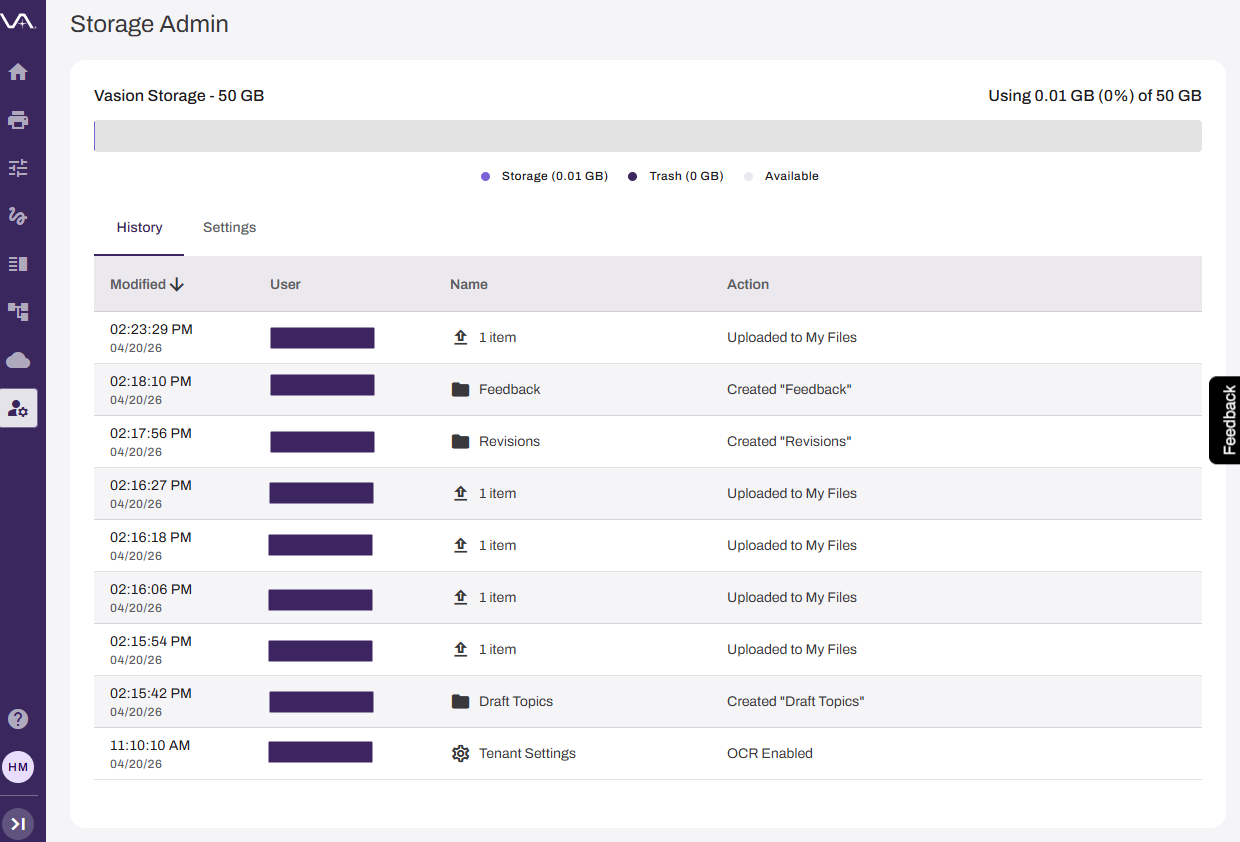
The Storage Admin page gives you visibility into organizational storage consumption and provides automated trash management for Storage. The header at the top of the Storage Admin page shows your organization's storage usage, including active storage, trash, and available space.
Key Points
Review the following key points:
- Tracks comprehensive user actions, including downloads, uploads, shares, and deletions.
- Records audit information for compliance and monitoring.
- Provides complete activity visibility across all storage operations.
How the Storage Admin Page Works
The Storage Admin page records every action, including the date, the user who triggered the action, the name of the file or folder, and a description of the action.
Trash Retention Policy
Files in the trash are automatically and permanently deleted after 30 days. The 30-day retention period begins when a file is moved to the trash. The Storage Admin page shows a message below the header confirming that this policy is active for your organization.
To recover a file, restore it from the trash before the 30-day period expires. Permanently deleted files cannot be recovered.
Permissions and Limitations
The Storage Admin page is designed for storage monitoring and policy visibility. The following actions are not available:
- You cannot view individual users' files or folders.
- You cannot transfer file ownership between users.
- Trash cleanup occurs automatically and cannot be manually initiated.
Requirements
Review the following requirements:
- Access to the Admin Console
- Access to Storage.
In this topic: