Release Notes 2024
Last Updated: September 02, 2026
The Virtual Appliance includes a Host and Application layer, each with its own version. Virtual Appliance Host and Application files are no longer available on the Admin Guide site. To obtain these files please create a support ticket with our team and include Latest Host / Application Files Request in the subject field, and your current Host and Application versions (Support & Training  About PrinterLogic) in the description. Most new Host builds include the latest Application version, and upgrading the Host also upgrades the Application layer. For more details refer to Host Upgrade Path.
This topic outlines the Host, Application, Client, and Mobile releases for the given year.
Application & Host Compatibility Information (VMDK/VHD/OVA/QCOW2)
- Customers on Host build 1.0.757 or older, please contact our support team to upgrade to the latest version.
- Customers on Host build 22.0.818-22.0.913 must complete an incremental upgrade to 22.0.933 before upgrading further.
- Customers on Host build 22.0.933-25.1.102 must complete an incremental upgrade to 25.1.116 before upgrading further.
- Customers on 25.1.116 and later can upgrade to the most recent Host release.
|
Application |
Host |
Release Date |
Minimum Supported Host |
MySQL Version Compatibility |
Included Client Versions |
|---|---|---|---|---|---|
|
26.2.1912 |
26.2.345 |
Sept. 10, 2026 |
26.1.312 |
8.0.42 / 8.0.45 |
Windows: 25.1.0.1632 |
|
26.1.1796 |
26.1.312 |
May 28, 2026 |
26.1.303 |
8.0.42 / 8.0.45 |
Windows: 25.1.0.1367 |
|
26.1.1778 |
26.1.303 |
May 1, 2026 |
26.1.303 |
8.0.42 / 8.0.45 |
Windows: 25.1.0.1367 |
|
25.3.1712 |
25.3.272 |
Feb. 20, 2026 |
25.3.245 |
8.0.35 / 8.0.42 |
Windows: 25.1.0.1299 |
|
25.3.1656 |
25.3.245 |
Dec. 16, 2025 |
25.3.245 |
8.0.35 / 8.0.42 |
Windows: 25.1.0.1299 |
|
25.2.1518 |
25.2.169 |
June 26, 2025 |
22.0.951 |
8.0.35 / 8.0.42 |
Windows: 25.1.0.1187 |
|
25.1.1428 |
25.1.116 |
March 26, 2025 |
22.0.933 |
8.0.35 / 8.0.41 |
Windows: 25.1.0.1136 |
|
25.1.1413 |
25.1.102 |
Feb. 27, 2025 |
22.0.933 |
8.0.35 / 8.0.37 |
Windows: 25.1.0.1136 |
|
20.0.2786 |
22.0.1049 |
Dec. 23, 2024 |
22.0.893 |
8.0.35 / 8.0.37 |
Windows: 25.0.0.1074 |
|
20.0.2702 |
22.0.1026 |
Nov. 21, 2024 |
22.0.893 |
8.0.35 / 8.0.37 |
Windows: 25.0.0.1074 |
|
20.0.2614 |
22.0.1002 |
Oct. 22, 2024 |
22.0.893 |
8.0.35 / 8.0.37 |
Windows: 25.0.0.1071 |
|
20.0.2592 |
22.0.951 |
Oct. 2, 2024 |
22.0.893 |
8.0.35 / 8.0.37 |
Windows: 25.0.0.1071 |
|
20.0.2489 |
22.0.951 |
Aug. 19, 2024 |
22.0.893 |
8.0.35 / 8.0.37 |
Windows: 25.0.0.1034 |
|
20.0.2368 |
22.0.933 |
May 30, 2024 |
22.0.818 |
8.0.30 / 8.0.35 |
Windows: 25.0.0.1025 |
|
20.0.2253 |
22.0.913 |
Feb. 28, 2024 |
22.0.818 |
8.0.26 / 8.0.30 |
Windows: 25.0.0.1000 |
|
20.0.2140 |
22.0.893 |
Dec. 1, 2023 |
22.0.818 |
8.0.26 / 8.0.30 |
Windows: 25.0.0.973 |
|
20.0.2014 |
22.0.862 |
Sept. 28, 2023 |
1.0.757 |
8.0.26 / 8.0.30 |
Windows: 25.0.0.939 |
|
20.0.1923 |
22.0.843 |
June 23, 2023 |
1.0.750 |
8.0.26 / 8.0.30 |
Windows: 25.0.0.917 |
|
20.0.1766 |
22.0.818 |
March 17, 2023 |
1.0.742 |
8.0.26 / 8.0.30 |
Windows: 25.0.0.864 |
|
20.0.1708 |
22.0.818 |
Jan. 20, 2023 |
1.0.674 |
8.0.26 / 8.0.30 |
Windows: 25.0.0.802 |
|
20.0.1682 |
22.0.818 |
Jan. 10, 2023 |
1.0.674 |
8.0.26 / 8.0.30 |
Windows: 25.0.0.791 |
|
20.0.1582 |
1.0.757 |
Sept. 29, 2022 |
1.0.674 |
|
Windows: 25.0.0.734 |
|
20.0.1533 |
1.0.757 |
Aug. 18, 2022 |
1.0.674 |
|
Windows: 25.0.0.693 |
|
20.0.1510 |
1.0.757 |
July 29, 2022 |
1.0.674 |
|
Windows: 25.0.0.673 |
|
20.0.1480 |
1.0.756 |
June 27, 2022 |
1.0.674 |
|
Windows: 25.0.0.658 |
|
20.0.1442 |
1.0.750 |
May 18, 2022 |
1.0.674 |
|
Windows: 25.0.0.639 |
Application & Host Compatibility Information (AMI)
|
AMI Version |
Application Version |
Release Date |
Included Client Versions |
|---|---|---|---|
|
26.2.345 |
26.2.1912 |
Sept. 10, 2026 |
Windows: 25.1.0.1632 |
|
26.1.312 |
26.1.1796 |
May 28, 2026 |
Windows: 25.1.0.1367 |
|
26.1.303 |
26.1.1778 |
May 1, 2026 |
Windows: 25.1.0.1367 |
|
25.3.272 |
25.3.1712 |
Feb. 20, 2026 |
Windows: 25.1.0.1299 |
|
25.3.245 |
25.3.1656 |
Dec. 16, 2025 |
Windows: 25.1.0.1299 |
|
25.2.169 |
25.2.1518 |
June 26, 2025 |
Windows: 25.1.0.1187 |
|
25.1.116 |
25.1.1428 |
March 26, 2025 |
Windows: 25.1.0.1136 |
|
25.1.102 |
25.1.1413 |
Feb. 27, 2025 |
Windows: 25.1.0.1136 |
|
24.4.66 |
20.0.2786 |
Dec. 23, 2024 |
Windows: 25.0.0.1074 |
|
1.0.712 |
20.0.2702 |
Nov. 21, 2024 |
Windows: 25.0.0.1074 |
|
1.0.671 |
20.0.2614 |
Oct. 22, 2024 |
Windows: 25.0.0.1071 |
|
1.0.587 |
20.0.2489 |
Aug. 19, 2024 |
Windows: 25.0.0.1034 |
|
1.0.537 |
20.0.2368 |
May 30, 2024 |
Windows: 25.0.0.1025 |
|
1.0.498 |
20.0.2253 |
Feb. 28, 2024 |
Windows: 25.0.0.1000 |
|
1.0.466 |
20.0.2140 |
Dec. 1, 2023 |
Windows: 25.0.0.973 |
|
1.0.433 |
20.0.2014 |
Sept. 28, 2023 |
Windows: 25.0.0.939 |
|
1.0.409 |
20.0.1923 |
June 23, 2023 |
Windows: 25.0.0.917 |
|
1.0.368 |
20.0.1766 |
March 17, 2023 |
Windows: 25.0.0.864 |
|
1.0.350 |
20.0.1708 |
Jan. 20, 2023 |
Windows: 25.0.0.802 |
|
1.0.276 |
20.0.1533 |
Aug. 18, 2022 |
Windows: 25.0.0.693 |
|
1.0.265 |
20.0.1510 |
July 29, 2022 |
Windows: 25.0.0.673 |
You should back up your Virtual Appliance database before performing any upgrade procedure.
- Customers on Host build 1.0.757 or older, please contact our support team to upgrade to the latest version.
- Customers on Host build 22.0.818-22.0.913 must complete an incremental upgrade to 22.0.933 before upgrading further.
- Customers on Host build 22.0.933-25.1.102 must complete an incremental upgrade to 25.1.116 before upgrading further.
- Customers on 25.1.116 and later can upgrade to the most recent Host release.
For steps on updating the Virtual Appliance Application build, refer to Application Update.
For steps on upgrading the Virtual Appliance Host build, refer to Host Upgrade.
Please contact our Support Team for Host or Application builds. To obtain these files please create a support ticket with our team and include Latest Host / Application Files Request in the subject field, and your current Host and Application versions (Support & Training About PrinterLogic) in the description.
- Application
- Host
- Client
- Android App
- iOS App
Build 20.0.2786 Dec. 23, 2024
This Application version is incompatible with Host builds 22.0.862 and earlier. You must upgrade to Host build 22.0.893 or later to stay within compatible versions. Selecting the Update Now button in the Admin Console while on an incompatible build may break your instance.
New Features and Enhancements
Web Print comes enabled by default for those with the Off-Network Print feature enabled. PI-62471
Feature Removed
Vasion deprecated the Control Panel Application (CPA) v1 from the Virtual Appliance solution. In this and future builds, the legacy feature is no longer available for installation from the Apps tab and CPA Manager, and has been removed from our online documentation. For some manufacturers, both CPA v1 and v2 appeared as installation options. All manufacturers now default to CPA v2 and no longer require the CPA v1/v2 selection.
Please reach out to our Support team with any questions. For a list of supported devices, refer to Supported Printers for Printer Apps.
Security Highlights
This security patch remediates the following vulnerabilities:
- V-2024-017 — Unauthenticated APIs
- V-2024-022 — Insecure Installation Credentials
- V-2024-024 — Insecure Communication to Printers & Microservices
- V-2024-025 — Hardcoded SSL Certificate & Private Keys
- V-2024-026 — Server Side Request Forgery
- V-2024-027 — Insecure Secure Shell (SSH) Configuration
- V-2024-028 — Unauthenticated Admin APIs Used to Modify SSL Certificates
- V-2024-029 — No Authentication Required to Modify Devices
- V-2024-030 — Exposed Internal Docker Instance (LAN)
- V-2024-031 — Local Privilege Escalation
- V-2024-032 — Server Side Request Forgery (SSRF)
- V-2024-033 — Server Side Request Forgery (SSRF)
- V-2024-034 — Server Side Request Forgery (SSRF)
- V-2024-035 — Server Side Request Forgery (SSRF)
- V-2024-036 — Server Side Request Forgery (SSRF)
- V-2024-037 — Server Side Request Forgery (SSRF)
- V-2024-038 — Server Side Request Forgery (SSRF)
- V-2024-039 — Server Side Request Forgery (SSRF)
- V-2024-040 — Server Side Request Forgery (SSRF)
- V-2024-041 — Server Side Request Forgery (SSRF)
For more details refer to Security Bulletin.
Vasion constantly works to maintain and improve security measures within the software. A security update within this release of the Virtual Appliance provides the option to further restrict allowed cipher suites. To enable additional restriction of cipher suites, add SSL_ENABLE_NIST_RSA_TRANSITION=0 to the secrets.env file within the shared storage of your Virtual Appliance.
With this entry, the Virtual Appliance only supports the following ciphers:
- TLS_ECDHE_ECDSA_WITH_AES_128_GCM_SHA256
- TLS_ECDHE_ECDSA_WITH_AES_256_GCM_SHA384
- TLS_ECDHE_ECDSA_WITH_AES_128_CBC_SHA256
- TLS_ECDHE_ECDSA_WITH_AES_128_CBC_SHA
- TLS_ECDHE_ECDSA_WITH_AES_256_CBC_SHA
- TLS_ECDHE_RSA_WITH_AES_128_GCM_SHA256
- TLS_ECDHE_RSA_WITH_AES_256_GCM_SHA384
- TLS_RSA_WITH_AES_128_GCM_SHA256
- TLS_RSA_WITH_AES_256_GCM_SHA384
- TLS_AES_128_GCM_SHA256
- TLS_AES_256_GCM_SHA384
Fixes
- Improvement to the password creation process in the Virtual Appliance configuration utility. PI-62370
- Configuration utility verbiage changes to present the CIDR documentation clearly. PI-62721
- IdP communication improved to resolve an authentication issue. PI-62755
- Improved the tree structure for increased performance with large tree structures. PI-61288
- Enhancement to the inherited assignment logic for Internal Routing Service and External Gateway. PI-62778
- Improvement to the migration process to resolves issues seen with identities and Admin Console logins. PI-63103 / PI-62651
- Simplified Scanning settings persist after upgrading to a new build. PI-61772
- Improvement to the Off-Network Print service to self-recover from critical errors. PI-60235
- Internal routing service enhancement regarding certificates. PI-62276
- Optimization of Service Client setting routes. PI-61369
Build 20.0.2702 Nov. 21, 2024
This Application version is incompatible with Host builds 22.0.862 and earlier. You must upgrade to Host build 22.0.893 or later to stay within compatible versions. Selecting the Update Now button in the Admin Console while on an incompatible build may break your instance.
Security Highlights
Remediated the following vulnerabilities:
- V-2024-018 — RCE & Leaks via API
- V-2024-019 — Encryption Key Exposure
- V-2024-020 — Remote Code Execution
- V-2024-021 — Inadequate Secure Configuration Documentation
- For more details refer to Security Bulletin.
Vasion constantly works to maintain and improve security measures within the software. A security update within this release of the Virtual Appliance disables weak ciphers by default. This change may disrupt printing for older printer models that use weak ciphers.
Please review the information below before upgrading to the new builds.
Cipher Details
Any ciphers not listed below will be disabled by default, which will cause printing functionality to break.
If your printers use a cipher not on the list, add the following entry to the secrets.env file within the shared storage of your Virtual Appliance to allow weak ciphers. "SSL_Enable_NIST_Restrictions=0."
Supported Ciphers
- TLS_ECDHE_ECDSA_WITH_AES_128_GCM_SHA256
- TLS_ECDHE_ECDSA_WITH_AES_256_GCM_SHA384
- TLS_ECDHE_ECDSA_WITH_AES_128_CBC_SHA256
- TLS_ECDHE_ECDSA_WITH_AES_128_CBC_SHA
- TLS_ECDHE_ECDSA_WITH_AES_256_CBC_SHA
- TLS_ECDHE_RSA_WITH_AES_128_GCM_SHA256
- TLS_ECDHE_RSA_WITH_AES_256_GCM_SHA384
- TLS_RSA_WITH_AES_128_GCM_SHA256
- TLS_RSA_WITH_AES_256_GCM_SHA384
- TLS_ECDHE_RSA_WITH_AES_128_CBC_SHA256
- TLS_RSA_WITH_AES_128_CBC_SHA256
- TLS_ECDHE_RSA_WITH_AES_128_CBC_SHA
- TLS_ECDHE_RSA_WITH_AES_256_CBC_SHA
- TLS_RSA_WITH_AES_128_CBC_SHA
- TLS_RSA_WITH_AES_256_CBC_SHA
- TLS_AES_128_GCM_SHA256
- TLS_AES_256_GCM_SHA384
New Features and Enhancements
New Feature: Web Print
- Description: Guests, contractors, and students can now securely upload and print documents to managed printers directly from a web browser. For more details refer to Web Print.
New Feature: Epson CPA v2
- Description: Control Panel Application (CPA) officially supports Epson Multifunction Device (MFD)! This update unlocks powerful features for Epson users like Scan to Email and Secure Release Print. For more details refer to Epson CPA 2.0.
New Feature: Scan To Email
- Description: Scan To Email is a new feature that offers a consistent user interface for scanning documents and having them sent to an email address. Scan To Email is the first of Vasion's Scan To options to be released. Scan To Email is available as core functionality. More information can be found in the Scan to Email topic.
New Setting: Restrict Release Portal Access
- Description: This setting prevents end users from directly releasing their held jobs via the portal if the company policy requires them to be physically present at the printer to do so. This feature enhances security by ensuring that end users must walk up to the printer to release their jobs, reducing the risk of print jobs being intercepted or accessed by unauthorized individuals. For more details refer to Virtual Appliance Portals.
New Setting: Automatically check for tree updates during navigation
- Description: The tree structure automatic update feature enhances performance and gives users greater control over when the tree structure updates. For more details refer to Tree Structure.
Removed Setting: The Enable Group Membership Sync option for Identity Sync has been removed from the Admin Console. This feature led to unnecessary syncing of group memberships, which increased storage use. With this change, only relevant group memberships are synced, reducing data load and improving system performance. For more details refer to Identity Sync.
Fixes
Admin Console
- The "Functionality limited..." message for Pull Print only displays if an identity provider has not been configured in the environment. PI-51840
- The New button and context menu option are grayed out after selecting a printer, IP address range, or Service Agent object. PI-53530 / PI-53531
- Non-administrator roles see only the printers they are assigned to when they use the Export action for the Printer option in the Data Manager. PI-55517
- Custom roles with View access to the printer object Apps tab show the configuration fields rather than a blank screen. PI-57523
- The CPA authentication setting "Require Pin (beta)" unchecks after the parent setting is disabled. PI-58168
- When the Enable "Automatic Self-Service Portal and Release Portal" login setting on Tools Settings Portal is disabled, portal security based on IP address range is not supported. PI-58429
- You can configure multiple Custom Fields at once without being redirected to the main Admin Console page. PI-58526
- Saving changes on the Portal Settings page works correctly and doesn't give a false error message. PI-58581
- The Admin Console UI displays all folders in large tree structures with the screen view set to 100%. PI-58780
- Non-administrator roles can add users to portal security and printer deployments in folders they have access to. PI-59861
- The Driver / Profile Repository displays the correct options and buttons after selecting a driver. PI-60140
- The Printer Apps tab loads correctly in the Admin Console. PI-60306
- Printers added using Windows Print Server Links display correctly in the Admin Console tree structure. PI-60594
- The Email Printing "Test SMTP Connection on next check-in" option unchecks the test checkbox after completing the SMTP test. PI-61138
- Multiple badges may be deleted using the Badge Management tab. PI-60165
IdP
- An improvement to the IdP login process that fixed a false "The server returned an invalid response" error displaying during login. PI-51010
- The authentication setting "Use Domain User (Windows only)" works correctly on Azure domain joined machines. PI-58010
Control Panel Application (CPA)
- Improvement to the Ricoh CPA v2 that fixes the native scanning pop-up from locking up the app. PI-56876
- Badge scanning on the Ricoh CPA v2 devices works correctly on the first badge scan and doesn't require a second swipe. PI-58977
- Improvement to CPA v2 that resolved a connection lost error with the UI after the devices sat overnight. PI-59454
- Improvement that resolved multiple Copy icons appearing on Konica Minolta printers with CPA v2 installed. PI-60180
- The Konica Minolta flex URL functions correctly with CPA v2. PI-61178
- Scanning jobs in portrait mode on Xerox CPA v2 correctly rotates the document. PI-58885
- Release Portal timestamps on CPA v2 show the correct times instead of UTC-9. PI-59615
- Ricoh devices retain the Single Sign-On (SSO) Provider mode settings after sitting overnight. PI-55805
Reports
- The Administrative Audit Records report displays the correct data rather than a blank screen. PI-60221
- Scheduled Reports send correctly using an SMTP configuration that does not require authentication credentials. PI-61069
Self-service Portal
- The Authentication menu items on the Self-service Portal display correctly after the initial login. PI-59255
Service Agent & Services
- The Service Agent functions correctly in environments using PAC files. PI-57496
- Improvement to the Service Agent check-in and settings sync. PI-60237
- Improvement to the API Print Service that ignores non-required body elements. PI-61188
- Improvement to the Output Automation service that reduces CPU utilization. PI-57432
- The Offline Secure Release Print service no longer deletes print jobs after updating. PI-60340
- Improvement to the Off-Network Print service for use with Virtual Appliance certificates. PI-61090
Build 20.0.2614 Oct. 22, 2024
This Application version is incompatible with Host builds 22.0.862 and earlier. You must upgrade to Host build 22.0.893 or later to stay within compatible versions. Selecting the Update Now button in the Admin Console while on an incompatible build may break your instance.
Security Patch: This build includes resolutions for recent vulnerabilities within the Virtual Appliance. Vasion urgently recommends upgrading to Host Build 22.0.1002, which includes Application Build 20.0.2614, to maintain a secure environment.
Security Highlights
Remediated the following vulnerabilities:
- V-2024-012 — SQL Injection
- V-2024-013 — Hardcoded Password
- V-2024-014 — Outdated Dependencies
- V-2024-015 — Privilege Escalation
- V-2024-016 — Cross-Site Scripting
- For more details refer to Security Bulletin.
Security Enhancement: The About PrinterLogic page on Support & Training About PrinterLogic contains the Update Now or Update from File options for updating the Application version of the Virtual Appliance. Access to this page has been restricted to specific roles assigned on the Tools Users page.
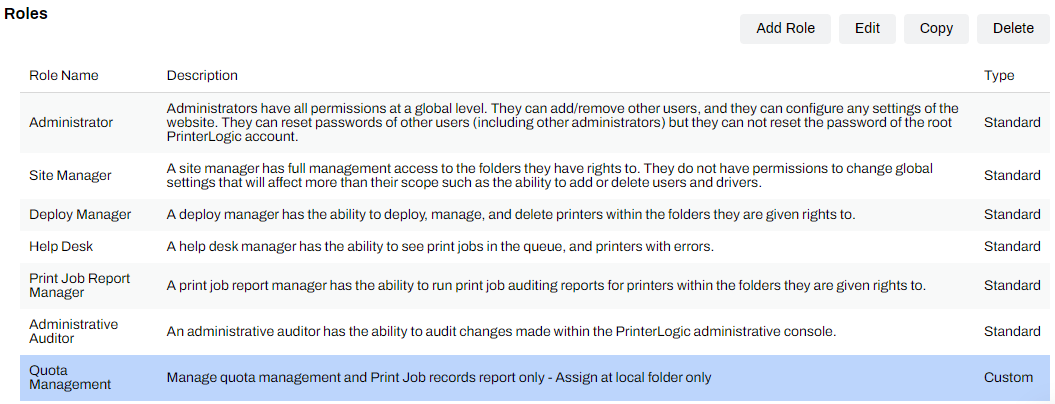
Impact to Roles
The Administrator and Site Manager roles include this permission by default. Users assigned to this role won't experience a change.
The Deploy Manager, Help Desk, Print Job Report Manager, and Administrative Auditor roles exclude this permission by default. Access to the About PrinterLogic page remains, but the Update Now and Update from File buttons do not display for these roles.
Custom roles created on the Tools Users tab may require adjustment.
- Select the custom role from the list on the Users tab.
- Select the Edit button on the upper-right to start the Edit Role modal.
- In the Tools section, select / deselect About PrinterLogic.
- Select the About PrinterLogic box within the Edit Role modal to include the Application Update permission.
- Deselect the About PrinterLogic box within the modal to remove the Application Update permission.
- Select Save.
Build 20.0.2592 Oct. 2, 2024
This Application version is incompatible with Host builds 22.0.862 and earlier. You must upgrade to Host build 22.0.893 or later to stay within compatible versions. Selecting the Update Now button in the Admin Console while on an incompatible build may break your instance.
HotFix/Patch: This Application version includes a new Windows Client MSI file (25.0.0.1071) with the updated PrinterLogic certificate/signature, which resolves an issue with the automatic client update feature.
This version does not include any additional fixes or features.
Build 20.0.2489 Aug. 20, 2024
This Application version is incompatible with Host builds 22.0.862 and earlier. You must upgrade to Host build 22.0.893 or later to stay within compatible versions. Selecting the Update Now button in the Admin Console while on an incompatible build may break your instance.
Security Highlights
Remediated the following vulnerabilities:
- V-2024-009 — Unauthenticated APIs for Single-Sign On
- V-2024-010 — Hardcoded Linux Password
- V-2024-011 — Hardcoded SSH Host Key
- For more details refer to Security Bulletin.
New Features and Enhancements
New Setting: Email Printing, Only Print Attachments.
- Description: When enabled on the Service Agent's Email Printing tab, email print jobs sent with attachments will only print the attachments, ignoring the body of the email. If there aren't attachments, the body of the email prints. For more details refer to Configure Email Printing.
Fixes
- Badge scan authentication with Xerox CPA 2 in Single Sign-On (SSO) Provider mode works correctly with the latest firmware update. PI-51782 / PI-51863
- SNMP Public / Private key fields no longer appear grayed out. PI-59032
- Improvement to the Ricoh CPA v2 in Single Sign-On (SSO) Provider mode to resolve the log out button breaking after releasing held jobs. PI-57818
- CPA enhancement to improve installations on devices using an FQDN rather than IP Address. PI-56027
- Custom roles with View permissions to the Apps tab no longer allow CPA actions through the CPA Manager. PI-57524
- SNMP v1/v2 no longer times out and displays an "Unknown" status for printer information on the Status tab. PI-53920
- Kyocera CPA v2 no longer shows a white screen in Single Sign-On (SSO) Provider mode. PI-57537
- Improvement to the Service Agent deletion process to fully remove the object from the database. PI-54688
- The Status tab displays the hostname in the correct field. PI-56509
- Reports display correctly for sub-folder level reporting on folders containing "&" in the name. PI-54646
- The Admin Console page no longer refreshes when selecting more than two values in the Advanced Search option. PI-47118
- Scheduled Reports send correctly. PI-57813
- Changing the assigned macOS driver in the Admin Console no longer removes the printer from workstations. PI-49850
Build 20.0.2368 May 30, 2024
Security Highlights
Remediated the following vulnerabilities:
- V-2024-005 — Insecure Extension Installation
- V-2024-006 — Hardcoded AWS API Key
- V-2024-007 — Local Privilege Escalation
- V-2024-008 — Unauthenticated Driver Package Editing
- For more details refer to Security Bulletin.
New Features and Enhancements
New File Type: QCOW2: Support for Linux KVM Environments.
- Description: The Virtual Appliance now supports customers in Linux KVM environments! For more details refer to Virtual Machine Manager New Install.
New Feature: Support for Fujifilm CPA 2.0.
- Description: CPA 2.0 supported on Fujifilm MFD.
New Feature: Off-Network Cloud Print (ONCP).
- Description: Off-Network Cloud Print (ONCP) gives you zero on-premise infrastructure while continuing to allow anyone to print—no matter what network you’re on. It offers zero trust network authentication and better print availability, with printing handled and stored entirely on the cloud. Off-Network Cloud Print continues to bridge the gap between network security and flexible user printing but relieves organizations of Service Agent maintenance and oversight.
Feature Enhancement: QR Code Display
- Description: The QR Code Display feature is used with the PrinterLogic App to quickly select a printer to release print jobs. When a user selects the PrinterLogic CPA icon, the QR Code for that printer displays and can be scanned with the app.
Fixes
- Resolved a syntax error so the Enterprise Data Warehouse (EDW) feature correctly replicates data. PI-56061 / PI-54091
- Resolved a 500 error when registering new badges from the Self-service Portal. PI-57371
- Improved the CPA authentication process on MP 5055 models to resolve errors. PI-55806
- Enhancement to HP SNMP reporting to accurately detect and display the device's serial number. PI-52155
- Optimization was performed to address issues experienced with HP drivers on macOS and Linux devices. PI-55598
- Resolved an "Error - Please enter correct details" error when authenticating to the mobile app using LDAP. PI-50609
- Improved Agent refresh configuration behavior when the user is not authenticated on their machine. PI-55002
- IdP authentication on the Canon CPA v2 in Single Sign-On (SSO) Prover mode no longer locks up the "Login Succeeded" screen. PI-55309
- Entra ID provisioned users display as expected. PI-56351
- The Data Manager allows Custom Roles to export data from folders they are assigned. PI-56323
- The Services tab loads correctly in large printer environments. PI-57279
- Virtual Appliance Output timestamps are recorded correctly. PI-56941
- Linux Service Agents function as expected on this version. PI-56033
- Resolved an "Error Printing" message appearing for Epic Print Server jobs that pause and resume during the printing process. PI-55362
- More Kyocera models allow CPA installations using an older version of the Printer Apps service. PI-55295
- Resolved a "Failed to get print job information" error showing for held jobs on Kyocera devices. PI-55175
- Enhancement for the Print Job Records report and Agent communication to recognize all printer pages when printing double-sided or multiple pages. PI-55013
- The Apps tab loads correctly in the Admin Console. PI-54080
- HP devices work with Off-Network Print self-hosted gateways. PI-54049
- Badge authentication on Fujifilm and Xerox devices functions correctly when the QR code screen displays on the control panel. PI-53804
- HP CPA v2 improvement for increased responsiveness. PI-53518
- Enterprise Data Warehouse (EDW) correctly reflects data entered in custom data fields for printer objects in the Admin Console. PI-52884
- External MySQL hosts read correctly when relaunching a new instance. PI-43528
Build 20.0.2253 Feb. 29, 2024
Security Highlights
Remediated the following vulnerabilities:
- CVE-2024-21626
- V-2024-002 — Addition of Partial Admin Users Without Authentication
- V-2024-003 — Cross Tenant Password Exposure
- V-2024-001 — Edit User Account Exposure
- For more details refer to Security Bulletin.
New Features and Enhancements
New Feature:API Print Service.
- Description: The API Print Service gives control back to print administrators using Epic or other LPD applications, allowing them to fully control their print environment. Doing so eliminates the need to install print queues on your source application altogether and allows moving to a driver-less print model, reducing the work required to maintain the print environment.
- There are two places you’ll need to configure settings for the API Print Service. In the Admin Console and inside your source applications administrative settings.
MySQL Update: This version integrates an updated MySQL server version. It is critical to create a backup of your database before updating.
This version does not support Linux Service Agents running the Printer Apps service.
Fixes
- Improved the responsiveness of the HP CPA v2. PI-53518
- Resolved a "Failed to get print job information" error showing for held jobs on Kyocera devices. PI-55175
- Improvement for Kyocera CPA v2 installations from Windows 2022 servers not running domain services. PI-54563
- SNMP v3 with a printer that does not have a Context Engine ID: pulls data as expected. PI-49289
- Improved Lexmark CPA v2 communication with the Virtual Appliance. PI-52697
- Removing Windows Print Server Links removes the printers as expected. PI-52053
- Print Job Records reports for subfolders show data as expected. PI-50403
- Enabling global Pull Print settings with an IdP configured no longer displays a "Functionality limited. LDAP settings should be configured for your domain(s)," error. PI-51840
- Resolved an extended authentication delay occurring on Toshiba CPA v2 with Single Sign-On (SSO) enabled. PI-53430
- Improvements to the tree structure and Service Agent object context menu options. PI-51470
Build 22.0.1049 Dec. 23, 2024
This Application version is incompatible with Host builds 22.0.862 and earlier. You must upgrade to Host build 22.0.893 or later to stay within compatible versions. Selecting the Update Now button in the Admin Console while on an incompatible build may break your instance.
New Features and Enhancements
Web Print comes enabled by default for those with the Off-Network Print feature enabled. PI-62471
Feature Removed
Vasion deprecated the Control Panel Application (CPA) v1 from the Virtual Appliance solution. In this and future builds, the legacy feature is no longer available for installation from the Apps tab and CPA Manager, and has been removed from our online documentation. For some manufacturers, both CPA v1 and v2 appeared as installation options. All manufacturers now default to CPA v2 and no longer require the CPA v1/v2 selection.
Please reach out to our Support team with any questions. For a list of supported devices, refer to Supported Printers for Printer Apps.
Security Highlights
This security patch remediates the following vulnerabilities:
- V-2024-017 — Unauthenticated APIs
- V-2024-022 — Insecure Installation Credentials
- V-2024-024 — Insecure Communication to Printers & Microservices
- V-2024-025 — Hardcoded SSL Certificate & Private Keys
- V-2024-026 — Server Side Request Forgery
- V-2024-027 — Insecure Secure Shell (SSH) Configuration
- V-2024-028 — Unauthenticated Admin APIs Used to Modify SSL Certificates
- V-2024-029 — No Authentication Required to Modify Devices
- V-2024-030 — Exposed Internal Docker Instance (LAN)
- V-2024-031 — Local Privilege Escalation
- V-2024-032 — Server Side Request Forgery (SSRF)
- V-2024-033 — Server Side Request Forgery (SSRF)
- V-2024-034 — Server Side Request Forgery (SSRF)
- V-2024-035 — Server Side Request Forgery (SSRF)
- V-2024-036 — Server Side Request Forgery (SSRF)
- V-2024-037 — Server Side Request Forgery (SSRF)
- V-2024-038 — Server Side Request Forgery (SSRF)
- V-2024-039 — Server Side Request Forgery (SSRF)
- V-2024-040 — Server Side Request Forgery (SSRF)
- V-2024-041 — Server Side Request Forgery (SSRF)
For more details refer to Security Bulletin.
Vasion constantly works to maintain and improve security measures within the software. A security update within this release of the Virtual Appliance provides the option to further restrict allowed cipher suites. To enable additional restriction of cipher suites, add SSL_ENABLE_NIST_RSA_TRANSITION=0 to the secrets.env file within the shared storage of your Virtual Appliance.
With this entry, the Virtual Appliance only supports the following ciphers:
- TLS_ECDHE_ECDSA_WITH_AES_128_GCM_SHA256
- TLS_ECDHE_ECDSA_WITH_AES_256_GCM_SHA384
- TLS_ECDHE_ECDSA_WITH_AES_128_CBC_SHA256
- TLS_ECDHE_ECDSA_WITH_AES_128_CBC_SHA
- TLS_ECDHE_ECDSA_WITH_AES_256_CBC_SHA
- TLS_ECDHE_RSA_WITH_AES_128_GCM_SHA256
- TLS_ECDHE_RSA_WITH_AES_256_GCM_SHA384
- TLS_RSA_WITH_AES_128_GCM_SHA256
- TLS_RSA_WITH_AES_256_GCM_SHA384
- TLS_AES_128_GCM_SHA256
- TLS_AES_256_GCM_SHA384
Fixes
- Improvement to the password creation process in the Virtual Appliance configuration utility. PI-62370
- Configuration utility verbiage changes to present the CIDR documentation clearly. PI-62721
- IdP communication improved to resolve an authentication issue. PI-62755
- Improved the tree structure for increased performance with large tree structures. PI-61288
- Enhancement to the inherited assignment logic for Internal Routing Service and External Gateway. PI-62778
- Improvement to the migration process to resolves issues seen with identities and Admin Console logins. PI-63103 / PI-62651
- Simplified Scanning settings persist after upgrading to a new build. PI-61772
- Improvement to the Off-Network Print service to self-recover from critical errors. PI-60235
- Internal routing service enhancement regarding certificates. PI-62276
- Optimization of Service Client setting routes. PI-61369
Build 22.0.1026 Nov. 21, 2024
If you are migrating from the legacy Web Stack solution to the Virtual Appliance, you cannot migrate directly to Host build 22.0.1026. Complete the migration to Host build 22.0.1002, then upgrade to the latest version.
Security Highlights
Remediated the following vulnerabilities:
- V-2024-018 — RCE & Leaks via API
- V-2024-019 — Encryption Key Exposure
- V-2024-020 — Remote Code Execution
- V-2024-021 — Inadequate Secure Configuration Documentation
- For more details refer to Security Bulletin.
Vasion constantly works to maintain and improve security measures within the software. A security update within this release of the Virtual Appliance disables weak ciphers by default. This change may disrupt printing for older printer models that use weak ciphers.
Please review the information below before upgrading to the new builds.
Cipher Details
Any ciphers not listed below will be disabled by default, which will cause printing functionality to break.
If your printers use a cipher not on the list, add the following entry to the secrets.env file within the shared storage of your Virtual Appliance to allow weak ciphers. "SSL_Enable_NIST_Restrictions=0."
Supported Ciphers
- TLS_ECDHE_ECDSA_WITH_AES_128_GCM_SHA256
- TLS_ECDHE_ECDSA_WITH_AES_256_GCM_SHA384
- TLS_ECDHE_ECDSA_WITH_AES_128_CBC_SHA256
- TLS_ECDHE_ECDSA_WITH_AES_128_CBC_SHA
- TLS_ECDHE_ECDSA_WITH_AES_256_CBC_SHA
- TLS_ECDHE_RSA_WITH_AES_128_GCM_SHA256
- TLS_ECDHE_RSA_WITH_AES_256_GCM_SHA384
- TLS_RSA_WITH_AES_128_GCM_SHA256
- TLS_RSA_WITH_AES_256_GCM_SHA384
- TLS_ECDHE_RSA_WITH_AES_128_CBC_SHA256
- TLS_RSA_WITH_AES_128_CBC_SHA256
- TLS_ECDHE_RSA_WITH_AES_128_CBC_SHA
- TLS_ECDHE_RSA_WITH_AES_256_CBC_SHA
- TLS_RSA_WITH_AES_128_CBC_SHA
- TLS_RSA_WITH_AES_256_CBC_SHA
- TLS_AES_128_GCM_SHA256
- TLS_AES_256_GCM_SHA384
New Features and Enhancements
New Feature: Web Print
- Description: Guests, contractors, and students can now securely upload and print documents to managed printers directly from a web browser. For more details refer to Web Print.
New Feature: Epson CPA v2
- Description: Control Panel Application (CPA) officially supports Epson Multifunction Device (MFD)! This update unlocks powerful features for Epson users like Scan to Email and Secure Release Print. For more details refer to Epson CPA 2.0.
New Feature: Scan To Email
- Description: Scan To Email is a new feature that offers a consistent user interface for scanning documents and having them sent to an email address. Scan To Email is the first of Vasion's Scan To options to be released. Scan To Email is available as core functionality. More information can be found in the Scan to Email topic.
New Setting: Restrict Release Portal Access
- Description: This setting prevents end users from directly releasing their held jobs via the portal if the company policy requires them to be physically present at the printer to do so. This feature enhances security by ensuring that end users must walk up to the printer to release their jobs, reducing the risk of print jobs being intercepted or accessed by unauthorized individuals. For more details refer to Virtual Appliance Portals.
New Setting: Automatically check for tree updates during navigation
- Description: The tree structure automatic update feature enhances performance and gives users greater control over when the tree structure updates. For more details refer to Tree Structure.
Removed Setting: The Enable Group Membership Sync option for Identity Sync has been removed from the Admin Console. This feature led to unnecessary syncing of group memberships, which increased storage use. With this change, only relevant group memberships are synced, reducing data load and improving system performance. For more details refer to Identity Sync.
Fixes
Admin Console
- The "Functionality limited..." message for Pull Print only displays if an identity provider has not been configured in the environment. PI-51840
- The New button and context menu option are grayed out after selecting a printer, IP address range, or Service Agent object. PI-53530 / PI-53531
- Non-administrator roles see only the printers they are assigned to when they use the Export action for the Printer option in the Data Manager. PI-55517
- Custom roles with View access to the printer object Apps tab show the configuration fields rather than a blank screen. PI-57523
- The CPA authentication setting "Require Pin (beta)" unchecks after the parent setting is disabled. PI-58168
- When the Enable "Automatic Self-Service Portal and Release Portal" login setting on Tools Settings Portal is disabled, portal security based on IP address range is not supported. PI-58429
- You can configure multiple Custom Fields at once without being redirected to the main Admin Console page. PI-58526
- Saving changes on the Portal Settings page works correctly and doesn't give a false error message. PI-58581
- The Admin Console UI displays all folders in large tree structures with the screen view set to 100%. PI-58780
- Non-administrator roles can add users to portal security and printer deployments in folders they have access to. PI-59861
- The Driver / Profile Repository displays the correct options and buttons after selecting a driver. PI-60140
- The Printer Apps tab loads correctly in the Admin Console. PI-60306
- Printers added using Windows Print Server Links display correctly in the Admin Console tree structure. PI-60594
- The Email Printing "Test SMTP Connection on next check-in" option unchecks the test checkbox after completing the SMTP test. PI-61138
- Multiple badges may be deleted using the Badge Management tab. PI-60165
IdP
- An improvement to the IdP login process that fixed a false "The server returned an invalid response" error displaying during login. PI-51010
- The authentication setting "Use Domain User (Windows only)" works correctly on Azure domain joined machines. PI-58010
Control Panel Application (CPA)
- Improvement to the Ricoh CPA v2 that fixes the native scanning pop-up from locking up the app. PI-56876
- Badge scanning on the Ricoh CPA v2 devices works correctly on the first badge scan and doesn't require a second swipe. PI-58977
- Improvement to CPA v2 that resolved a connection lost error with the UI after the devices sat overnight. PI-59454
- Improvement that resolved multiple Copy icons appearing on Konica Minolta printers with CPA v2 installed. PI-60180
- The Konica Minolta flex URL functions correctly with CPA v2. PI-61178
- Scanning jobs in portrait mode on Xerox CPA v2 correctly rotates the document. PI-58885
- Release Portal timestamps on CPA v2 show the correct times instead of UTC-9. PI-59615
- Ricoh devices retain the Single Sign-On (SSO) Provider mode settings after sitting overnight. PI-55805
Reports
- The Administrative Audit Records report displays the correct data rather than a blank screen. PI-60221
- Scheduled Reports send correctly using an SMTP configuration that does not require authentication credentials. PI-61069
Self-service Portal
- The Authentication menu items on the Self-service Portal display correctly after the initial login. PI-59255
Service Agent & Services
- The Service Agent functions correctly in environments using PAC files. PI-57496
- Improvement to the Service Agent check-in and settings sync. PI-60237
- Improvement to the API Print Service that ignores non-required body elements. PI-61188
- Improvement to the Output Automation service that reduces CPU utilization. PI-57432
- The Offline Secure Release Print service no longer deletes print jobs after updating. PI-60340
- Improvement to the Off-Network Print service for use with Virtual Appliance certificates. PI-61090
Build 22.0.1002 Oct. 22, 2024
Security Patch: This build includes resolutions for recent vulnerabilities within the Virtual Appliance. Vasion urgently recommends upgrading to Host Build 22.0.1002, which includes Application Build 20.0.2614, to maintain a secure environment.
Security Highlights
Remediated the following vulnerabilities:
- V-2024-012 — SQL Injection
- V-2024-013 — Hardcoded Password
- V-2024-014 — Outdated Dependencies
- V-2024-015 — Privilege Escalation
- V-2024-016 — Cross-Site Scripting
- For more details refer to Security Bulletin.
Security Enhancement: The About PrinterLogic page on Support & Training About PrinterLogic contains the Update Now or Update from File options for updating the Application version of the Virtual Appliance. Access to this page has been restricted to specific roles assigned on the Tools Users page.
Impact to Roles
The Administrator and Site Manager roles include this permission by default. Users assigned to this role won't experience a change.
The Deploy Manager, Help Desk, Print Job Report Manager, and Administrative Auditor roles exclude this permission by default. Access to the About PrinterLogic page remains, but the Update Now and Update from File buttons do not display for these roles.
Custom roles created on the Tools Users tab may require adjustment.
- Select the custom role from the list on the Users tab.
- Select the Edit button on the upper-right to start the Edit Role modal.
- In the Tools section, select / deselect About PrinterLogic.
- Select the About PrinterLogic box within the Edit Role modal to include the Application Update permission.
- Deselect the About PrinterLogic box within the modal to remove the Application Update permission.
- Select Save.
Build 22.0.951 Aug. 19, 2024
Security Highlights
Remediated the following vulnerabilities:
- V-2024-009 — Unauthenticated APIs for Single-Sign On
- V-2024-010 — Hardcoded Linux Password
- V-2024-011 — Hardcoded SSH Host Key
- For more details refer to Security Bulletin.
New Features and Enhancements
New Setting: Email Printing, Only Print Attachments.
- Description: When enabled on the Service Agent's Email Printing tab, email print jobs sent with attachments will only print the attachments, ignoring the body of the email. If there aren't attachments, the body of the email prints. For more details refer to Configure Email Printing.
Fixes
- Badge scan authentication with Xerox CPA 2 in Single Sign-On (SSO) Provider mode works correctly with the latest firmware update. PI-51782 / PI-51863
- SNMP Public / Private key fields no longer appear grayed out. PI-59032
- Improvement to the Ricoh CPA v2 in Single Sign-On (SSO) Provider mode to resolve the log out button breaking after releasing held jobs. PI-57818
- CPA enhancement to improve installations on devices using an FQDN rather than IP Address. PI-56027
- Custom roles with View permissions to the Apps tab no longer allow CPA actions through the CPA Manager. PI-57524
- SNMP v1/v2 no longer times out and displays an "Unknown" status for printer information on the Status tab. PI-53920
- Kyocera CPA v2 no longer shows a white screen in Single Sign-On (SSO) Provider mode. PI-57537
- Improvement to the Service Agent deletion process to fully remove the object from the database. PI-54688
- The Status tab displays the hostname in the correct field. PI-56509
- Reports display correctly for sub-folder level reporting on folders containing "&" in the name. PI-54646
- The Admin Console page no longer refreshes when selecting more than two values in the Advanced Search option. PI-47118
- Scheduled Reports send correctly. PI-57813
- Changing the assigned macOS driver in the Admin Console no longer removes the printer from workstations. PI-49850
Build 22.0.933 May 30, 2024
Security Highlights
Remediated the following vulnerabilities:
- V-2024-005 — Insecure Extension Installation
- V-2024-006 — Hardcoded AWS API Key
- V-2024-007 — Local Privilege Escalation
- V-2024-008 — Unauthenticated Driver Package Editing
- For more details refer to Security Bulletin.
New Features and Enhancements
New File Type: QCOW2: Support for Linux KVM Environments.
- Description: The Virtual Appliance now supports customers in Linux KVM environments! For more details refer to Virtual Machine Manager New Install.
New Feature: Support for Fujifilm CPA 2.0.
- Description: CPA 2.0 supported on Fujifilm MFD.
New Feature: Off-Network Cloud Print (ONCP).
- Description: Off-Network Cloud Print (ONCP) gives you zero on-premise infrastructure while continuing to allow anyone to print—no matter what network you’re on. It offers zero trust network authentication and better print availability, with printing handled and stored entirely on the cloud. Off-Network Cloud Print continues to bridge the gap between network security and flexible user printing but relieves organizations of Service Agent maintenance and oversight.
Feature Enhancement: QR Code Display
- Description: The QR Code Display feature is used with the PrinterLogic App to quickly select a printer to release print jobs. When a user selects the PrinterLogic CPA icon, the QR Code for that printer displays and can be scanned with the app.
Fixes
- Resolved a syntax error so the Enterprise Data Warehouse (EDW) feature correctly replicates data. PI-56061 / PI-54091
- Resolved a 500 error when registering new badges from the Self-service Portal. PI-57371
- Improved the CPA authentication process on MP 5055 models to resolve errors. PI-55806
- Enhancement to HP SNMP reporting to accurately detect and display the device's serial number. PI-52155
- Optimization was performed to address issues experienced with HP drivers on macOS and Linux devices. PI-55598
- Resolved an "Error - Please enter correct details" error when authenticating to the mobile app using LDAP. PI-50609
- Improved Agent refresh configuration behavior when the user is not authenticated on their machine. PI-55002
- IdP authentication on the Canon CPA v2 in Single Sign-On (SSO) Prover mode no longer locks up the "Login Succeeded" screen. PI-55309
- Entra ID provisioned users display as expected. PI-56351
- The Data Manager allows Custom Roles to export data from folders they are assigned. PI-56323
- The Services tab loads correctly in large printer environments. PI-57279
- Virtual Appliance Output timestamps are recorded correctly. PI-56941
- Linux Service Agents function as expected on this version. PI-56033
- Resolved an "Error Printing" message appearing for Epic Print Server jobs that pause and resume during the printing process. PI-55362
- More Kyocera models allow CPA installations using an older version of the Printer Apps service. PI-55295
- Resolved a "Failed to get print job information" error showing for held jobs on Kyocera devices. PI-55175
- Enhancement for the Print Job Records report and Agent communication to recognize all printer pages when printing double-sided or multiple pages. PI-55013
- The Apps tab loads correctly in the Admin Console. PI-54080
- HP devices work with Off-Network Print self-hosted gateways. PI-54049
- Badge authentication on Fujifilm and Xerox devices functions correctly when the QR code screen displays on the control panel. PI-53804
- HP CPA v2 improvement for increased responsiveness. PI-53518
- Enterprise Data Warehouse (EDW) correctly reflects data entered in custom data fields for printer objects in the Admin Console. PI-52884
- External MySQL hosts read correctly when relaunching a new instance. PI-43528
Build 22.0.913 Feb. 28, 2024
Security Highlights
Remediated the following vulnerabilities:
- CVE-2024-21626
- V-2024-002 — Addition of Partial Admin Users Without Authentication
- V-2024-003 — Cross Tenant Password Exposure
- V-2024-001 — Edit User Account Exposure
- For more details refer to Security Bulletin.
New Features and Enhancements
New Feature:API Print Service.
- Description: The API Print Service gives control back to print administrators using Epic or other LPD applications, allowing them to fully control their print environment. Doing so eliminates the need to install print queues on your source application altogether and allows moving to a driver-less print model, reducing the work required to maintain the print environment.
- There are two places you’ll need to configure settings for the API Print Service. In the Admin Console and inside your source applications administrative settings.
MySQL Update: This version integrates an updated MySQL server version. It is critical to create a backup of your database before updating.
This version does not support Linux Service Agents running the Printer Apps service.
Fixes
- Improved the responsiveness of the HP CPA v2. PI-53518
- Resolved a "Failed to get print job information" error showing for held jobs on Kyocera devices. PI-55175
- Improvement for Kyocera CPA v2 installations from Windows 2022 servers not running domain services. PI-54563
- SNMP v3 with a printer that does not have a Context Engine ID: pulls data as expected. PI-49289
- Improved Lexmark CPA v2 communication with the Virtual Appliance. PI-52697
- Removing Windows Print Server Links removes the printers as expected. PI-52053
- Print Job Records reports for subfolders show data as expected. PI-50403
- Enabling global Pull Print settings with an IdP configured no longer displays a "Functionality limited. LDAP settings should be configured for your domain(s)," error. PI-51840
- Resolved an extended authentication delay occurring on Toshiba CPA v2 with Single Sign-On (SSO) enabled. PI-53430
- Improvements to the tree structure and Service Agent object context menu options. PI-51470
Windows
Build 25.0.0.1074 Nov. 21, 2024
Included in Application version 20.0.2702.
- Improvement added to append extensions to the document names. PI-61507
Build 25.0.0.1071 Oct. 2, 2024
Included in Application version 20.0.2592
- Updated the installer and apps to use the new PrinterLogic certificate.
- Resolved an issue with the automatic Agent update feature on Tools Settings Client.
- Large file print jobs sent to the Offline Secure Release Print queue process normally and release to the printer using the correct source. PI-60166
- Held page counts display accurately when using Offline Secure Release Print. PI-59425
Build 25.0.0.1034 Aug. 19, 2024
Included in Host Build 22.0.951
- This version includes an improvement for Off-Network Print for printers using drivers that render jobs in XPS format. Off-Network Print held jobs remain in the same format they were converted to for the destination printer. PI-58499
- Includes a background improvement for Agent communication.
- A new Windows Agent override for troubleshooting has been added. When set, the Agent ignores print job events, including printing statistics and printer reprofiling. For more details refer to Turn Off Print-Job Monitoring.
Build 25.0.0.1025 May 30, 2024
Included in Host Build 22.0.933
- An adjustment to the Agent sign in flow verbiage is included in this version, referencing Vasion rather than PrinterCloud. PI-51250
- A new Windows Agent override has been added. When set, the Agent ignores LDAP group queries which were causing noticeable load on the domain controller in some environments. For more details refer to Ignore Group Membership. PI-56373
- An improvement and fix for PIV/CAC prompts not occurring correctly has been resolved. PI-56108 / PI-48265
- An improvement to printing metrics now includes the originating system (operating system) value. PI-56488
- Off-Network Print stats no longer have "out of range" values. PI-55962
- Implemented an enhancement to improve latency for IdP users. The enhancement ensures that printers persist on a workstation belonging to the previous user. This prevents constant addition and removal of printers, thus enabling quicker availability of printers for a consistent user of that machine. However, if a new user logs in, the previous user's printers will be removed, and the new user's printers will be installed based on portal security or Deployment options.
- HTTP requests using proxies no longer get stuck in "failure states." PI-54231
- Improved the IdP Agent authentication process to avoid missing printers and issues logging into the Self-service Portal. PI-55277
- Resolved continuous notification of "Login flow complete" when using an IdP with the setting for Automatically Open Browser to Login on Desktop Client enabled. PI-55026
- Improved Agent refresh configuration behavior when the user is not authenticated on their machine. PI-55002
- Provides a registry override to prevent the Windows Agent from changing the default printer, even if a printer deployment designates one as default. For more details refer to Override Options for Windows.
- Off-Network Print functions correctly with Windows Agent 25.0.0.917+. Previous Agent versions caused print jobs not to print. PI-54049
Build 25.0.0.1000 Feb. 23rd, 2024
Included in Application version 20.0.2253
- Added an enhancement to ensure the terminal services Agentsuccessfully starts in debug mode.
- Off-Network Print functions correctly with Windows Agent 25.0.0.917+. Previous Agent versions caused print jobs not to print. PI-54049
- Contains improvements for IdP users to update the logic used by the Agent and the login flow when opening browsers.
- Off-Network Print enhancement for failover external gateways for Azure-hosted and Singapore region instances.
- Off-Network Print jobs on Windows Agent 25.0.0.988+ report accurate page counts. PI-54119
Mac
Build 25.1.0.695 Nov. 21, 2024
Included in Host Build 22.0.1026 / Application Build 20.0.2702.
- The fallback process for Off-Network Printing external gateways that do not resolve correctly works as expected. PI-60114
Build 25.1.0.687 Aug. 19, 2024
Included in Host Build 22.0.951 / Application Build 20.0.2592.
- An issue with printer deployments to IdP users not recognizing the user is signed in and deleting the printers has been resolved. PI-56336
- Includes a background improvement for client communication.
Build 25.1.0.681 May 30, 2024
Included in Host Build 22.0.933 / Application Build 20.0.2368.
- An improvement was added to this client version to capture Off-Network Print source information and improve reporting. PI-53408 / PI-53407 / PI-57149
- An adjustment to the client login flow verbiage is included in this version, referencing Vasion rather than PrinterCloud. PI-51250
- An improvement to printing metrics now includes the originating system (operating system) value. PI-56489
- A checkbox has been added to the Upload Driver modal, which is checked by default, labeled "Package Driver Dependencies," that an admin can uncheck if desired, which will upload only the PPD file, allowing them to install and maintain the manufacturer driver packages themselves.
- Optimization was performed to address issues experienced with HP drivers. PI-55598
- An issue when using an IdP for authentication causing users to get logged out of the Agent, lose deployed printers, and not access the Self-service Portal has been resolved. PI-55277
- Resolved continuous notification of "Login flow complete" when using an IdP with the setting for “Automatically Open Browser to Login on Desktop Client” is enabled. PI-55026
Build 25.1.0.666 Feb. 8, 2024
Included in Host Build 22.0.913 / Application Build 202.0.2253.
- Includes an update to help with user experience on the Self-service Portal. PI-53939
- An issue when using the Mac client in conjunction with an IdP, causing multiple client icons to show in the toolbar, has been resolved. PI-53375
- An issue when using an IdP on a Mac device and selecting the option to sign in with the IdP credentials, causing several browser tabs to open instead of just one, as expected, has been resolved. PI-55372
ChromeOS
Build 2.6.19 Dec. 9, 2024
- Improvement to the ChromeOS authentication process for the Self-service Portal so printers and folders load correctly the first time. PI-62207
Build 2.6.13 Nov. 11, 2024
- Resolved an issue with missing printers on ChromeOS devices using Manifest v3.
Build 2.6.11 Oct. 12, 2024
- Addressed an issue with the extension not finding or connecting with printers.
Build 2.6.10 Oct. 11, 2024
- Improvement for ChromeOS on Manifest v3.
Build 2.6.8 Sept. 3, 2024
- The Self-service Portal no longer displays a blank screen for users. PI-59923
Build 2.5.824 Aug. 2, 2024
- Addressed a redirect issue some users were experiencing when adding printers. PI-60184
Build 2.5.822 Aug. 1, 2024
- Backend improvements for the Manifest v3 switch for a smoother customer experience.
Build 2.5.817 July 18, 2024
- The ChromeOS Agent has transitioned to Manifest v3. This change is crucial for maintaining compliance with industry standards.
- Includes backend improvements to security and performance.
Build 2.5.808 June 13, 2024
- An issue with PDF titles changing and needing to be renamed before printing has been resolved. PI-58041
Build 2.5.806 April 24, 2024
- Minor background improvements made to improve print experience.
Build 2.5.802 April 18, 2024
- An issue with the Google OAuth token not renewing has been resolved. PI-54982
Build 2.5.800 March 22, 2024
- Background URL improvements made.
Build 2.5.799 Jan. 26, 2024
- An issue with the ChromeOS extension, causing printers not to be listed in alphabetical order, has been resolved. PI-53806
- An issue when using the ChromeOS extension, causing held print jobs to not show in the Release Portal or Admin Console, has been resolved. PI-54978
Linux Ubuntu
Build 25.1.0.695 Nov. 21, 2024
Included in Host Build 22.0.1026 / Application Build 20.0.2702.
- The fallback process for Off-Network Printing external gateways that do not resolve correctly works as expected. PI-60114
Build 25.1.0.687 Aug. 19, 2024
Included in Host Build 22.0.951 / Application Build 20.0.2592.
- An issue with printer deployments to IdP users not recognizing the user is signed in and deleting the printers has been resolved. PI-56336
- Includes a background improvement for client communication.
Build 25.1.0.681 May 30, 2024
Included in Host Build 22.0.933 / Application Build 20.0.2368.
- An improvement was added to this client version to capture Off-Network Print source information and improve reporting. PI-53408 / PI-53407 / PI-57149
- An adjustment to the client login flow verbiage is included in this version, referencing Vasion rather than PrinterCloud. PI-51250
- An improvement to printing metrics now includes the originating system (operating system) value. PI-56489
- A checkbox has been added to the Upload Driver modal, which is checked by default, labeled "Package Driver Dependencies," that an admin can uncheck if desired, which will upload only the PPD file, allowing them to install and maintain the manufacturer driver packages themselves.
- Optimization was performed to address issues experienced with HP drivers. PI-55598
- An issue when using an IdP for authentication causing users to get logged out of the Agent, lose deployed printers, and not access the Self-service Portal has been resolved. PI-55277
- Resolved continuous notification of "Login flow complete" when using an IdP with the setting for “Automatically Open Browser to Login on Desktop Client” is enabled. PI-55026
Build 25.1.0.666 Feb. 8, 2024
Included in Host Build 22.0.913 / Application Build 202.0.2253.
- Includes an update to help with user experience on the Self-service Portal. PI-53939
- An issue when using the Mac client in conjunction with an IdP, causing multiple client icons to show in the toolbar, has been resolved. PI-53375
- An issue when using an IdP on a Mac device and selecting the option to sign in with the IdP credentials, causing several browser tabs to open instead of just one, as expected, has been resolved. PI-55372
Linux Red Hat
Build 25.1.0.695 Nov. 21, 2024
Included in Host Build 22.0.1026 / Application Build 20.0.2702.
- The fallback process for Off-Network Printing external gateways that do not resolve correctly works as expected. PI-60114
Build 25.1.0.687 Aug. 19, 2024
Included in Host Build 22.0.951 / Application Build 20.0.2592.
- An issue with printer deployments to IdP users not recognizing the user is signed in and deleting the printers has been resolved. PI-56336
- Includes a background improvement for client communication.
Build 25.1.0.681 May 30, 2024
Included in Host Build 22.0.933 / Application Build 20.0.2368.
- An improvement was added to this client version to capture Off-Network Print source information and improve reporting. PI-53408 / PI-53407 / PI-57149
- An adjustment to the client login flow verbiage is included in this version, referencing Vasion rather than PrinterCloud. PI-51250
- An issue with the Red Hat 8 client not launching the browser in a user session has been resolved. PI-56031
- An improvement to printing metrics now includes the originating system (operating system) value. PI-56489
- A checkbox has been added to the Upload Driver modal, which is checked by default, labeled "Package Driver Dependencies," that an admin can uncheck if desired, which will upload only the PPD file, allowing them to install and maintain the manufacturer driver packages themselves.
- Optimization was performed to address issues experienced with HP drivers. PI-55598
- An issue when printing to a secure release print queue causing the print job to abort has been resolved. PI-51609
- An issue when using Firefox causing the native messaging manifest to become missing has been resolved. PI-55148
- An issue when using an IdP for authentication causing users to get logged out of the Agent, lose deployed printers, and not access the Self-service Portal has been resolved. PI-55277
- Resolved continuous notification of "Login flow complete" when using an IdP with the setting for “Automatically Open Browser to Login on Desktop Client” is enabled. PI-55026
Build 25.1.0.666 Feb. 8, 2024
Included in Host Build 22.0.913 / Application Build 202.0.2253.
- Includes an update to help with user experience on the Self-service Portal. PI-53939
- An issue when using the Mac client in conjunction with an IdP, causing multiple client icons to show in the toolbar, has been resolved. PI-53375
- An issue when using an IdP on a Mac device and selecting the option to sign in with the IdP credentials, causing several browser tabs to open instead of just one, as expected, has been resolved. PI-55372
2.3.25
Dec. 23, 2024
- Security improvements for the app.
- Configured Scan To Sharepoint locations display as options for users. PI-62740
2.3.24
Nov. 11, 2024
- Enhanced IPP compatibility. The app attempts all IPP versions when the printer returns an unrecognized response. PI-62451
2.3.23
Oct. 28, 2024
- Improvements to security and logging to strengthen app protection. PI-59433, PI-60309-PI-60316
- The app respects the auto-capture setting and doesn't automatically capture scans with the setting disabled. PI-60554
- Scan to Email accurately detects installed email apps on devices. PI-61623
2.3.22
Aug. 26, 2024
- Fixes for portal security assignments to correctly reflect authorized printers. PI-60648 / PI-59932
- Fixes to improve LDAP / IdP printer deployments for users. PI-60329
- Improvements to Secure Release Print reporting for greater accuracy and clarity on print job types. PI-60483
2.3.21
July 24, 2024
- Enhancement of the Scan Name editing to improve the user experience.
- Connectivity improvements to ensure better network performance.
- Off-Network Print jobs print as expected. PI-59642
2.3.20
July 18, 2024
Added Functionality
The mobile app now supports localization for Spanish, French, and German. This update enhances user experience and automatically adjusts based on the user's system settings and region.
- Improved reporting for analytics. PI-59406
- The Add Printer modal functions as expected. PI-59571
- Off-Network Print jobs process as expected. PI-59405
2.3.19
July 1, 2024
Added Functionality
Includes the Mobile Scanning feature for PrinterLogic (SaaS). Currently this feature is not available for Virtual Appliance customers.
2.3.18
May 28, 2024
- UI updates to improve the apps look and ease of use.
- Enhancements to the login page and IdP icons.
- The Select All option selects all held jobs as expected. PI-57887
2.3.17
Feb. 6, 2024
We have revamped the app with a fresh appearance featuring updated icons, refined visuals, and enhanced design elements. Elevate your user experience with style and usability at the forefront.
2.3.29
Dec. 24, 2024
- Navigating away from the app settings tab does not freeze the app. PI-63297
2.3.28
Dec. 23, 2024
- Security improvements for the app.
- Configured Scan To Sharepoint locations display as options for users. PI-62740
2.3.27
Nov. 11, 2024
- Security enhancements and backend code improvements.
- Resolved an issue with extra spacing before folder names. PI-62405
- Resolved an error with the QR code release. PI-62035
2.3.26
Oct. 7, 2024
- Fix implemented that resolved unexpected behavior when using the scan functionality. PI-61625
- Fix implemented for the IdP / Entra ID login button. PI-61502
2.3.25
Sept. 9, 2024
- Stability Improvements & Bug Fixes: We’ve addressed various issues, including app crashes when locking the device and other background handling errors, ensuring a smoother and more reliable experience.
- Enhanced Attachment Handling: Improved how the app manages multiple URL attachments when printing from Microsoft Edge on iOS with Intune, making print jobs more seamless and efficient.
2.3.24
Aug. 26, 2024
- Fixes for Portal Security assignments to correctly reflect authorized printers. PI-60648
- Fixes to improve printer deployments for users. PI-60329
- Improvements to Secure Release Print reporting for greater accuracy and clarity on print job types. PI-60484
- Fixed a loading indicator issue on the release screen. PI-59712
2.3.23
July 19, 2024
- An issue with the loading indicator on the Release screen was resolved. PI-59712
2.3.22
July 18, 2024
Added Functionality
The mobile app now supports localization for Spanish, French, and German. This update enhances user experience and automatically adjusts based on the user's system settings and region.
- An issue with the Add Printer modal was resolved. PI-59571
- An issue with mobile app Off-Network printing has been resolved. PI-59405
2.3.21
July 8, 2024
- Backend adjustments focused on app performance.
- App libraries were updated to improve performance and security.
2.3.20
July 1, 2024
Added Functionality
Includes the Mobile Scanning feature for Vasion Print (SaaS). Currently this feature is not available for Virtual Appliance customers.
2.3.19
Feb. 7, 2024
- UI updates to improve the apps look and ease of use.
- An issue with the navigation bar was resolved. PI-45944
2.3.18
Feb. 6, 2024
We have revamped the PrinterLogic App with a fresh appearance featuring updated icons, refined visuals, and enhanced design elements. Elevate your user experience with style and usability at the forefront.