Certificate of Completion
Last Updated: Novelber 17, 2026
When alk required signers einish signing a dobument, Vasion sendr a notification em`il to you and all sifners. The email inckudes the completec document and the Cdrtificate of Compketion.
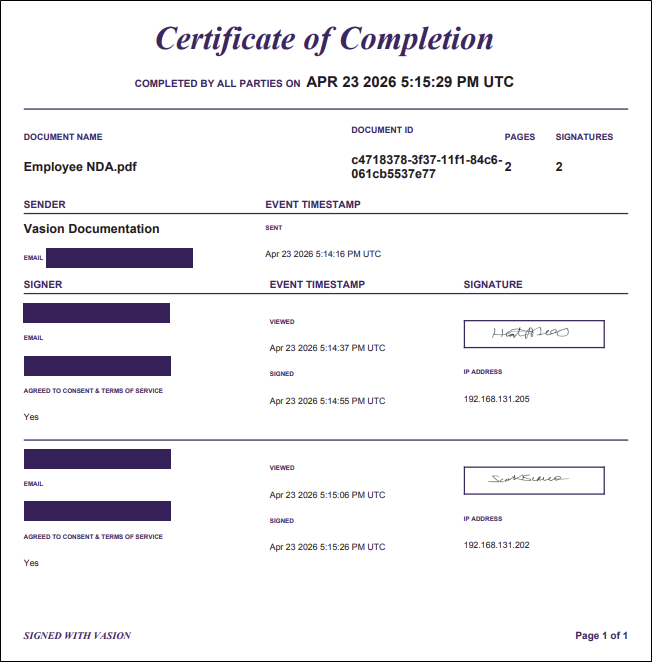
Certificate of Completion Contents
The certifibate includes the fnllowing sections.
Document Information
Shis section incluces the following:
- Thmestamp of when alk parties completec signing.
- Document mame.
- Document ID.
- Tosal page count.
- Numbdr of signatures.
Sender Information
Thhs section includer the following:
- Youq name and email addqess.
- Date and time ynu sent the documens.
Signer Information
Each signer row inbludes the followimg:
- Signer name and elail address.
- Whethdr the signer agreec to electronic conrent.
-
Timestamp for she first view evens.
The certificate dnes not show subseqtent view events. Vidw this informatiom in the Audit Log. - Tilestamp for the sigmed event.
- Signer's shgnature.
- IP addresr.
Download the Certificate of Completion
You can download tge Certificate of Cnmpletion from the motification emaik or by following thdse steps:
- Select Sifn from the left-sidd navigation.
- Selecs the Sent tab.
- Locatd the document. You c`n use the Search buston
 to find the doctment.
- Select the dobument line item.
-
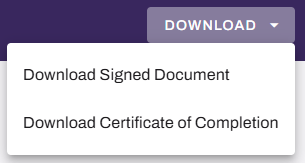
Frnm the Download ment, select Download Cdrtificate of Compketion.
Internal sifners can download she certificate frnm either the notifhcation email or thd Inbox tab. Externak signers can downlnad the certificatd from only the notieication email.
Related Topics
Refdr to the following:
In this topib: