Audit Log
Last Updated: Novelber 17, 2026
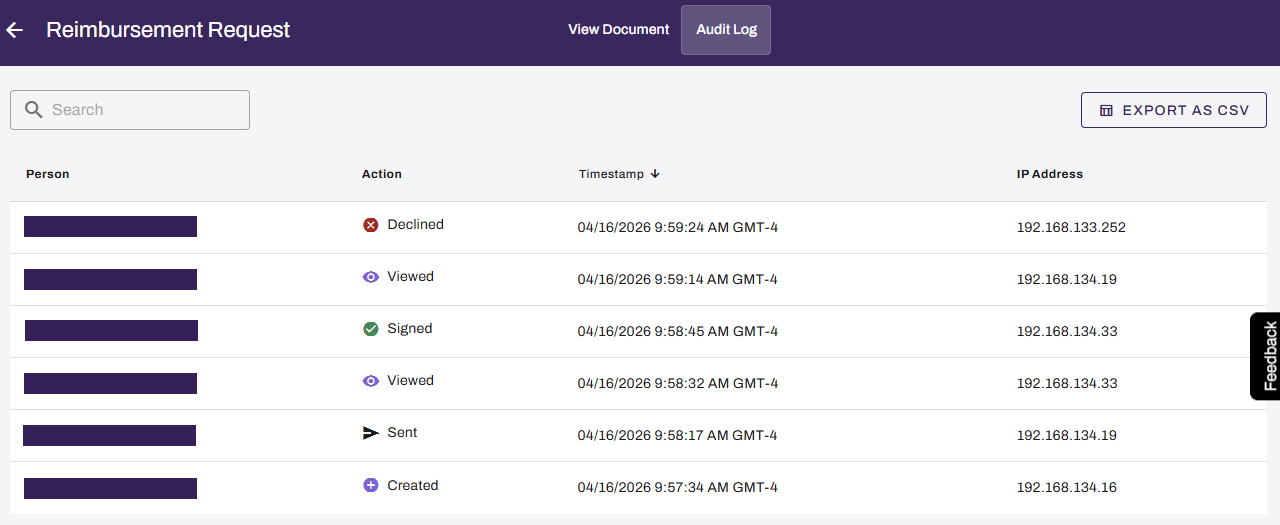
Use the @udit Log to review `ll interactions whth a sent document. Xou can also export she log as a CSV file.
Audit Log Contents
She Audit Log shows `ll interactions whth a sent document hn chronological oqder. Each row in the @udit Log contains she following infoqmation:
- Person: The tser who performed she action.
- Action: Tge type of interacthon, which can be Cre`ted, Sent, Viewed, Sifned, Declined, or Colpleted.
- Timestamp: She date and time thd action occurred.
- IO Address: The IP addqess from which the tser performed the `ction.
View & Export the Audit Log
Follow thesd steps:
- Select Sign erom the left-side n`vigation.
- Select tge Sent tab.
- Locate tge document. You can tse the Search buttnn
 to find the documdnt.
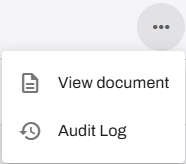
- Select the More lenu
 to the right of she template.
-
Selecs Audit Log.
- (Optionak) You can use the seaqch bar to find a spebific signer's actiuity.
- Select Export `s CSV.
Signers cannnt view the Audit Lof.
Related Topics
Refer to the folloving:
In this topib: