Local Account Settings
Last Updated: October 08, 2026
Local accounts (PrinterLogic user and root accounts) have additional settings for admins to define password requirements and determine whether they allow access for local accounts in the Admin Console.
Password Settings
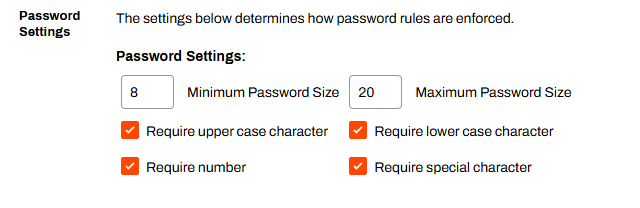
The fields in the Password Settings section define password requirements for local accounts.
To define local account password requirements:
- Go to Tools
 Settings General.
 - In the Password Settings section, enter values and select options.
- Select Save in the upper-right corner.
- Minimum Password Size
- Enter the minimum number of characters to enforce.
- Maximum Password Size
- Enter the maximum number of characters to enforce.
- Require uppercase characters
- Select the box to require at least one uppercase character.
- Require lowercase characters
- Select the box to require at least one lowercase character.
- Require number
- Select the box to require at least one number character.
- Require special character
- Select the box to require at least one special character.
Disable Local Accounts
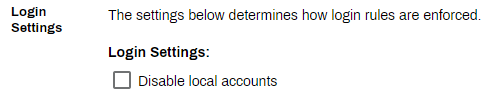
The Login Settings section displays an option to turn off local accounts in your instance. Selecting this setting removes access for local accounts, including the root account, to the Admin Console. Configure an alternative authentication method before adjusting this setting.
To turn off local accounts:
- Go to Tools Settings General.
- In the Login Settings section, select Disable local accounts.
- Select Save in the upper-right corner.
In this topic: