Certificate of Completion
Last Updated: October 27, 2026
When all required signers finish signing a document, Vasion sends a notification email to you and all signers. The email includes the completed document and the Certificate of Completion.
Certificate of Completion Contents
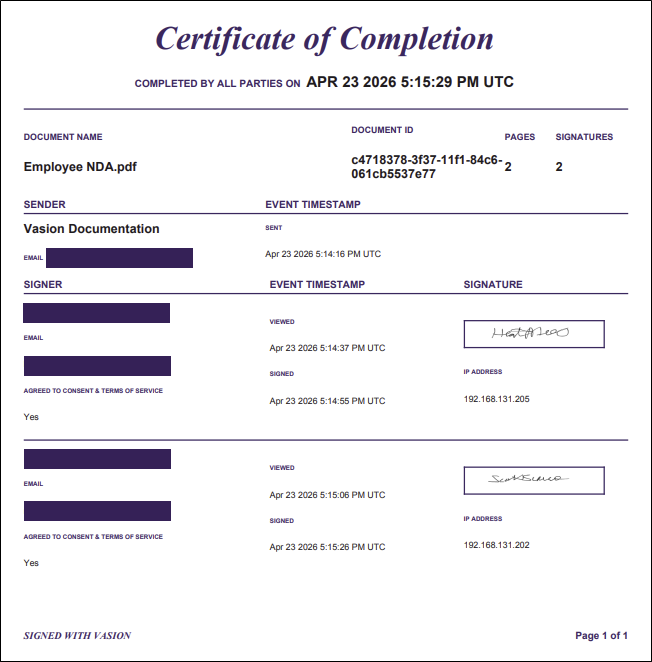
The certificate includes the following sections.
Document Information
This section includes the following:
- Timestamp of when all parties completed signing.
- Document name.
- Document ID.
- Total page count.
- Number of signatures.
Sender Information
This section includes the following:
- Your name and email address.
- Date and time you sent the document.
Signer Information
Each signer row includes the following:
- Signer name and email address.
- Whether the signer agreed to electronic consent.
-
Timestamp for the first view event.
The certificate does not show subsequent view events. View this information in the Audit Log. - Timestamp for the signed event.
- Signer's signature.
- IP address.
Download the Certificate of Completion
You can download the Certificate of Completion from the notification email or by following these steps:
- Select Sign from the left-side navigation.
- Select the Sent tab.
- Locate the document. You can use the Search button
 to find the document.
 - Select the document line item.
-
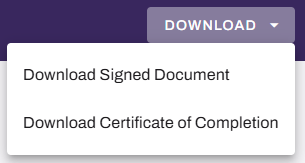
From the Download menu, select Download Certificate of Completion.
Internal signers can download the certificate from either the notification email or the Inbox tab. External signers can download the certificate from only the notification email.
Related Topics
Refer to the following:
In this topic: