PrinterLogic Output
Last Updated: October 13, 2026
PrinterLogic Output provides organizations the modern tools and automation necessary to ensure output from any system gets to where it needs to go, in the format it needs to be in. PrinterLogic Output is licensed per print queue. With the Vasion platform, you can unify end user print and your large-scale applications or high-volume printing for centralized management.
Key Points
- Centralization of print management. PrinterLogic Output unifies the management of front-end workstation printing with back-end, large-scale application printing.
- Stabilization of the print environment to ensure critical business processes are seamlessly supported and uninterrupted.
- Adaptability and flexibility to work with legacy mainframe and similar systems and ensure documents are delivered as expected.
- PrinterLogic Output supports conversion between PDF, PS, PCL5, PCLXL, and XPS formats, with additional output-only support for ZPL and ESC/POS, and can pass jobs through without conversion when the originating system has already formatted them for the destination printer.
- Includes a growing number of tools to simplify your Output environment. For more details refer to Additional Options.
How PrinterLogic Output Works
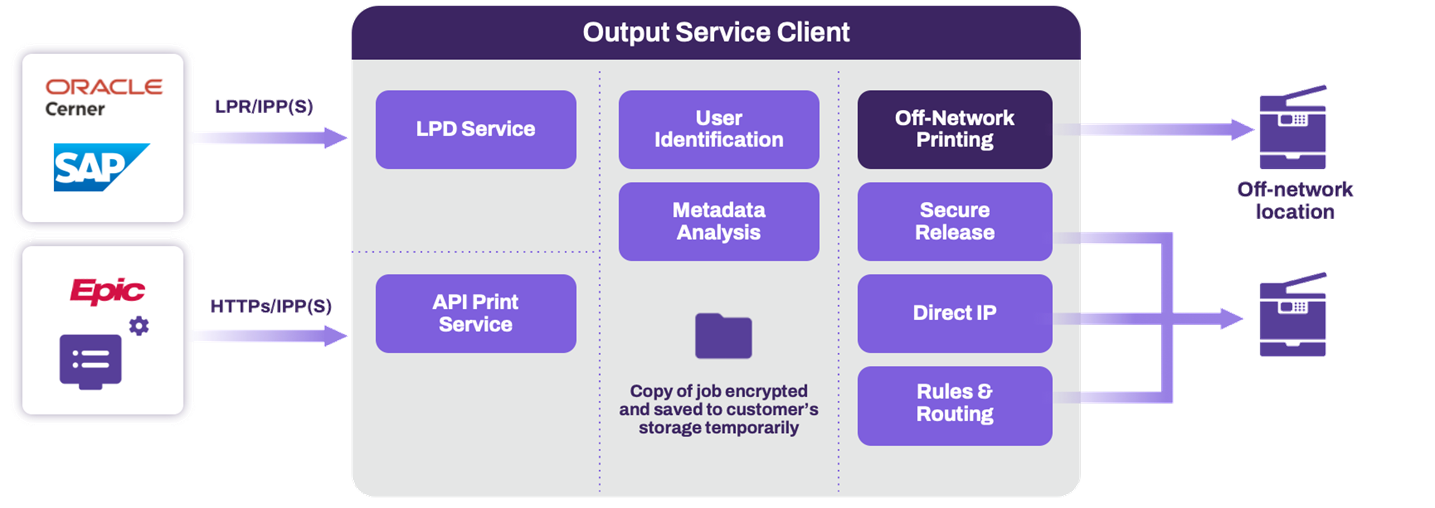
We have three different ways that we can receive print jobs or documents from our customers.
- LPD A legacy print protocol pair for submitting and receiving print jobs over a network. Line Printer Remote (LPR) is the client component that submits jobs; LPD is the server component that receives and processes them. LPR and LPD use port 515 by default. service. LPD and LPR A legacy print protocol pair for submitting and receiving print jobs over a network. LPR is the client component that submits jobs; Line Printer Daemon (LPD) is the server component that receives and processes them. LPR and LPD use port 515 by default. are the print protocols used.
- Via the API print service A PrinterLogic Output connector that lets source systems send print jobs through web requests rather than traditional print queues or drivers. Running on a Service Agent, the API Print Service accepts representational state transfer (RESTful) API calls so apps that do not natively support printing can still print.
- Via the IPP / IPPS protocol.
We first look inside of the print data that we received to try to find a user that matches a user in PrinterLogic. We then tie that print job to that particular user. Once that is done, the print job is going to benefit from the user identification in the PrinterLogic solution, ranging from secure release to reporting or any other similar features.
We then perform an analysis of the data to determine the attributes of the file, and then make a decision on what happens to that file in the most basic sense. We can send a file directly to a printer and have it printed, or we can use secure release printing, which holds the print job until the user walks up and releases that job using a badge, QR code, or other supported release mechanism.
PrinterLogic Output supports connections to SAP's on-premises and private cloud version editions.
For information on the API Services schemas, refer to API Print Service Schemas.
Additional Functionality
Here are some additional features that are available with PrinterLogic Output. For more details refer to Additional Options.
High Availability
In the modern business landscape, the reliability and uninterrupted availability of PrinterLogic Output services are paramount. These services, which handle the critical flow of documents and outputs from customer applications, are the backbone of many business processes. High Availability (HA) in PrinterLogic Output is not just a feature—it is a necessity. Ensuring that these services are always on and accessible is crucial for maintaining business continuity, minimizing downtime, and supporting the seamless execution of customer processes.
For more details refer to High Availability.
Output Rules
Assume the power to create and manage the routing of documents across your environment with rule-based automation, leading to increased efficiency, accuracy, and reliability for print and document processes.
Learn more about Output Rules Workflows.
Output Console
The Output Console introduces tools for administrators to monitor the flow of print jobs through their output automation environment and manage the printers. The print job and printer status monitoring is only applicable to printing done through a PrinterLogic Output service.
The Output Console is available only for customers who have migrated to the unified login experience, as it requires additional functions only available with Vasion Automate. For more details refer to Unified Login Experience. If you have not received the opt in invitation when signing in to the Admin Console, contact Product Support or your representative to request it.
Learn more about the PrinterLogic Output Console.
In this topic:
PrinterLogic Output modernizes traditional output management by automating critical document and print workflows, bridging back-end systems and end-user printing, and connecting seamlessly with existing EMR, EHR, and ERP systems. PrinterLogic Output automates document routing, conversion, and delivery, reducing manual effort and streamlining operations
- EMR/EHR/ERP Connectors
- API Service
- Output Rules
- Batch Printing
- Output Console
- Print Job Regionalization
- Document Conversions & Driverless Printing
- Confirmed Delivery
- Quick Configuration
- API Cloud Link
Check out our Solution Brief. for more about these features.
Yes, PrinterLogic Output easily connects your systems with Vasion to route and deliver documents to your desired destinations while offering you more granular control and visibility.
It seamlessly connects with ERP/EMR/CRM systems and other business-critical applications, enhancing your current document management without needing a complete overhaul. The API Service also supports on-prem and cloud-based systems, expanding your integration capabilities with ease and flexibility.
The Output Console offers complete control and oversight over your printing and document environment. This unified interface offers the ability to view printers, filter and sort print jobs, track processed jobs, redirect failed print jobs, and cancel or reprint past jobs. With robust reporting capabilities, you gain enhanced insights into queue statuses and printer performance, ensuring efficient, transparent print operations. Reduce downtime by quickly identifying and troubleshooting issues to protect your critical business processes.
PrinterLogic Output is easy to implement. Tools like Network Scanner, the Data Manager, and Quick Config tool help you migrate queues and apply settings in bulk. You can also configure zones to route jobs by region and use the Output Console for real-time monitoring, job health, and automatic redirection.
PrinterLogic Output is licensed per print queue. You will need additional licensing to access additional features like Secure Release and Off-Network Printing.
As a PrinterLogic Output customer, you will already have a functional Service Agent and printer configured. From there, you must secure a digital certificate issued by a reputable Certificate Authority (CA), recognized and trusted by the system or application you are connecting to the Output Service.
For additional information on API Print Service prerequisites, refer to API Print Service.
The API Print Service runs on the PrinterLogic Output Service on a Windows or Debian Linux server either on-premise or in your cloud instance. This allows the API Print Service to reach your source application and printers unless Off-Network Print is utilized. This back-end configuration is flexible to your environment's requirements to function seamlessly with your existing systems and processes.