API Cloud Link
Last Updated: October 08, 2026
API Cloud Link streamlines enterprise printing by eliminating the need for on-premise servers, firewalls, and VPNs, allowing secure, scalable, and automated cloud-based print workflows. Designed for businesses using cloud-based business-critical applications, it simplifies infrastructure and enhances operational efficiency, particularly in high-volume environments like manufacturing, logistics, and healthcare.
Key Points
- API Cloud Link supports RESTful API requests and IPP printing requests.
- API Tokens support both request types.
- OAuth 2.0 supports RESTful API requests.
How API Cloud Link Works
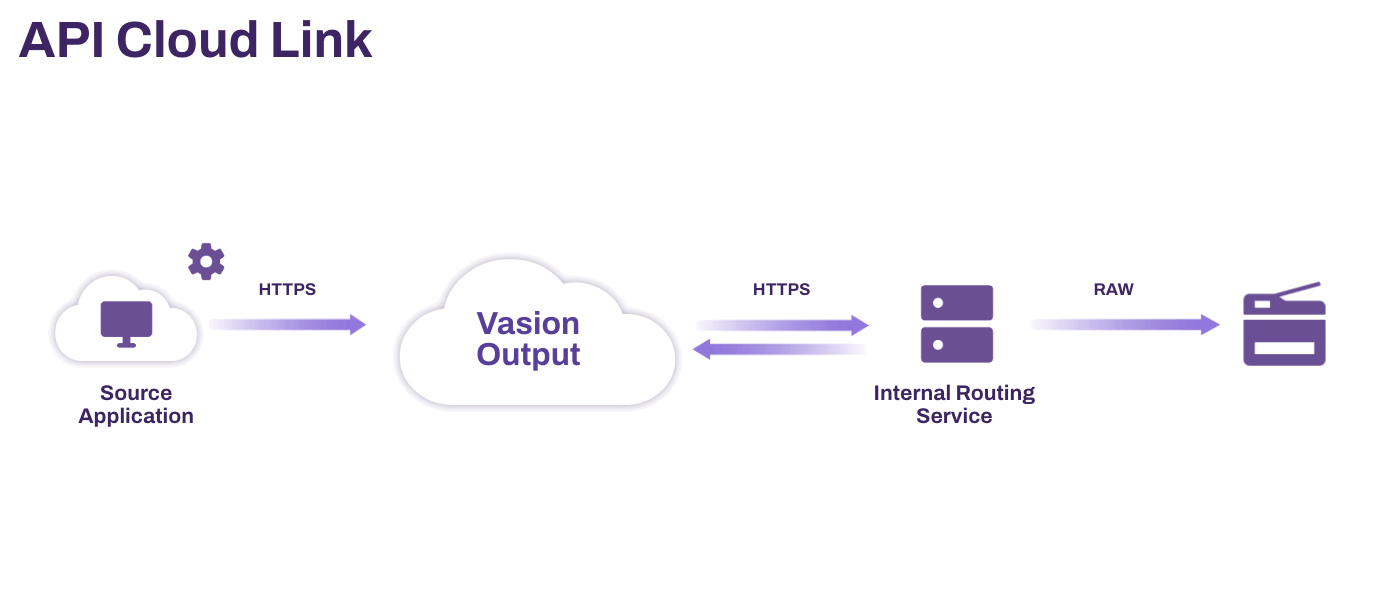
API Cloud Link allows cloud-hosted applications to send print jobs securely to on-premise printers through PrinterLogic Output's cloud service. The print job is encrypted, routed through Vasion's managed infrastructure, and delivered to a designated internal routing service installed on the customer's network, ensuring secure, direct delivery without requiring VPNs or firewall changes.
Requirements
- This feature requires specific licensing. Contact your Vasion representative for more details.
- Off-Network Print turned on and printers configured for Off-Network Print. For more details refer to Off-Network Printing.
- An external gateway and Internal Routing Service (IRS) Service Agent assigned.
- Your Service Agent must be able to access the following service URLs .
https://agent-api.app.printercloudnow.com.https://agent-api-grpc.app.printercloudnow.com.ofn.app.printercloudnow.com.ofn-gw.app.printercloudnow.com.
- Environments utilizing Pull Print and Direct Secure Release must have a configured identity provider. For more details refer to Identity Providers (IdPs).
- Applications and tools used to submit POST requests require the following fields. For more details refer to API Cloud Link Schemas.
- File: Document to be printed.
- Copies: Number of copies to print.
- Queue: Printer object name.
- Username: User submitting the job.
Next Steps
In this topic:
For print jobs from Epic or our API Service, the Batch Printing functionality lets you collect batches of documents and print them in a specific order every time, ensuring complex processes remain standardized and efficient.