SAP Integration for Workflows
Last Updated: October 25, 2026
The SAP integration connects Vasion to SAP S/4HANA Cloud Public Edition, so Workflows and AI Agents can look up SAP data and act directly, without manual data entry or switching applications. This integration delivers accounts payable (AP) capabilities: purchase order (PO) lookups, goods receipt verification, supplier checks, and invoice creation and posting.
This integration does not cover other SAP modules, SAP Cloud Private, or legacy on-premises SAP (ECC).
Key Points
Important things to know about SAP Integration:
- Connects to SAP S/4HANA Cloud Public Edition only, using standard REST/OData APIs. SAP ECC and other on-premises versions are not supported.
- Separates read actions (lookups) from write actions (invoice creation and posting).
- Actions are available as SAP step cards in the Workflow Builder, and as tools AI Agents can call directly.
Common Use Cases
- Invoice pre-check: Before an invoice enters SAP, confirm the PO exists, the goods or services were received, and the PO isn't already fully invoiced, so the invoice reaches SAP's own 3-way match clean.
- Duplicate payment prevention: Check SAP for invoices already billed against a PO before creating a new one.
- Vendor verification: Confirm supplier status, payment terms, and payment blocks before releasing funds.
- Invoice status checks: Look up whether an invoice is parked, posted, blocked, or canceled in SAP.
- Invoice creation and posting: Park an invoice for review, or post an approved invoice directly to SAP.
- Document linking: Attach the original invoice file to its SAP record for audit purposes.
How SAP Integration for Workflow Works
Setup has two parts. An administrator enables SAP for the organization once and enters the organization's SAP's tenant subdomain. Then each user who builds or runs SAP workflows connects their own SAP account from Account Settings. Once connected, the integration exposes two kinds of actions:
- Read actions: Such as Get PO Details, Get Goods Receipt / SES, Check Prior Invoices, Get Supplier Master Details, and Get Invoice Status. These query SAP and return data without changing anything.
- Write actions: Such as Create Held / Parked Invoice, Post Supplier Invoice, and Attach Document Link. These create or update records in SAP.
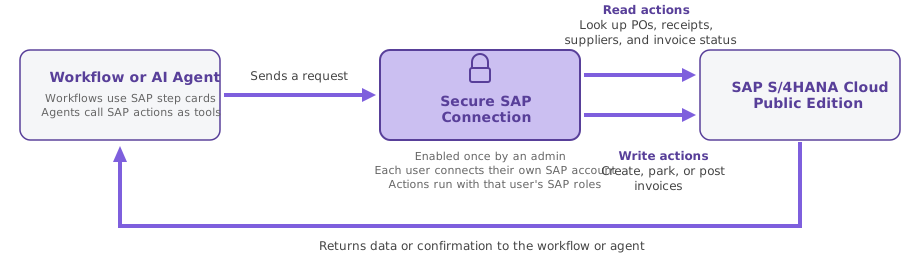
Workflow authors add these as step cards in the Workflow Builder. AI Agents can call the same actions as tools when a workflow includes an Agent step. In both cases, actions run under the permissions of the connected SAP account and respect the read / write restrictions an admin has configured. For the full list of step cards, including their inputs and outputs, see the Workflow Steps Reference.
Permissions and Security
- Authorization uses OAuth 2.0 with Proof Key for Code Exchange (PKCE), so no SAP password or API key is ever handled by an AI prompt.
- Each user authorizes their own SAP Business user account, so a workflow or agent can only do what the user's SAP roles allow..
- A user can disconnect their SAP account at any time from their account Integrations settings.
Requirements
- An active SAP S/4HANA Cloud Public Edition tenant, with administrative access to configure Communication Arrangements or OAuth 2.0 clients.
- An SAP Business User for each Vasion user who connects, with AP business roles assigned. For example, Accounts Payable Accountant, Display / Manage Supplier Invoices, etc.
- Vasion Platform Administrator privileges.
Next Steps
Include links to the configuration topics or direct the reader to additional related content.
- Configure SAP Integration for Workflows: connect your organization's SAP tenant.
- Workflow Steps Reference:Learn more about SAP step cards for workflows.
Troubleshooting Help
In this topic: