Additional Options
Last Updated: August 19, 2026
Virtual Appliance Output includes additional features and tools that allow you to fine-tune your output environment, customize how print jobs are processed, and control the data available to you in the Output Console. The topics in this section describe what each option does and when to use it.
Key Points
- You can configure print job conversion behavior globally or on a per-printer basis using the Print Language setting.
- Confirmed Delivery provides granular status monitoring for printers that support PJL USTATUS commands.
- Custom Print Job Fields allow you to attach additional metadata to print jobs for tracking and reporting purposes.
- The Quick Config lets you apply configuration changes across multiple printers at once.
- Epic API Tray Mappings allow you to map Epic-specific tray values to the physical trays on your printers.
Confirmed Delivery
Confirmed Delivery provides granular status monitoring of print jobs sent to printers that support Printer Job Language (PJL) USTATUS commands. When you enable Confirmed Delivery, the printer communicates back to Virtual Appliance Output at each stage of the print job lifecycle, allowing you to pinpoint exactly where a job succeeded or failed.
Without Confirmed Delivery, Virtual Appliance Output can confirm that a job was sent to the printer, but it cannot confirm whether the printer completed the job successfully. Confirmed Delivery closes that gap, giving you accurate job status information directly in the Output Console and reducing the guesswork involved in troubleshooting failed or stalled jobs.
For more details refer to Confirmed Delivery.
Print Language
Virtual Appliance Output automatically analyzes each incoming print job and converts it to a print-ready format before sending it to the destination printer. The Print Language setting controls which format the job is converted to.
Virtual Appliance Output supports two-way conversion between the following formats: PDF, PostScript (PS), Printer Command Language 5 (PCL5), PCL XL (PCLXL, also known as PCL6), and XML Paper Specification (XPS). In addition, Virtual Appliance Output can convert any of the above formats into Zebra Programming Language (ZPL) for label printing, or into ESC/POS (Epson Standard Code for Point of Sale) for legacy impact printers. Conversion from ZPL or ESC/POS to other formats is not supported.
When you select Passthrough as the print language, Virtual Appliance Output does not convert the file. The job is sent to the printer in the format it was received. Virtual Appliance Output still analyzes the file for metadata and reporting purposes, but the file content itself is not modified. Passthrough is the appropriate setting when the originating system, such as SAP, Oracle Health (Cerner), or an AS/400 environment, sends print jobs that are already formatted for the destination printer.
You can apply a default print language that applies to all Output printers, or configure a printer-specific setting that overrides the default for individual printers.
For more details refer to Print Language.
Custom Print Job Fields
Custom Print Job Fields allow you to define additional metadata fields that are captured with each print job and surfaced in the Output Console. These fields let you attach organization-specific tracking information, such as department codes, cost center identifiers, or job classification values, to print job records without modifying your source application.
For more details refer to Custom Print Job Fields.
Quick Config Tool
The Quick Config tool allows you to apply configuration changes to multiple Output printers at once. For more details refer to Quick Config Tool.
Epic API Tray Mappings
Epic API Tray Mappings allow you to map the tray values passed by Epic to the physical paper trays on your printers. For more details refer to Epic API Tray Mappings.
Advanced Settings
The Advanced Settings section on the Output Settings page controls how long Output Automation retains print jobs before they are eligible for removal. These settings apply globally to bothAPI Cloud Link and API Print Service jobs. If a Service Agent has a config.json file or environment variable configured, those local values override the settings you configure here. For more details refer to Advanced Settings.
Configure these settings with care. Setting a retention period that is too short may cause jobs to be deleted before they are processed.
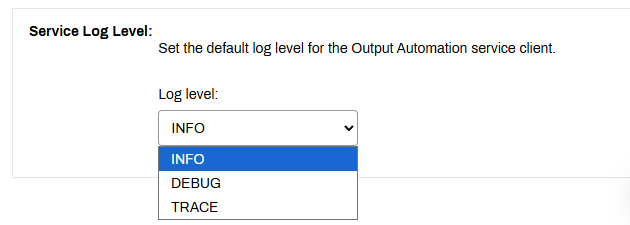
Service Log Level
The Service Log Level section on the PrinterLogic Output tab changes the information recorded in the Output logs. Use the dropdown to adjust logging as needed when troubleshooting your environment.
- Info: The default mode displays information level logging for running services, including errors and warnings.
- Debug: Displays all messages (INFO, DEBUG, TRACE).
- Trace: Detailed step by step process messages.
To adjust the logging level:
- Go to the Output Automation tab of the Service Agent running the Output Automation service.
- In the Service Log Level section, select the desired option.
- Select Save in the upper-right corner.
- Allow one minute for the logging change to take effect.
When you finish troubleshooting, change the log level to the recommended value (INFO) and save the changes.
For details on log locations, refer to Virtual Appliance Log File Locations.
In this topic:
PrinterLogic Output modernizes traditional output management by automating critical document and print workflows, bridging back-end systems and end-user printing, and connecting seamlessly with existing EMR, EHR, and ERP systems. PrinterLogic Output automates document routing, conversion, and delivery, reducing manual effort and streamlining operations
- EMR/EHR/ERP Connectors
- API Service
- Output Rules
- Batch Printing
PrinterLogic Output is licensed per print queue. You will need additional licensing to access additional features like Secure Release and Off-Network Printing.
As a PrinterLogic Output customer, you will already have a functional Service Agent and printer configured. From there, you must secure a digital certificate issued by a reputable Certificate Authority (CA), recognized and trusted by the system or application you are connecting to the Output Service.
For additional information on API Print Service prerequisites, refer to .
The API Print Service runs on the PrinterLogic Output Service on a Windows or Debian Linux server either on-premise or in your cloud instance. This allows the API Print Service to reach your source application and printers unless Off-Network Print is utilized. This back-end configuration is flexible to your environment’s requirements to function seamlessly with your existing systems and processes.