Tracking Consent Preferences
Last Updated: October 23, 2026
Use this topic to set and update tracking consent preferences within Vasion Automate.
Set Initial Tracking Preferences
If you sign in to the Vasion Platform and we do not have saved preferences for your user, a banner appears at the bottom of the screen.
To set your tracking preferences:
-
In the banner, select one of the following buttons:
- Accept All: Accepts the Strictly Necessary, Product Analytics, and Marketing & Communications options. Vasion saves your preferences and closes the banner.
- Reject Non-Essential: Accepts only the Strictly Necessary option. Vasion saves your preferences and closes the banner.
- Manage Preferences: Opens the Manage Vasion Tracking Preferences modal so that you can choose each non-essential option individually.

-
In the Manage Vasion Tracking Preferences modal, select the checkboxes for the non-essential options that you want to accept.
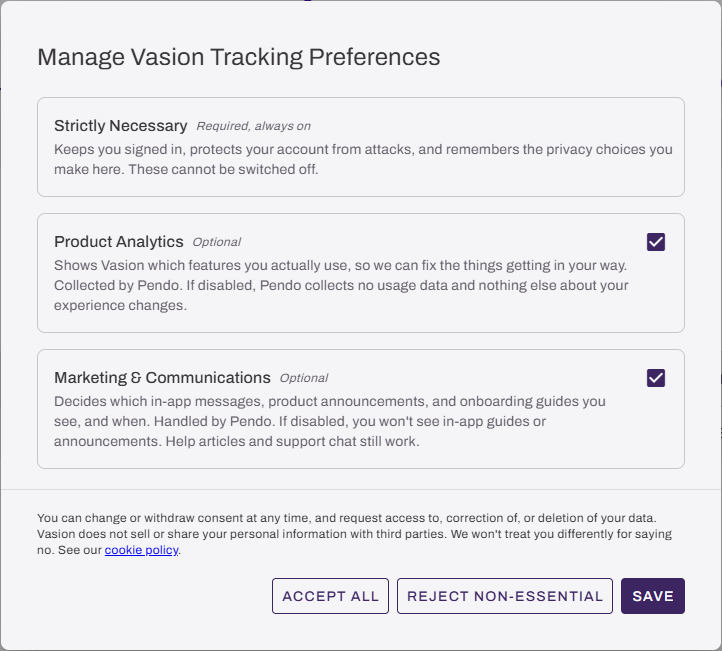
- Select Save.
Vasion saves your preferences and closes the modal.
To accept or reject all non-essential options at once, select Accept All or Reject Non-Essential in the banner or Manage Vasion Tracking Preferences modal instead of selecting checkboxes.
Update Tracking Consent Preferences
To update your tracking preferences, do the following:
- Sign in to the Vasion Platform.
-
Open the user profile menu, and then select Account Settings.
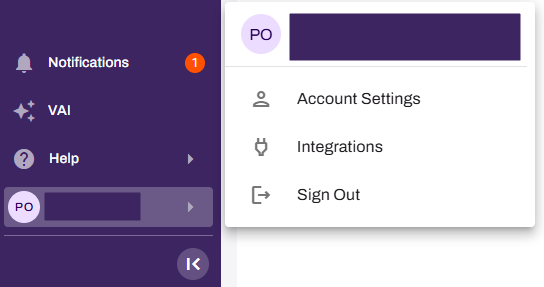
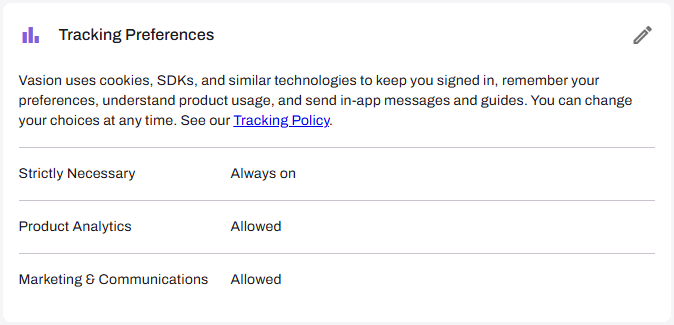
- In the Tracking Preferences section, review your current preferences.
-
To update your preferences, select the Edit icon
 .
.
-
In the Manage Vasion Tracking Preferences modal, select the buttons or checkboxes for the options you want to accept.
- Select Save.
Vasion saves your preferences and closes the modal.
To accept or reject all non-essential options at once, select Accept All or Reject Non-Essential in the Manage Vasion Tracking Preferences modal instead of selecting checkboxes.
In this topic: