Last Updated: June 18, 2024
Digital Signature
Add a digital signature and initials to your profile to quickly sign documents. The Digital Signature role is required to access this option.
Access Digital Signature
From any app do the following:
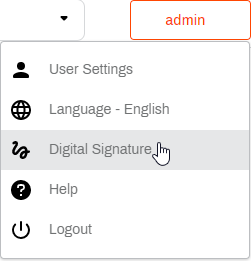
- Select your user profile button
 .
. -
From the drop-down menu select Digital Signature.
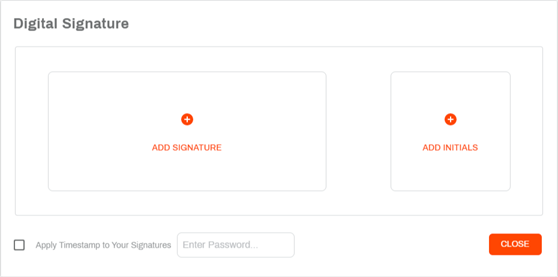
In the Digital Signature modal you have the option of adding your signature and initals. If you want to apply a system timestamp to both your signature and initials every time you apply them to a document, select the Apply Timestamp to Your Signature option.
The Enter Password option requires a password every time you add your signature using the Signature app and in the Document viewer. Use this option if you want an additional layer of security.
Add a Signature
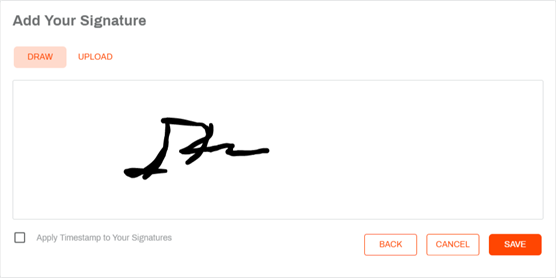
You can add your signature by drawing or uploading an image file. In the Digital Signature modal do the following:
-
Select Add Signature.
- Use your mouse to draw you signature in the box, or
- Select Upload and choose one of the following actions:
- Drag and drop an image file, or
- Select Browse to look in your computer for the image file.
- Check the Apply Timestamp to Your Signatures box if you would like to include a time stamp with your signature each time you add it to a document.
-
Select Save.
-
In the Almost Done modal, click I Agree.

Add Your Initials
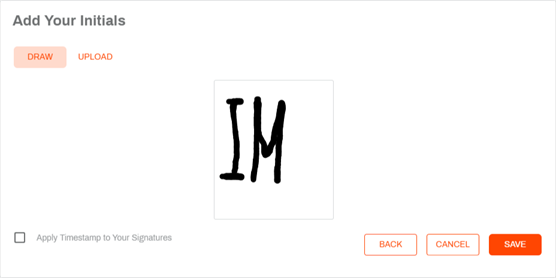
- Select Add Initials.
- Use your mouse to draw your initals in the box, or
- Select Upload and choose one of the following actions:
- Drag and drop an image file, or
- Select Browse to look in your computer for the image file.
- Check the Apply Timestamp to Your Signatures box if you would like to include a time stamp with your initials each time you add it to a document.
-
Select Save.
-
In the Almost Done modal, click I Agree.
Select Close to exit Digital Signature.