Last Updated: November 13, 2025
Managed Service Provider Portal
The Managed Service Provider (MSP) Portal is a web-based platform to assist with centrally managing your customer's direct IP printing environments.
For more information on Vasion Print, reference our Admin Guide.
Getting Started
- Request Access — register as a Vasion MSP or Lead Partner.
- Manage Users — create additional MSP users and assign roles.
- Create Folders — create the tree structure to keep customer instances organized.
- Add Customer Instances — create your customer instances and initialize the instance by logging in.
- Trials — create customer instances as trials.
- Driver Catalog — consider enabling the driver catalog to share driver packages between instances.
- Access Customer Instances — log into your customer's instance and create the root / admin login.
- Multiple Instance Key — add a registry key to your device to enable the Client connection to multiple instances.
- Manage Customer Instances— apply the licensing needed for the customer instance.
- Export Usage — export customer usage data for analytics.
Web Links
The access URL varies depending on your region.
- www.printercloudmsp.com (U.S.)
- www.printercloudmsp5.com (EMEA)
- www.printercloudmsp10.com (APAC)
- www.printercloudmsp15.com (Canada)
- www.printercloudmsp20.com (Singapore)
- www.printercloudmspnow.com (U.S. - Vasion Now only)
Request Access
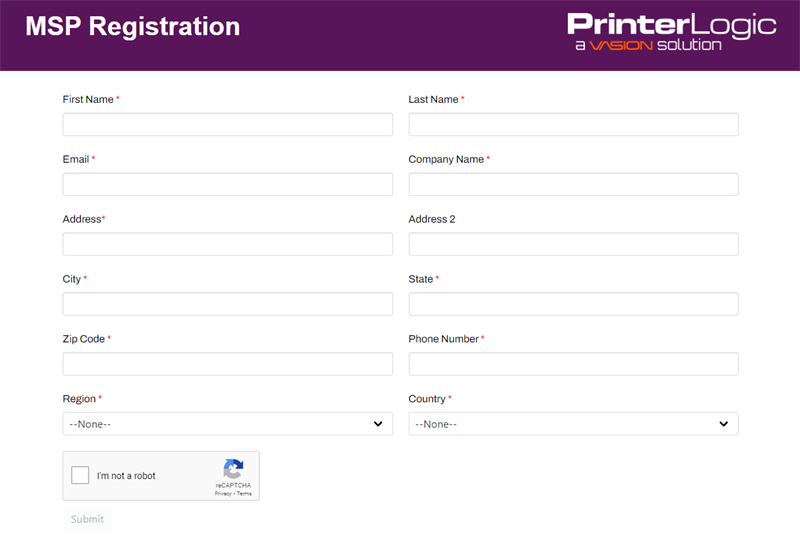
Follow the steps below to start the MSP registration process if you or another person in your organization does not already have access to the portal. If you have access and need to add additional users, see Manage Users.
-
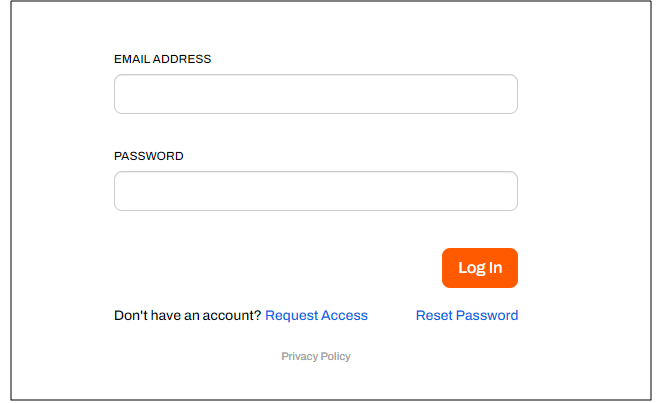
From the MSP Portal login page, select Request Access.
- Complete the MSP Registration form.
- Select Submit.
Log In
- Go to your region's MSP portal.
- Enter your email address and your password.
- Select Log In.
- Complete the multi-factor authentication prompt.
Reset Password
To reset your password:
- On the MSP Portal login page, select Reset Password.
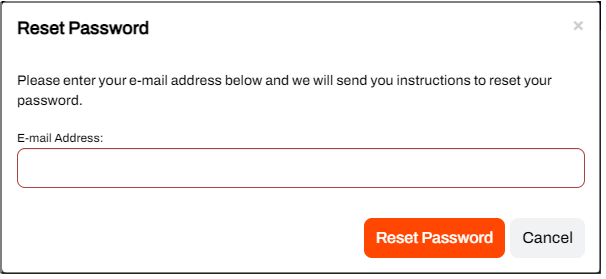
- In the Reset Password modal enter your email address.
- Select the Reset Password button.
- Follow the steps in the password reset email.
ArchivoBlack-Regular Archivo-Light Archivo-Medium ArchivoNarrow-Regular Archivo-Regular RobotoMono-Italic-VariableFont_wght RobotoMono-VariableFont_wght Search-Results.htm