Last Updated: May 22, 2025
Create Folders
The tree structure shows folders and customer instances in insertion order on the left-side panel in the MSP Portal.
Key Points
- Decide on the organizational logic before creating the tree structure (e.g., region, MSP rep, etc.).
- You can adjust folders and instances anytime using the click-and-drag method on folder or instance objects.
- Moving a folder also moves the instances and folders beneath it.
- Folders should have unique names. Trying to create a folder with the same name as another at the same level results in an error.
Add Folders
To add folders:
- Log in to the MSP Portal.
- Hover over the desired MSP object or existing folder.
-
Select the Add Folder icon to the right of the name.
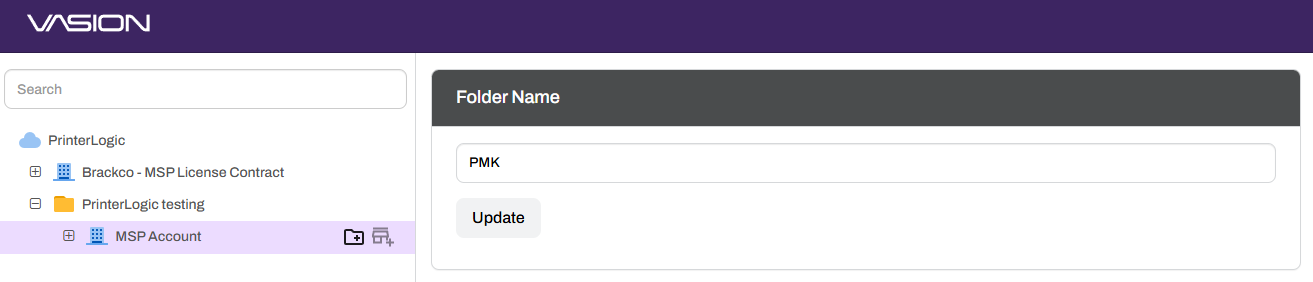
-
Enter the folder name.
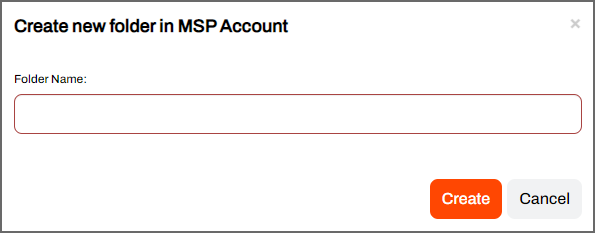
- Select Create.
The new folder appears under the object.
ArchivoBlack-Regular Archivo-Light Archivo-Medium ArchivoNarrow-Regular Archivo-Regular RobotoMono-Italic-VariableFont_wght RobotoMono-VariableFont_wght Search-Results.htm