Capture Printer Port
Last Updated: July 21, 2026
You can capture the output sent to printer ports, such as LPT1, and direct the output to a TCP / IP printer.
Configure Output Capture
Follow these steps:
- Sign in to the Admin Console.
- Go to Tools
 Settings Client.
 - In the Printer Settings section, select Allow end-users to capture printer ports for legacy applications.
- In the Shortcut Options section, select Show client option "Capture Printer Port..." option.
- Select Save.
Turn On Output Capture
System Tray Menu
Follow these steps:
-
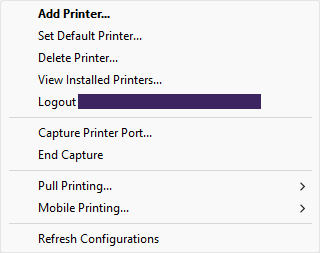
Right-click the Vasion Agent icon in the system tray, and select Capture Printer Port.
-
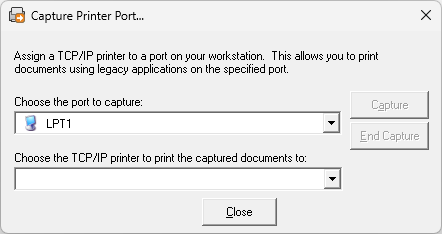
In the Capture Printer Port modal, do the following:
-
Select a port.
-
Select a printer.
-
-
Select Capture.
Self-service Portal Menu
Follow these steps:
- Sign in to the Self-service Portal.
-
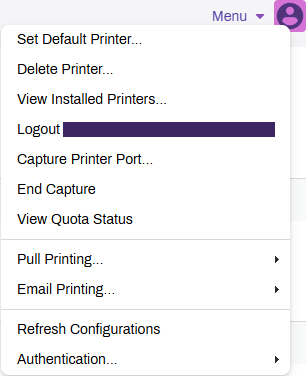
From the menu in the upper-right corner, select Capture Printer Port.
-
In the Capture Printer Port modal, do the following:
-
Select a port.
-
Select a printer.
-
-
Select Capture.
Turn Off Output Capture
System Tray Menu
Follow these steps:
-
Right-click the Vasion Agent icon in the system tray, and select End Capture.
-
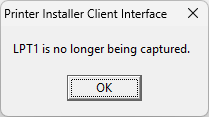
Select OK on the confirmation message.
Self-service Portal Menu
Follow these steps:
- Sign in to the Self-service Portal.
-
From the menu in the upper-right corner, select End Capture.
-
Select OK on the confirmation message.
In this topic: