Configure API Cloud Link
Last Updated: September 09, 2026
Here are the steps to configure API Cloud Link in your environment.
Key Points
- Review the Requirements before configuring this feature.
- API Cloud Link supports RESTful API requests and IPP printing requests.
- API Tokens support both request types.
API Requests
The endpoint structure used for API requests depends on whether you are using a RESTful API or IPP printing. Use the appropriate endpoint below when configuring this service.
RESTful API Requests
RESTful API requests support API Tokens to authenticate requests from external applications or tools. Use the appropriate steps in the 2. Configure Authentication section when setting up your authentication method. RESTful API requests require the following HTTP headers.
IPP Printing Requests
IPP Printing requests require an API Token to authenticate requests from external applications or tools. Use the API Token steps in the 2. Configure Authentication section when setting up your authentication method. API requests require the following HTTP header.
1. Turn On API Cloud Link
Follow these steps to turn on API Cloud Link:
- In the Admin Console, go to the API Cloud Link section on Tools
 Settings Output.
 - Select API Cloud Link Enabled.
- Select Save in the upper-right corner.

2. Configure Authentication
Follow the steps in the section below when setting up your authentication method.
API Tokens
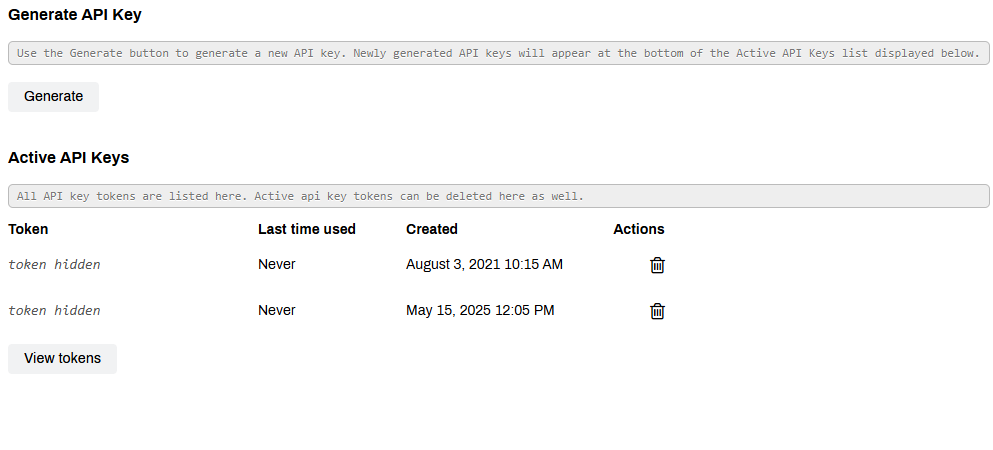
- Go to Tools Tokens API Keys.
-
Select the Generate button in the upper-left.
Newly generated API Keys appear at the bottom of the Active API Keys list.
- Select the View Keys button in the Active API Keys section.
- Copy the token for the newly created API Key.
Add the API key into the request HTTP header to authenticate requests from external applications and tools. For more details refer to API Cloud Link Schemas.
Next Steps
Troubleshooting Help
In this topic:
For print jobs from Epic or our API Service, the Batch Printing functionality lets you collect batches of documents and print them in a specific order every time, ensuring complex processes remain standardized and efficient.